MES calling BPM FORM

2023.1.8

We have MES user calling a Custom BPM Form.

Finding a weird issue where if a user just logs into MES (ie user hasn’t clicked ‘Log In’) and they call the Custom BPM Form; all of the customizations are not available. This causes an issue downstream as the customization is where data validation occurs.

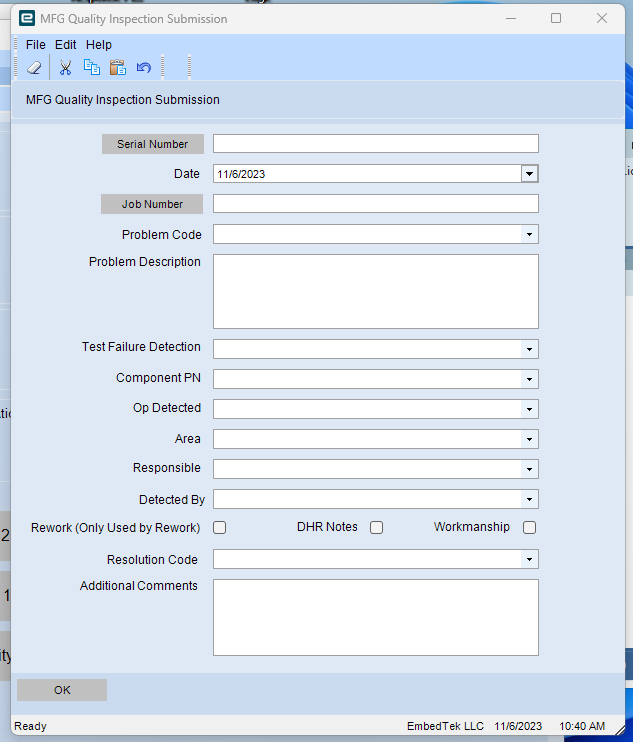
Form should look like

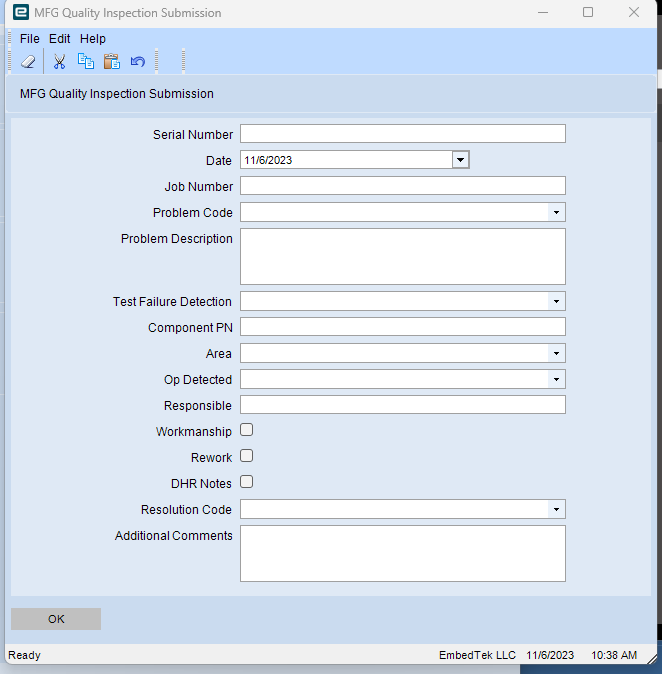
Form when user isn’t ‘Log In’

Is there a way to check to see if the user has clicked log in a BPM. Most of our custom forms do not force a user to be logged in.

Any help would be great.

Are they getting an error when the BPM form opens?

No errors. Just not the customization, which validates Job/SN/Users.

What’s the BPM look like? Tat’s interesting that unless they are clocked in it would show the non customized BPM form. Any logic in the BPM looking for Emp ID on the session?

When the user isn’t logged in the BPM Data Form is calling base.

Very odd.

So user is in MES but not “logged in” and you get base. You “log in” or “clock in” and everything is hunky dory?

What is in your prefill data form? Upload the customization export?

Correct.

The prefill data form just clears out callContext BPM Data.

as a just in case.

var ttUD16Row = Epicor.Customization.Bpm.EnumerableExtensions.GetSingleRow(ds.UD16, "ttUD16");
 
this.callContextBpmData.Date01 = BpmFunc.Today();
this.callContextBpmData.ShortChar01 = (ttUD16Row.Key2);
this.callContextBpmData.ShortChar02 = (ttUD16Row.Key3);
this.callContextBpmData.ShortChar03 = (ttUD16Row.ShortChar03);
this.callContextBpmData.ShortChar04 = (ttUD16Row.ShortChar04);
this.callContextBpmData.ShortChar05 = (ttUD16Row.ShortChar05);
this.callContextBpmData.ShortChar06 = (ttUD16Row.ShortChar06);
this.callContextBpmData.ShortChar07 = (ttUD16Row.ShortChar07);
this.callContextBpmData.ShortChar08 = (ttUD16Row.ShortChar08);

this.callContextBpmData.Character01 = "";
this.callContextBpmData.Character02 = "";
this.callContextBpmData.Character03 = "";
this.callContextBpmData.Character04 = "";
this.callContextBpmData.Checkbox01 = false;
this.callContextBpmData.Checkbox02 = false;
this.callContextBpmData.Checkbox04 = false;
this.callContextBpmData.ShortChar10 = "";

UI.InfoPrompt.IP_QualityMan_Customization_MFGData_CustomExport.xml (274.6 KB)

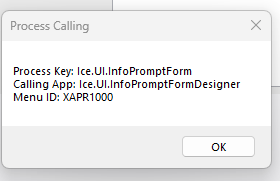
Could the menu ID XAPR1000 be the culprit? Thats the only item I haven’t really dug into.

image

2 line call context clear

callContextBpmData.InitializeRow();
callContextBpmData.SysRowID = Guid.NewGuid();

Naw thats just the base info prompt form. It shouldn’t be an issue. I don’t see EmpID or EmployeeNum referred to in the code of the customization, anywhere in the BPM?

It’s possible your Get Employees should be moved to Form_Shown or some other event than Form_Load?

I commented out the code on the custom form; still didn’t get loaded. The custom buttons and what not didn’t even come up. Its like the custom BPM Form is never even loading…

Any way to tell if the mes client is “log-in”? The BPMClient doesn’t look like the place.

There shouldn’t be an Employee ID in the session if they aren’t logged in.

There is though, as the employee logs into MES.

So all your employees have actual usernames? Otherwise if you are in as a generic user and switching employees unless they are logged in there shouldn’t be an employee id.

1 Like

Stepping back for a moment, why not apply a row rule to disable the button unless they are logged in. Or use initalize epidataview, no dataview row no button enabled.

Think you have something there. Quality users might need to do another step, but if it fixes the issue that might be it. Granted it is still strange for the Customized BPM Form to not show.