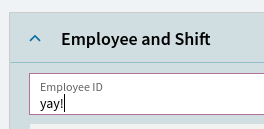
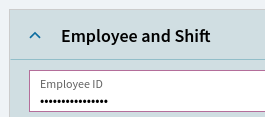
So, I’m attempting to de-obfuscate the employee ID field when folks are logging in on the browser client. Sounds easy! Just pop into application studio, untick “masked”, publish.
Application studio looks like it published okay? To be fair, I am the opposite of an application studio expert at this point in time. First step to being good at something, that is where I definitely am.
If you want it to show up on the generic MES url then you have to copy that menu to current company and apply your layer to it. Otherwise you have to get the url with your layer name embedded and use that to launch it instead of the generic MES url. That works in 2024.2 but I have no idea if it will still work in 2025.1 since they are now removing layer names from urls.
Somehow that is the (a?) step I missed, but the time has come when I’m gonna have to park this one until tomorrow. Meanwhile, remembering this summary of everything I’ve ever learned: