Still in implementation mode. We’ve run into a concern regarding Shop floor MES that we are not sure how to solve for. We want the employee to see what the schedule is for the equipment they are running that day via Shop Floor MES. The work queue only shows schedule for the Resource group that employee is tied to. Our employees are cross trained and move daily from one Resource group to another so the Work queue is not relevant. If we create an Employee ID for the equipment and have the employee log in as the equipment then we loose traceability to who ran the job. We do not want to schedule people as well as machines to an operation.
Any suggestions?
1 Like
When an employee opens the Work Queue, it defaults to the Resource Group like you say. However, they can search for any Resource Group or Resource to display.
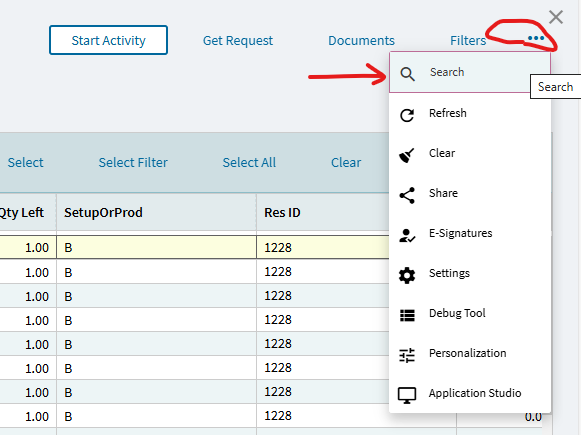
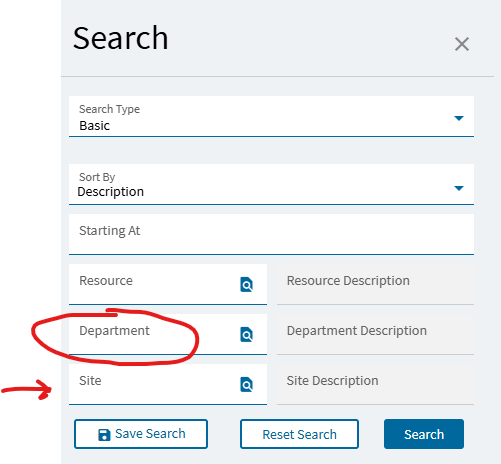
In the Kinetic browser UI ver 25.1, changing the resource group from the employee default is unintuitively found by selecting the generic “Search” option in the 3-dot / overflow menu. The slide out screen allows optional filtering by resource, site and dept. Be aware the department initially fills in with the employee’s assigned dept, so searching by default filters will only provide a list of resource groups associated with the dept. To see all available resource groups, be sure to delete the dept before hitting the search button on the slide out. Ideally the current SITE would be the only default filter, as selecting a resource group from another site from what you’re currently not logged into would prevent starting any activities, i.e. jobs are site specific.
1 Like