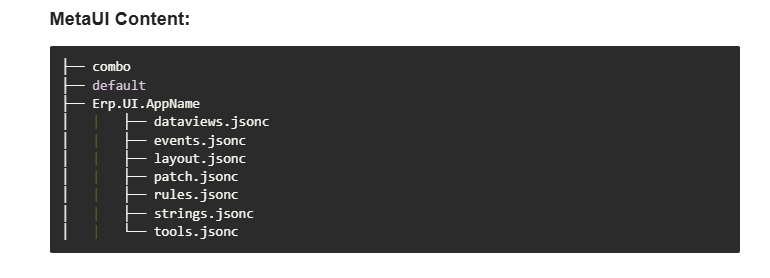
Is there any way for cloud customers to download the MetaUI dir?
Nice to have to fill gaps in AppStudio Docs but my copy is out of date.
Is there any way for cloud customers to download the MetaUI dir?
Nice to have to fill gaps in AppStudio Docs but my copy is out of date.
Have you seen @klincecum’s all purpose downloader?
Yes. Thanks. it’s great for all-the-things. No idea how to grab a server dir though.
The server directory is a cache. The source of the MetaUI is in the database. It’s possible to run Kinetic without the MetaUI folder.
Good to know. didn’t realize the builtin jsonc was also in db. Still the dir hierarchy and files is what I’m after ideally. Thanks.
I’m sure the aforementioned Kevin can get there, but once the Sandbox is in place, it will be exceedingly difficult to grab any folders outside of the EpicorData folder.
What business problem are you trying to solve?
Lack of documentation I’m sure 
I mean why is the layout of a cache folder useful?
Developer education mostly, plus some curiosity. Due primarily to the lack of documentation, I often go to the json first to find out what the oob apps are doing. Mostly event patterns and expressions. looking at events.jsonc is much more straight forward than digging through AppStudio designer and guessearching to find the event chain, then copying locked events, then fighting with janky wysiwyg diagrams and property panes just to see what’s inside.
Plus when a major update rolls out, I’m curious to see the diff.
As an example, I find no instances of dynamic-panel-open action in 2024.x MetaUI (i could tell you where i got this, but as kevin says, then id have to kill you ;-|). Could be wrong, but AFAIK, that action may have debuted in 2025.2. I’m curious where else it may be in use and how.
The 2025.2 bits were built to prod in August - they’ve been in dev for many months before that, surely the internal dev team has extensive docs on their usage, yet there’s no public developer docs I’m aware of about this cool new action. Most likely it’ll several months more before those like the talented members of this community discover these bits and ‘document’ by example on here.
I’d like the horizon shortened.
Did the CI/CD guy really just ask that question? 
/jk
I mean, a textual respresentaion of an app is a sub-dir by appName having additional subdirs and files for layout, event, rules etc. Ideal for SCM persistance and diffing. if we really had our way wouldn’t we even prefer to deploy layers to disk not db?
The cache folder is also used to create a list of apps you can use. I had one left in our folder which I had deleted from Application Studio. It still allowed me to choose it in Menu Maintenance but gave everyone errors when they tried to use it.
I suppose if they simply add a json view to AppStudio that’s all I’m really wanting at a minimum.
EDIT: oh yeah, and a DOM tree:
I think it’s moving way too fast even for the devs and no such doc exists as a dump. Who knows? 
I’ve been toying with the idea of a VSCode extension for what you’re talking about. I want the format that the browser uses from GetApp and not the three sub folders in MeatUI. Of course with Git integration, which the EpiDevs do use…
Yes, because source control isn’t built on cache!
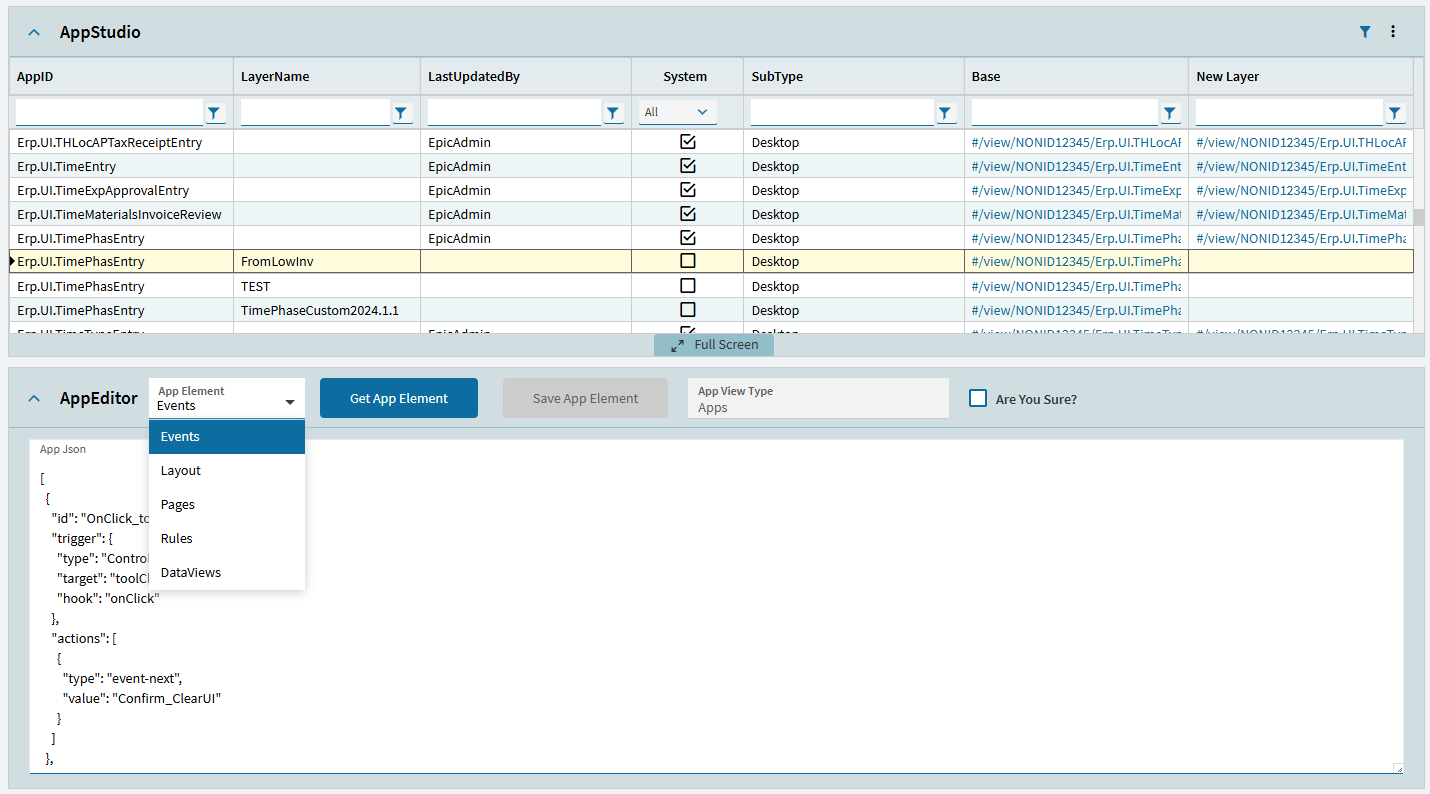
Dev Tools Dashboard has an app json viewer that will let you walk through all the oob (and custom) jsons direct in the dashboard, always up to date because it’s right out of your database  I use it for a reference a lot for the same reason. I also use it to directly edit the events json in my apps for complicated flows that I dont want to gui-fy. And columns arrays on grids. The dir/subdir concept for app/events/layouts/pages/rules is there too just in a pub sub instead of folder structure
All your MetaUIs belong to us.:
Also, if you are editing a draft layer, you can tell the dashboard you are sure (so that you can’t blame me for what you break), and hit Save App Element.

This will update draft layer to reflect the json changes. You can have appstudio open to the app, edit json in dev tools, then f5 to refresh app studio and see the changes you did. (then publish etc. as normal from there)
If you would like a feature request for a download button to download all the metaui zips, feel free to feature request on my thread and i will add
Note: There is an open bug with 2025.2 compatibility, and saving app json, (the dashboard is coded to work with 2025.1 and there was a change to the BO Signature for GetApp/SaveApp between versions) - someone posted a fix on my thread. when i got around to it i was going to figure out how to put a version check so i can case out the logic to behave appropriately for 2025.1 and 2025.2.
Here is the link for relevant post about editing json and the gotchas.
https://www.epiusers.help/t/dev-tools-developers-swiss-army-knife-server-logging-file-download-efxeditor-appstudiojsoneditor-baqaliaseditor-reporteditor-bpm-on-the-fly-kinetic-dashboard/127887/15?u=gabefranco
Grab the latest version v12 from last post
Ok. to each their own I guess. there’s a reason the file structure is that way and not the GetApp conglomerate. Separation of Concerns and Single Responsibility Principle for examples. Each file has its own schema def. Seems quite likely if dev team is doing json editing, they’re working in these base formats not db and not GetApp format. GetApp is a conglomerator. Guessing it generates from source (whether db or disk doesnt matter) and merges layers for browser consumption. Who knows.
If you would like to see the in-database storage format for MetaUI (it is a json object stored in XXXDef.SysCharacter03 for a Base Layer, XXXDef.Content for a Customized Layer, then there are also drafts and personalization layers. Key2 is the Appname and Key1 is the LayerName), run this in BPM on the fly:
var exclude = new[] { "Item", "SysRowID", "SysRevID", "Thumbnail", "EntityKey", "EntityState", "KeyNameValuePairs", "RowIDAsUInt64", "RowVersionAsUInt64", "Schema", "EntitySetName", "SysRevNum", "UD_SysRevID" };
var headerRow = result.Results.NewRow();
headerRow["Character01"] = "FieldName";
headerRow["Character02"] = "DataType";
headerRow["Character03"] = "Value.ToString()";
result.Results.Add(headerRow);
foreach (var r in Db.XXXDef.Where(x => x.Key2 == "Erp.UI.TimePhasEntry")) {
    foreach (var p in r.GetType().GetProperties().Where(y => !exclude.Contains(y.Name))) {
        var nr = result.Results.NewRow();
        var val = p.GetValue(r);
        var vType = val?.GetType();

        nr["Character01"] = p.Name;
        nr["Character02"] = vType?.FullName ?? "null";

        if (val == null || val is DBNull) {
            nr["Character03"] = "null";
        } else if (val is string && (string)val == "") {
            nr["Character03"] = "<<EMPTY STRING>>";
        } else if (val is bool) {
            nr["CheckBox01"] = val;
            nr["Character03"] = val.ToString();
        } else if (val is DateTime) {
            nr["Date01"] = val;
            nr["Character03"] = val.ToString();
        } else if (vType.IsArray && val is byte[]) {
            nr["Character03"] = Convert.ToBase64String((byte[])val);
        } else if (vType.IsArray && val is string[]) {
            nr["Character03"] = string.Join(", ", (string[])val);
        } else if (vType.IsArray && vType.GetElementType().FullName == "System.Collections.Generic.KeyValuePair`2[[System.String, mscorlib],[System.Object, mscorlib]]") {
            nr["Character03"] = string.Join(", ", ((Array)val).Cast<object>().Select(kvp => { var kv = kvp.GetType(); return $"{kv.GetProperty("Key").GetValue(kvp, null)}: {kv.GetProperty("Value").GetValue(kvp, null)?.ToString() ?? "null"}"; }));
        } else if (vType.IsArray && val is object[]) {
            nr["Character03"] = string.Join(", ", ((object[])val).Select(o => o?.ToString() ?? "null"));
        } else if (val is byte || val is sbyte || val is short || val is ushort || val is int || val is uint || val is long || val is ulong || val is float || val is double || val is decimal) {
            if (Convert.ToDecimal(val) == 0) { nr["Character03"] = "<<ZERO NUMERIC VALUE>>"; } else { nr["Number01"] = Convert.ToDecimal(val); nr["Character03"] = val.ToString(); }
        } else if (val is string) {
            nr["Character03"] = (string)val;
        } else {
            nr["Character03"] = val.ToString();
        }

        result.Results.Add(nr);
    }
}
OK, I have been traveling since Wednesday and am now able to reply without sitting in a plane or car seat. We may be talking past each other here. Where we agree: separating out the data views/rules, the page/layout, and the events is an excellent architectural choice. No argument there.
Where we disagree: the MetaUI folder is an alternate presentation of the atomic object. An app is stored as a single artifact by the developer (Epicor). Could Epicor have kept them separate? Maybe. It would certainly make versioning interesting! But internally, each app, layer, version, and associated draft are stored separately as an atomic “object” represented by JSON.
As a CI/CD guy, I want to start with a single source. Right off the bat, the MetaUI folder may or may not exist for each app server. The installer has a choice to enable or not enable that feature. When enabled, each app server will have its own MetaUI folder. Along with naming things and off-by-one errors, cache invalidation is one of the two hard things to do in software engineering. Treating the MetaUI folder(s) as “the source” seems like a weak point - at least from a CI/CD point of view.
This is why I like what @GabeFranco is doing by giving us presentation of the area we want to look at within the object. Focusing on presentation is something I’ve come to loath. Over the years, half our industry keeps mixing the two and the other half fights the urge. The whole story of markup languages got started when IBM was being sued by the US government for being too powerful. So much content was locked up in legal documents, IBM created the Standard Generalized Markup Language to separate the legal content from the presentation of the legal document. Later, HTML (an SGML application) was created to separate content from presentation in web pages. In Microsoft Office documents, styles and themes were developed to separate content from presentation. Has any of that stopped people from storing data in Office Documents?

Everyone loves their presentation and thinks everyone else should use that presentation that is optimized for their own purpose. If we fight that urge and keep that content separated, we actually can give each person a view that supports their needs.
Not getting into the full debate , however I want to clear something up here. For base applications, searches etc the MetaUI folder always exists in the app server directory, and is the source of truth as provided by Epicor. When you create an app server, or upgrade one. It is the MetaUI folder that is created or updated first. Then, if the Db is set to use the Db rather than file system, that MetaUI folder is imported into the database, through conversion 191, to create the XXXDef records. This is why 191 is run on every upgrade and patch along with CSF installs. As each updates the MetaUI folder and then imported in.
Using the Db to store this after creation / upgrade, along with layers helps with the moving of Databases to new servers etc along with a multi app server system.
Anybody know if there’s an exposed method or build script that transforms the MetaUI files to ‘Atomic object’ ala GetApp format? Custom layers, drafts personizations aside, is there such a thing that handles shared imports etc and outputs at least base json (SysCharacter03).