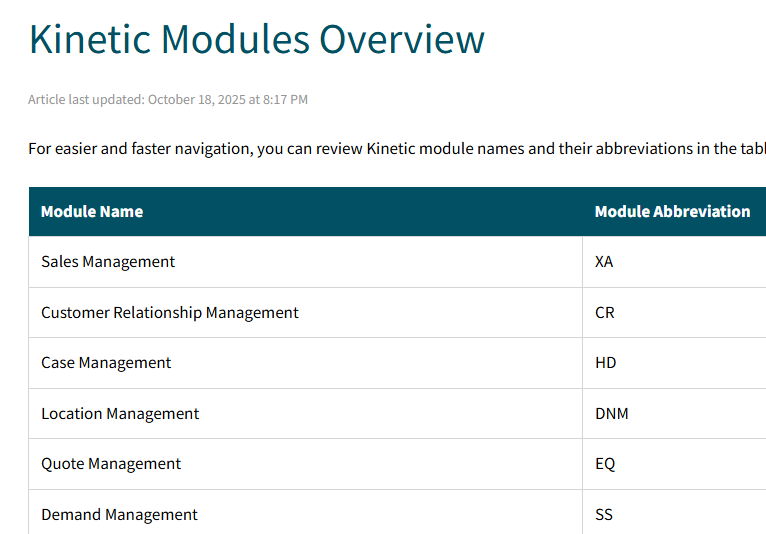
Does anyone know what the codes listed in ice.Menu.Module mean? I’m trying to produce a list of the menus only for the modules we are licenced. I’m doing this manually at the moment, but I’d love to figure out a way to cross reference this to ice.EnabledModule. Unfortunately, Data Dictionary wasn’t any help.
I was having the same trouble–not having a list of what menu items are actually available to me, so I made a spreadsheet. It uses the “Module” field in the menus table to filter based on what modules are licensed.
I am using 10.2.600, so the menu items could be different in your version
Download the menu items using a BAQ on Ice.Menu and paste into “Menu Detail” sheet (be careful to preserve the order of columns and the formulas in the last four columns)
Download the licensed modules using “copy all include labels” in the Company Configuration license tracker and paste into the “Modules” sheet (being careful to preserve the Module ID, which is hand-entered)
Sort the menu detail items based on the calculated “Hierarchy Code”
The grouping on “Menu Licd” was done by hand, but it wouldn’t be hard to create a macro to do it more efficiently
The “Menu Licd” sheet constructs the menu, in order, based on what modules you have licensed. It’s about 90% accurate, and for greater accuracy, you’ll have to go through menu by menu, line by line, and check it, manually showing or hiding items using the right-most column on the Menu Detail sheet. I had to hide a bunch of location-specific screens that are technically licensed but don’t apply to us here in Canada.
Thank you James.
I used what James had developed and mapped out the list of Licensed Modules Names to the related ModuleID value from the Ice.Menu table. I then created a User Code Type of License and set up the list below. This way I can use it in BAQs and External Audit reporting to show only the menu items licensed. Queries need to also account for the CGCCode in Ice.Menu to include/exclude country specific functionality.
Anyone know what module ‘BM’ is? There is a single system menu item in the menu table referencing it (BMMN3090) which appears to be a duplicate of SEMN3000 (Mfg Lead Time Calculation)?
Never mind, I had a go at working it out for the codes not listed in the table above.
Module Name
Module
AdvancedAllocations
AA
ActualCosting
ACT
AdvancedEstimatingAndPricing
AEP
AdvancedMaterialManagement
AM
APMICRChecks
AMC
AccountsPayable
AP
APPositivePay
APP
AccountsReceivable
AR
ARLockbox
ARL
PackOutManagement
AS
AdvancedUnitOfMeasure
AUM
BusinessProcessManagement
BP
CreditCardProcessing
CD
MultiCurrencyManagement
CM
CustomerRelationshipManagement
CR
ContractRenewal
CRL
DynamicAttributes
DA
DynamicDocuments
DD
Data Exchange Server
DE
LocationManagement
DNM
DeferredRevenue
DRV
EpicorElectronicReports
EC
EpicorCollaborate
ECB
ExpenseManagement
EM
ExternalPayrollIntegration
EPI
EstimateQuoteManagement
EQ
EnhancedQualityAssurance
EQA
Scheduling
ES
AssetManagement
FA
IntegratedFieldService
FS
FieldServiceManagement
FSM
GeneralLedger
GL
CaseManagement
HD
Handheld
HH
InventoryManagement
IM
EpicorIoTConnector
IOT
JobManagement
JC
LandedCostContainerTracking
LC
MaintenanceManagement
MM
MultiSitePublish
MP
MaterialRequirementsPlanning
MR
MultiSiteGLJournals
MS
OrderManagement
OM
ProjectBilling
PB
AdvancedConfigurator
PC
PurchaseContracts
PH
PaymentInstruments
PI
ProjectManagement
PJ
AdvancedPackageControl
PKG
PurchaseManagement
PM
Payroll
PR
AdvancedPlanningAndScheduling
PS
PettyCash
PYC
QualityAssurance
QA
RebatesPromotionsAndRoyalties
RP
RecipeAuthoring
RPA
SupplierRelationshipManagement
RQ
ICESDK
SDK
SingleLevelEngineering
SE
EpicorCommerceConnectCustomer
SI
ShippingReceiving
SR
EdiDemandManagement
SS
VisionEpicorFinancials
SV
AvalaraSalesTaxForGenericImportProcess
TCU
TimeManagement
TM
RohsWeeeManagement
WE
ExecutiveDashboard
XA
These ones I’m not sure about:
Module Name
Module
SU
System Utilities
BM
(?) Bill of Material Management (?)
MFS
(?) (mis-keyed?) Field Service Asset Management (?)
PZ
(?) CnvProgs Maintenance (?)
These modules must therefore not have codes in the Menu table. (Unless they have the same codes as those already assigned. I’ve assumed (rightly or wrongly) a one-to-one relationship between the module code and the licenced module.
EnterpriseSearchPremium
EnterpriseSocialPremium
EpicorEverywhereFramework
MultiTenant
GlobalUsers
SdkRuntime
VerticalizationCreator
Productization
DocumentManagement
EducationERPStandardAndEnterprise
EducationSLS
EducationExpress
MultiSiteManagement
ConsolidatedPayment
ConsolidatedPurchasing
AttachmentsForSharePoint
AdvancePrinting
AdvancePrintArchiving
DataManagementTool
KineticPreview
ADPPayrollIntegration
AdvancedCostManagement
AdvancedInventoryManagement
AdvancedProduction
AdvancedPurchasing
AutoLabelPrintControl
ChannelPartner
Configurator
ConsumerConfigurator
CustomerConfigurator
CustomerConnectStoreFront
CustomerManagedInventory
DealerNetworkManagement
EdiVantage80x
Engineering
EpicorCommerceConnectConsumer
EpicorCommerceConnectSupplier
ExpressShip
ExternalCRMIntegration
FSMIntegration
MESDataCollection
MobileConnectAndroid
MobileConnectiOS
MobileFieldService
MultiLevelEngineering
MultiLevelJob
MultiLevelQuote
MultipleBooks
MultipleDivision
MultipleWarehouse
MultisiteFinancials
PeriodicAverageCosting
PlanningByRevision
ReplicationServer
SlsAssessmentsAndFormsDesigner
SlsClinicalCare
SlsCommunityServices
SlsICareIntegration
SlsOnlineClaimingForResidentialManagement
SlsOutboundEdiInterface
SlsResidentialManagement
SupplierManagedInventory
Surveys
TaxConnectST
TaxConnectUT
ThirdPartyWMSIntegration
FoodBeverage
Pharma
Epicor Everywhere Framework Users
Enterprise
Education
Communication Channel: HTTP
REST Operations Support
iScala Business Object Model Version
Workflow Element: Condition
Windows Workflow Foundation Runtime
Workflow Element: Break
Workflow Element: Poster
Communication Channel: Windows Service Bus
Visual Email Builder
Epicor Service Connect Standalone
Workflow Element: REST Operation
Workflow Element: Manager
Workflow Element: Finish
Workflow Element: Choice
Workflow Element: Connector
Workflow Designer Users
Workflow Element: .NET Call
Workflow Element: Requester
Workflow Element: Workflow Foundation Integration
Workflow Element: Conversion
Communication Channel: Sonic MQ Series
Workflow Element: DB Operation
Web Services Support
Workflow Element: Splitter
WCF Integration
Workflow Element: Start
Workflow Element: Workflow Call
Web-based Task Monitor
Workflow Element: Web Method
iScala Admin Console
Unlimited Number of companies
Unicode
Multiple server support
English (UK)
Communication Channel: FTP
Communication Channel: MSMQ
Communication Channel: COM
Communication Channel: File
Communication Channel: IBM MQ Series
Communication Channel: SMTP
Multiple Installation Support
Any Database Server
Workflow Editor
Workflow Element: Task
.NET References Support
Integrated Workflow Designer
EPT for Accounts Receivable - US ACH
EPT for Accounts Payable - US ACH
Epicor Data Discovery Basic
Communication Channel: RabbitMQ
MICR Checks
TaxConnect