Trying to understand why it takes a bit to run the MRP/Pegging process (50k parts are so)
MRP is about 50 minutes
Pegging is about 50 minutes.
What are some troubleshooting techniques can I use to see what are the bottlenecks?
2877047
GSGR
Process MRP
Process
8/17/2026 12:01 AM
8/17/2026 1:38 AM
00:52:30 Starting Multi Level Pegging…
00:52:30 Multi-Level Pegging: Clearing existing pegging for Site (‘01’,‘02’)
00:52:33 Multi-Level Pegging: Clearing existing pegging for Site (‘01’,‘2’) Processing Time [ 00:00:03 ]
00:52:33 Building Temp Tables…
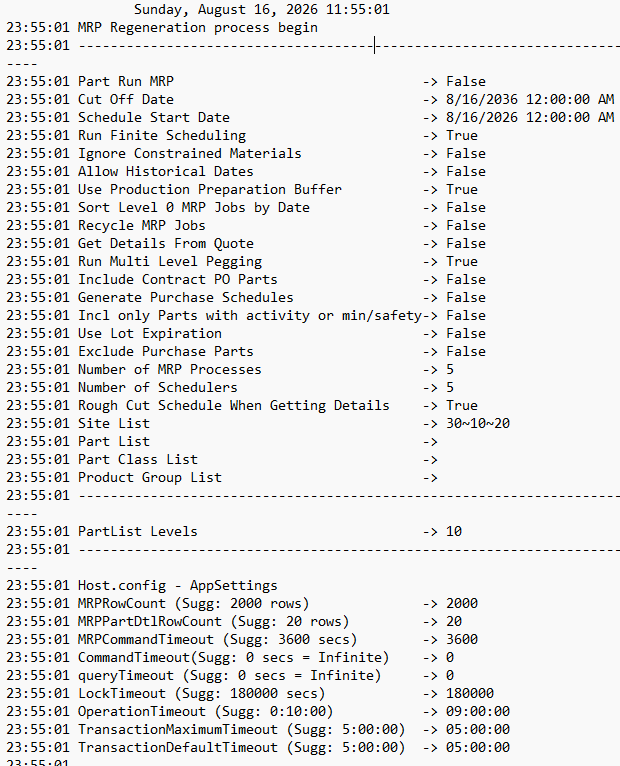
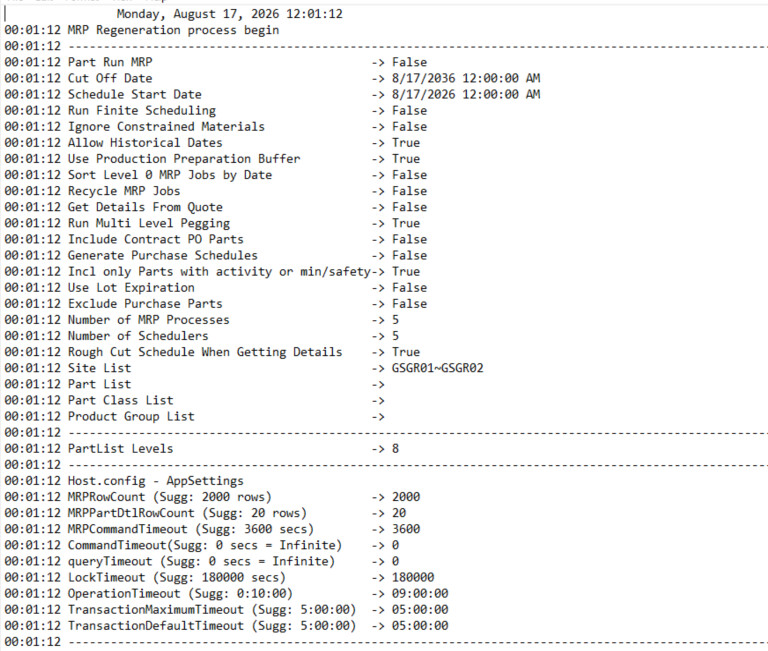
We also run it nightly w full regen mrp, 3 plants. It takes about 10 minutes for the pegging run, from the looks of the log. The MRP run takes about 1 hr 20 min. Here’s our setting on the MRP w pegging run. We have about 40K parts.
Here are our settings. I know there were some improvement to MRP a few years back. Forgot what they were, maybe our setup needs to be reviewed. (we have a few settings that are making things longer for no added vaule)
No filters that I can see. I speculate that MLP time probably increases roughly linearly with the number of order releases and PO releases, but somewhat more geometrically with the size of BOMs and especially the jobs that rely on other jobs for subassemblies; but I’m just guessing.
I wonder if allowing historical dates could make it take longer. Probably not, but possibly so, could be working hard coming up with demand fulfillment around old jobs.. Just a thought - maybe try to switch it off and see if it has any effect? (Side note we used to run with allow historical dates on also but were talked out of using it by a consultant.. never looked back; our internal fuss that this is the way we know what’s really bad off didn’t pan out as necessary for seeing it after all.)
If you use dates for anything like scheduling or Purchase Orders or Sales Orders, then having dates in the past is not a really good practice. I just can’t place a PO today and expect a delivery last week (or month or year). This is one of those things that people just can’t let go of. Tell whoever told you to keep it this way to:
We have deep BOMs and are a discrete manufacturer (mostly jobs of 1), have huge purch lead times, etc… We have spent tons of time optimizing our MRP parameters and planning parameters to ensure we can stay below the 20GB memory limit imposed by Epicor. Our regen MRPs take about 8 hours per plant, and pegging takes about 2 hours. Here are a few of our most important lessons learned (sorted top to bottom on most critical)
Make sure you are are using 3 MRP processors (max number) and 3 Schedulers (max)
Don’t run Finite scheduling
Check Include only Parts with activity or min/safety if your part master has a bunch of old parts you can ignore
Try to not put your cutoff date on MRP too far out (this is just tons more data), we have to go 18 months due to long cumulative lead times
Use Recycle Jobs (if you need to pickup methods changes for unplanned jobs periodically run Update Recycle Threshold, this will marked planned jobs with a engineering check out/in for purge and replan)
Turn off “Inform of Overload” on Resource Groups (make sure off on resources as well)
Don’t use Sort Level 0 MRP Jobs by Date (unless critical to your operation, it prevents all 3 processors and schedulers).
Don’t have your MRP run do things you can put in a process set instead and run sequentially (Pegging, Generate Sugg, Expiration; we exclude purchase parts from MRP as Generate Sugg runs after our MRP)
See if there are things you can do in a process set before your MRP process set (ex: Recalc part low level code, you could execute fix to delete all unplanned jobs but we find that recycling jobs is much faster than purging)
Try to reduce your discrete job count (we use a short horizon of 90 days with min and max lots sizes of 1 where needed, at least that way it can group demand outside 90 days to jobs of > 1 even though we won’t ultimately release this way.
Get good are reading your MRP logs (you can see the memory limit hangs or perhaps other things)