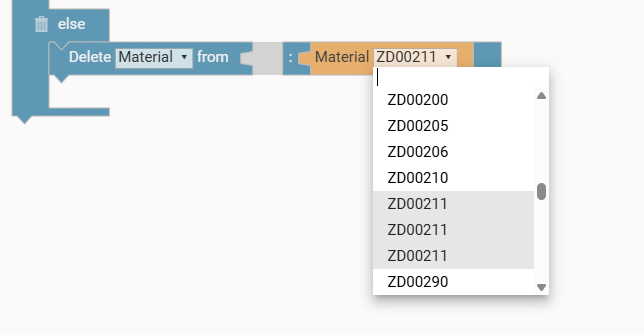
Is there a way to differentiate between materials in MOM that have the same part number, but different operations and keep when rules, when they were in Classic? Whenever I use delete on selecting one it deletes all of them. I can’t seem to delete them in another way that would let me choose between them either.
Can you delete the material via an API call?
This might allow you to delete ITEM where PROPERTY = STATE
I am sure I can delete the material once it gets to Kinetic, but I feel like there must be a in built way to have multiple of the same part number in the MOM with distinct rules. I assumed other users would have come across this before.
I can think of a number of roundabout ways to handle this logic inside of CPQ, but I’d reach out to Epicor first to see if they have any ideas.
My first thought is to load materials in with mapping or separate ID’d arrays, but the API route might be more straightforward.
Epicor knows about this issue. I put in a case almost a year ago now. They turned it into a problem “PRB0302900”, the problem state is “Accepted”, the PD Task is “3 - Defect with workaround”.
There have been no updates on the problem. I inquired what their “workaround” is and I did not receive a response.
Kind of a dumb way to do it, but I just deleted the Part from the BOM and added the Parts back in CPQ with the correct values and sequences. It works, but means your imported BOM never fully lines up with the one produced by CPQ. Thanks for responding its good to know that the issue might get solved.