Epicor REST Basic auth wants UserName, Password, and APIKey.
Excel PowerQuery (and PowerBI, Fabric, etc) seems to have issues with doing all three using the authentication methods dialogs. Basic allows for username & password but not X-API-Key header while API Key says ‘anonymous only’. The Auth UX differs depending on OData.Feed vs Web.Contents sometimes you can get it to work and it’ll stick - until it doesn’t. 
I’ve found Get Data > From Web allows you to set headers manually which seems to work and not break. The drawback is you need to Base64Encode the Authorization header value - means a tad of vba (more below).
The key bit is skip OData and go with this:
Source = Json.Document(Web.Contents(pURL, [Headers=[Authorization=pAuth, #"X-API-Key"=pAPIKey]])),
where
pAuth = "Basic " & EncodeBase64("UserName:Password")
Here’s our minimal viable BAQ Excel template.
PowerQueryBAQ.zip (23.9 KB)
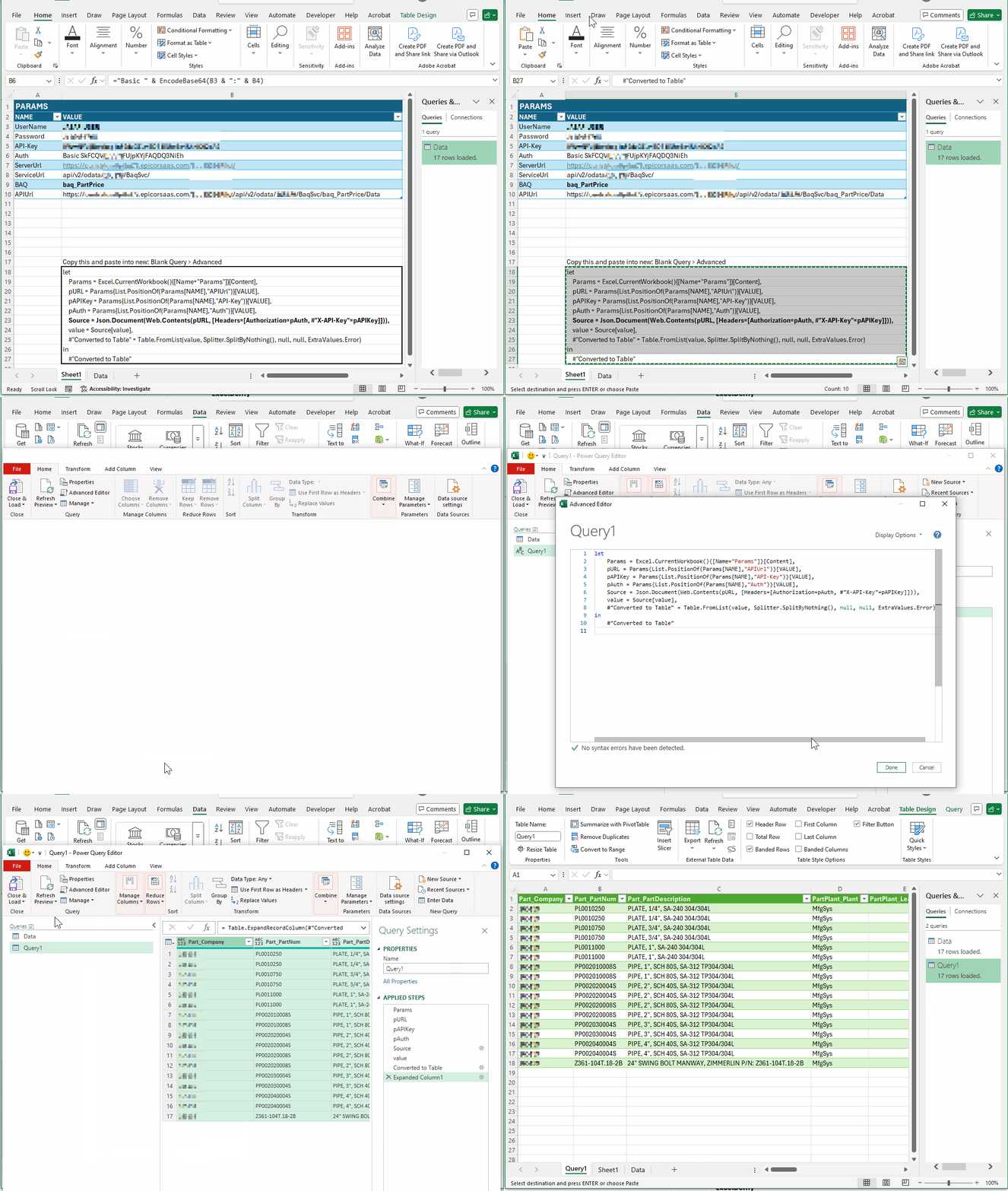
M-Query:
let
    Params = Excel.CurrentWorkbook(){[Name="Params"]}[Content],
    pURL = Params{List.PositionOf(Params[NAME],"APIUrl")}[VALUE],
    pAPIKey = Params{List.PositionOf(Params[NAME],"API-Key")}[VALUE],
    pAuth = Params{List.PositionOf(Params[NAME],"Auth")}[VALUE],
    Source = Json.Document(Web.Contents(pURL, [Headers=[Authorization=pAuth, #"X-API-Key"=pAPIKey]])),
    value = Source[value],
    #"Converted to Table" = Table.FromList(value, Splitter.SplitByNothing(), null, null, ExtraValues.Error)
in
    #"Converted to Table"
VBA:
Called from Params.Auth table cell like so:
="Basic " & EncodeBase64("UserName:Password")
Function EncodeBase64(text As String) As String
  Dim arrData() As Byte
  arrData = StrConv(text, vbFromUnicode)

  Dim objXML As Variant
  Dim objNode As Variant

  Set objXML = CreateObject("MSXML2.DOMDocument")
  Set objNode = objXML.createElement("b64")

  objNode.DataType = "bin.base64"
  objNode.nodeTypedValue = arrData
  EncodeBase64 = Replace(objNode.text, vbLf, "")

  Set objNode = Nothing
  Set objXML = Nothing
End Function
Alternatively, you can scrape the Auth header out of your browser tools or use PowerShell, like:
$Base64Auth = [Convert]::ToBase64String([Text.Encoding]::ASCII.GetBytes("$($Username):$($Password)"))
Better yet, do this:
Base64Auth = "Basic " & Binary.ToText(Text.ToBinary("datapuller:mydatapullerpassword"), BinaryEncoding.Base64),
Hope this helps. and hope MSFT will fix the auth UX someday.
Josh