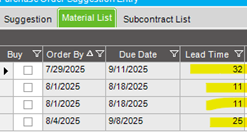
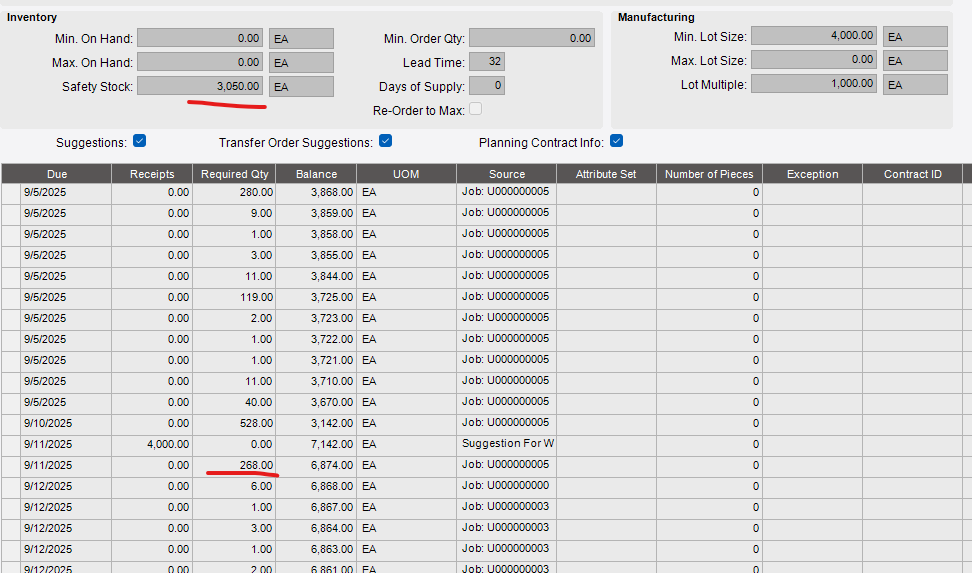
We’ve disabled the “Allow Historical Dates” option in our MRP run parameters, yet we’re still seeing PO suggestions with Order By Dates that fall in the past. In reviewing a recent case, it seems MRP is still calculating the Order By Date by working backward from a future demand (in this case, a large job that would take inventory below our defined safety stock). The result is an Order By Date that predates today’s run date, even though that setting is turned off.
I understand that MRP uses lead time to calculate when an order should have been placed, but I was under the impression that disabling historical dates would prevent any suggested Order By Dates from falling before today’s date, even if that meant dipping below safety stock or creating a late order.
Can anyone clarify:
Does disabling “Allow Historical Dates” truly constrain the Order By Date to today or later?
Are there conditions (e.g., firmed jobs, old suggestions, site settings) that can override this setting?
Could this be a display-only issue vs. a true planning date issue?
Appreciate any insight from others who’ve run into this!
What date did you process MRP? Historical dates are in reference to the MRP Process Date, not “today”.
I got into a pretty fun argument with support about the order by dates.
These quotes are directly from support during my case.
“Order by date is just a piece of information, and it won’t bring over to the generated PO.”
“By Design the Order by date is calculated based on the Due Date - Lead Time”
As a side note -
Be careful with order by date if you use supplier price lists. If the lead time in part entry doesn’t match the lead time in the supplier price list then the order by date will be wrong, especially if the lead time in part entry is LESS than the one in SPL.
We do a nightly MRP run and those snippets was from the MRP run on 8/5-8/6.
I could see how the one quote aligns with what I’m seeing: “By Design the Order By Date is calculated based on the Due Date - Lead Time”. Really, the system see’s we are going to dip below SS and it is using that date or the date before the job that would cause that to happen as the Due Date. Then working backwards according to lead time to arrive at an Order By Date (Even if the Order By Date is in the past).
Yes we do have that set as True. Would this potentially override the parameter on the MRP regarding historical dates? What would the potential implications be for setting that field to False?
I would try running suggestions by itself, not with MRP. Launch the Kinetic form and uncheck the “include only parts with activity or min/safety”, so that it runs wide open. Turn your logging on to suggestions.
You do a regen nightly or a net change? and the process date is set to dynamic>“today”?
Do you have a contract PO set up for that part?
Do you have a supplier price list set up with that part and if so is the lead time the same there as it is in part site?
What’s your forecast window in company config>production>MRP?
We allow scheduling before today, but we don’t allow historical dates during MRP run. Ignore the order by date and concentrate on the due date of the PO Rel. If the ((reorder point - lead time) < MRP Process Date) it should bounce back to (MRP Process Date + lead time), which it clearly isn’t.