I’m having issues with my kinetic function that has a goal of attaching an image, taken from an API pull, to an Order. Below are the steps in my function that upload and link the images:
// ================================================================
// STEP 3: Upload the image to Epicor via AttachmentSvc
// ================================================================
string uploadedFilePath = "";
string attachFileName   = $"PCID_{pcidString}_WS_{CurrentWorkstation}_{DateTime.Now:yyyyMMdd_HHmmss}.jpg";
//string base64Image      = Convert.ToBase64String(imageBytes);

try
{
    using (var attachSvc = Ice.Assemblies.ServiceRenderer
           .GetService<Ice.Contracts.AttachmentSvcContract>(this.Db as Ice.IceDataContext))
    {
        uploadedFilePath = attachSvc.UploadFile(
            docTypeID,
            $"PCID_{pcidString}",
            attachFileName,
            imageBytes
        );
    }

    if (string.IsNullOrEmpty(uploadedFilePath))
    {
        resultMessage = "AttachmentSvc returned an empty file path after upload.";
        return;
    }

    resultMessage = $"Image uploaded successfully | Path: {uploadedFilePath}";
}
catch (Exception ex)
{
    resultMessage = $"File upload error: {ex.Message}";
    return;
}

// ================================================================
// STEP 4: Link the uploaded image to each Sales Order
// ================================================================
List<string> successOrders = new List<string>();
List<string> failedOrders  = new List<string>();
int orderIndex = 1;

foreach (int orderNum in orderNums)
{
    try
    {
        // Generate unique filename per order by appending index
        string orderAttachFileName = orderNums.Count > 1
            ? $"PCID_{pcidString}_WS_{CurrentWorkstation}_{DateTime.Now:yyyyMMdd_HHmmss}_{orderIndex}.jpg"
            : attachFileName;

        // Upload a separate copy of the image for each order if multiple orders
        string orderFilePath = uploadedFilePath;
        if (orderNums.Count > 1)
        {
            using (var attachSvc = Ice.Assemblies.ServiceRenderer
                       .GetService<Ice.Contracts.AttachmentSvcContract>(this.Db as Ice.IceDataContext))
            {
                orderFilePath = attachSvc.UploadFile(
                    docTypeID,
                    $"PCID_{pcidString}",
                    orderAttachFileName,
                    imageBytes
                );
            }
        }

        using (var soSvc = Ice.Assemblies.ServiceRenderer
                   .GetService<Erp.Contracts.SalesOrderSvcContract>(this.Db as Ice.IceDataContext))
        {
            var soDS = soSvc.GetByID(orderNum);

            if (soDS == null || soDS.OrderHed.Count == 0)
            {
                failedOrders.Add($"{orderNum} (not found)");
                orderIndex++;
                continue;
            }

            var newAttach = soDS.OrderHedAttch.NewRow()
                            as Erp.Tablesets.OrderHedAttchRow;

            if (newAttach == null)
            {
                failedOrders.Add($"{orderNum} (could not create attachment row)");
                orderIndex++;
                continue;
            }

            newAttach.Company   = company;
            newAttach.OrderNum  = orderNum;
            newAttach.DrawDesc  = $"PCID Camera Capture | PCID: {pcidString} " +
                                  $"| Workstation: {CurrentWorkstation} " +
                                  $"| Camera: {cameraName} " +
                                  $"| Order: {orderIndex} of {orderNums.Count} " +
                                  $"| {DateTime.Now:yyyy-MM-dd HH:mm:ss}";
            newAttach.DocTypeID = docTypeID;
            newAttach.FileName  = orderFilePath;
            newAttach.RowMod    = "A";

            soDS.OrderHedAttch.Add(newAttach);
            soSvc.Update(ref soDS);

            successOrders.Add(orderNum.ToString());
        }
    }
    catch (Exception ex)
    {
        failedOrders.Add($"{orderNum} (error: {ex.Message})");
    }

    orderIndex++;
}
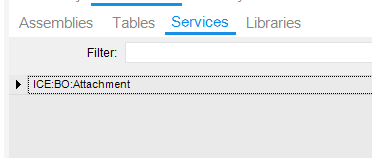
Right now in Epicor, the trigger for this function is a simple button on a custom label print screen, the DocumentType pictured below is the one that I am using within the function.
I am having an issue while testing, the function completes successfully but when I check the order header that should have an attachment, there is no attachment. Am I missing a key connection somewhere?
The new attachment doesnt show up unless a file is manually added
To answer your second question, theoretically yes if they all make it through the try block. That line you highlighted is just setting up the array to store the order nums. Those orders are tied to a PCID and a PCID has a number of orders tied to it and this function is supposed to tie an image to all orders under a single PCID.
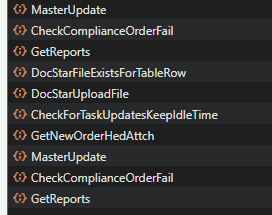
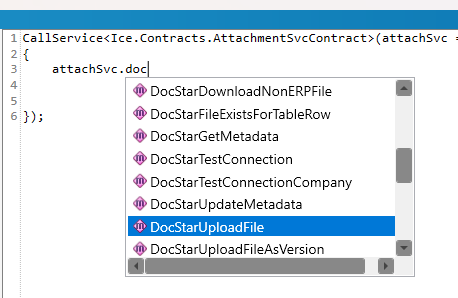
I should also preface that we are using DocStar.
I’ve updated the code since, this is what I am doing now. I still am not getting the image attachment on Order Header. Am I not handling the image attachment correctly or is DocStar not linking it back to Order Header?
// ================================================================
// STEP 3: Upload ONCE - DocStar stores it and returns a reference
// ================================================================
string uploadedFilePath = "";
string attachFileName = $"PCID_{pcidString}_WS_{CurrentWorkstation}_{DateTime.Now:yyyyMMdd_HHmmss}.jpg";

try
{
    using (var attachSvc = Ice.Assemblies.ServiceRenderer
           .GetService<Ice.Contracts.AttachmentSvcContract>(this.Db as Ice.IceDataContext))
    {
        // DocStarFileExistsForTableRow fires here internally before upload
        // DocStarUploadFile fires here - only need to do this ONCE
        uploadedFilePath = attachSvc.UploadFile(
            docTypeID,
            $"PCID_{pcidString}",
            attachFileName,
            imageBytes
        );
    }

    if (string.IsNullOrEmpty(uploadedFilePath))
    {
        resultMessage = "AttachmentSvc returned an empty file path after upload.";
        return;
    }

    resultMessage = $"Image uploaded successfully | Path: {uploadedFilePath}";
}
catch (Exception ex)
{
    resultMessage = $"File upload error: {ex.Message}";
    return;
}

// ================================================================
// STEP 4: Link the uploaded image to each Sales Order
//         Use GetNewOrderHedAttch instead of NewRow() so that
//         DocStar/ECM metadata is properly initialized
// ================================================================
List<string> successOrders = new List<string>();
List<string> failedOrders  = new List<string>();
int orderIndex = 1;

foreach (int orderNum in orderNums)
{
    try
    {
        using (var soSvc = Ice.Assemblies.ServiceRenderer
                   .GetService<Erp.Contracts.SalesOrderSvcContract>(this.Db as Ice.IceDataContext))
        {
            var soDS = soSvc.GetByID(orderNum);

            if (soDS == null || soDS.OrderHed.Count == 0)
            {
                failedOrders.Add($"{orderNum} (not found)");
                orderIndex++;
                continue;
            }

            // Use GetNewOrderHedAttch to mirror what the UI does -
            // this properly initializes the DocStar/ECM fields
            soSvc.GetNewOrderHedAttch(ref soDS, orderNum);

            // Find the newly added row (RowMod = "A")
            var newAttach = soDS.OrderHedAttch
                                .FirstOrDefault(r => r.RowMod == "A");

            if (newAttach == null)
            {
                failedOrders.Add($"{orderNum} (GetNewOrderHedAttch returned no new row)");
                orderIndex++;
                continue;
            }

            newAttach.Company   = company;
            newAttach.OrderNum  = orderNum;
            newAttach.DrawDesc  = $"PCID Camera Capture | PCID: {pcidString} " +
                                  $"| Workstation: {CurrentWorkstation} " +
                                  $"| Camera: {cameraName} " +
                                  $"| {DateTime.Now:yyyy-MM-dd HH:mm:ss}";
            newAttach.DocTypeID = docTypeID;
            newAttach.FileName  = uploadedFilePath; // Reuse same DocStar reference
            // RowMod is already "A" from GetNewOrderHedAttch

            soSvc.Update(ref soDS);

            successOrders.Add(orderNum.ToString());
        }
    }
    catch (Exception ex)
    {
        failedOrders.Add($"{orderNum} (error: {ex.Message})");
    }

    orderIndex++;
}
I am still having issues with this but now the issue is the fact that the function is not hitting the API, or when it does the response from the API is a 401 authentication error but we are passing in a x-functions-key and password. Does Epicor functions not allow external API calls?
Sometimes if you are uncertain if Epicor is the issue or not it can help to take it out of the equation - were you able to make the API calls you needed from POSTman or similar?
Yes the API works on Postman, when we trigger the function through a button in app studio it never hits the server even when we use an unauthenticated api end point.
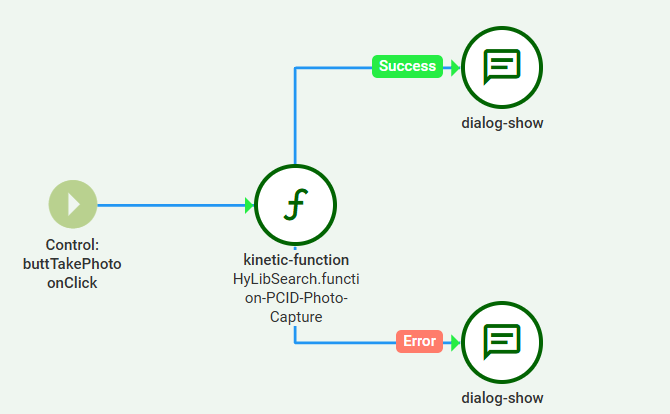
Here is the flow of the button click:
Do you have a base process of how you set your function up for this functionality? This is the first time we are trying to do this so there may be something within the set up that I am missing.