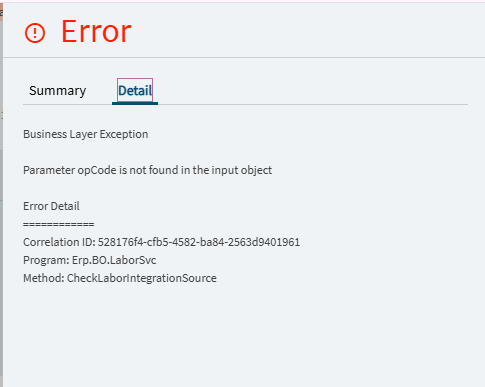
This has been happening for a while now whenever someone goes to add or edit time details in the Time Entry screen. I even created a ticket with Epicor support when it first started happening but since they weren’t able to replicate it (even in our environment) the ticket had to get closed out. Its random and I can’t find the exact steps to reproduce it but happens more and more frequently.
The only Data Directive we have on the LaborDtl table is Change Log. No Method Directives related to Time Entry.
We do have a App Studio Layer but I’ve also gotten this error on the Base Layer.
My users have been seeing that recently as well, particularly when creating time entries for days other than today. Is that the situation you’re seeing too?
I was able to get around it by having the users change the Default Date field in the top of Time Entry to whatever date they’re booking time for. Does that fix it on your end too?
We are seeing this now that we transitioned to the Kinetic UI. This error did not occur in classic. I am going to enter an Epicor case, however, am disappointed to hear that they couldn’t reproduce it and closed the case. I hope this isn’t our outcome as well.
I can confirm that changing the default date prior to adding a detail record does not throw the errors.
Hi, we have started seeing this since the upgrade to 2025.2, did you figure out what was causing this error? I submitted an EpicCare ticket, but so far they have not been able to replicate it.
No, we have not been able to identify the problem or even how to replicate it. Its been pretty random for us and is still occurring. Since we’re not able to replicate it on demand, Epicor Support wasn’t able to give us any assistance.
Let me know you make any progress on your ticket, thanks.
We started seeing this on the Monday following the upgrade to 2025.2.7. We do some time-entries via a copy from a dashboard and a Paste-New into time-entry details and started getting the Paremeter OpCode error. But if we click +Add first then Paste-Update it works without error.
Are you entering more than one row of data? We also have tried Paste Inserts from a spreadsheet and still get this error but we are doing a “Paste New” as opposed to Paste Update because we normally upload multiple time details at once.
Hi Fernando, Yes we paste multiple rows at once. We create the header record in the Summary section of Time-Entry first then click the Plus+ to add one new row (blank) in the Time Details section. The paste update then fills in the new (blank) row and automatically creates the additional rows that were copied. We used to be able to just click Paste-New but that generates the error. Even with the Paste-update it seems extra finicky, occassionally in testing I still get errors.
We are also encountering this error in Time Entry. I opened a ticket with EpicCare and have sent them a video of how to reproduce it. For us, to reproduce the error:
Start with an employee who does not have any current time details in their view
Add a new time detail from the “Time Detail” view plus button. Save
Click the plus button to add a 2nd time detail - the error occurs.
If the window is refreshed after the error, we can add new time details using the plus button without problem. It seems to only happen on the 2nd time detail.
I’d be curious to hear what EpicCare says on your ticket. It seems like this isn’t an isolated issue. Hoping they can get it resolved on the next version update
“It looks like this behavior was previously reported under PRB0304302 (ERPS‑296025).
Development noted that no error occurs when saving the Time Entry, and the system processes everything correctly on their side. This will be Fixed in version 2026.1.”
I guess we’ll have to wait for June and hope it’s fixed in the new release.