Has anyone successfully printed an Epicor SSRS report from outside of Epicor (not running the Epicor client)?
I have read many posts here about printing an SSRS report from C# but all are inside Epicor (BPM, screen customization, etc). We have a WinForms app that is external to Epicor calling Epicor BOs and we want to print an Epicor Packing Slip. I believe I have followed the steps found in a Trace of printing a Pack Slip in Epicor but the report doesn’t print… until I open the Epicor client, then it prints. Which leads me to believe the Report Monitor and/or System Monitor steps are not correct.
The code below is doing a print preview for testing purposes but ultimately we want to print.
 private void PrintDD250(int packNum)
        {
            try
            {
                ReportMonitorAdapter adpRptMon = new ReportMonitorAdapter(EpiUser.EpiLaunch);
                adpRptMon.BOConnect();

                PackingSlipPrintAdapter adpPackSlip = new PackingSlipPrintAdapter(EpiUser.EpiLaunch);
                adpPackSlip.BOConnect();
                adpPackSlip.GetNewParameters();
                adpPackSlip.ReportData.PackingSlipParam[0].PackNum = packNum;
                adpPackSlip.ReportData.PackingSlipParam[0].PrintingOptions = "S";
                adpPackSlip.ReportData.PackingSlipParam[0].AutoAction = "SSRSPREVIEW";
                //adpPackSlip.ReportData.PackingSlipParam[0].AutoAction = "SSRSClientPrint";
                //adpPackSlip.ReportData.PackingSlipParam[0].PrinterName = Properties.Settings.Default.DocumentPrinter;
                adpPackSlip.ReportData.PackingSlipParam[0].SSRSRenderFormat = "PDF";
                adpPackSlip.ReportData.PackingSlipParam[0].AgentID = "System Task Agent";
                adpPackSlip.ReportData.PackingSlipParam[0].ReportStyleNum = 1006;
                adpPackSlip.ReportData.PackingSlipParam[0].WorkstationID = Ice.Lib.Report.EpiReportFunctions.GetWorkStationID(EpiUser.EpiSession);
                adpPackSlip.ReportData.PackingSlipParam[0].ProcessTaskNum = 0;
                adpPackSlip.ReportData.PackingSlipParam[0].RowMod = "A";
                adpPackSlip.SubmitToAgent("System Task Agent", 0, 0);

                SysMonitorAdapter adpSysMonitor = new SysMonitorAdapter(EpiUser.EpiLaunch);
                adpSysMonitor.BOConnect();

                SearchOptions opts = new SearchOptions(SearchMode.AutoSearch);
                opts.NamedSearch.WhereClauses.Add("SysRptLst", "(PrintDriver='SSRS' AND (AutoAction='PREVIEW' OR AutoAction='PRINT') AND LastAction='SSRSREADY') AND WorkStationID='my-workstation-id'");
                opts.NamedSearch.WhereClauses.Add("SysTask", "history = true and  SubmitUser = 'my-user-id'");
                opts.NamedSearch.WhereClauses.Add("SysTaskLog", "");
                SysMonitorTasksAdapter adpSysMonTasks = new SysMonitorTasksAdapter(EpiUser.EpiLaunch);
                adpSysMonTasks.BOConnect();
                SysMonitorTasksDataSet sysMonitorData = adpSysMonTasks.SysMonitorTasksData;

                if (adpRptMon.GetRowsKeepIdleTimeWithBallonInfo(opts, false, out sysMonitorData))
                {
                    if (adpRptMon.ReportMonitorData.SysRptLst.Count > 0)
                    {
                        adpRptMon.ReportMonitorData.SysRptLst[0].AutoAction = "";
                        adpRptMon.ReportMonitorData.SysRptLst[0].LastAction = "Process";
                        adpRptMon.Update();

                        Byte[] returnRpt = adpRptMon.GetReportBytes(adpRptMon.ReportMonitorData.SysRptLst[0].SysRowID);

                        //adpRptMon.ReportMonitorData.SysRptLst[0].LastAction = "PRINT";
                        adpRptMon.ReportMonitorData.SysRptLst[0].LastAction = "PREVIEW";
                        adpRptMon.Update();
                    }
                    else
                    {
                        Misc.TraceLog.Write(string.Format("ReportMonitor didn't find Rpt for PackNumber [{0}].", packNum));
                    }
                }
                else
                {
                    Misc.TraceLog.Write(string.Format("ReportMonitor didn't find Rpt for PackNumber [{0}].", packNum));
                }

                SysMonitorDataSet dsSysMon = adpSysMonitor.GetReports(EpiUser.UserID, "", "Days", 1);

                opts = new SearchOptions(SearchMode.AutoSearch);
                opts.NamedSearch.WhereClauses.Add("SysTask", "history = false and SubmitUser = 'my-user-id'");
                opts.NamedSearch.WhereClauses.Add("SysTaskLog", "");
                opts.PageSize = 0;
                opts.AbsolutePage = 0;
                DataSet dsReport = adpSysMonTasks.GetRows(opts, out bool morePages);
                Misc.TraceLog.Write(string.Format("Pause to look at DataSet from SysMonTasks.GetRows for PackNumber [{0}].", packNum));
            }
            catch (Exception ex)
            {
                Misc.TraceLog.Write(string.Format("Exception caught trying to print DD 250 form for PackNumber [{0}]. Exception: {1}", packNum, ex.ToString()));
            }
        }
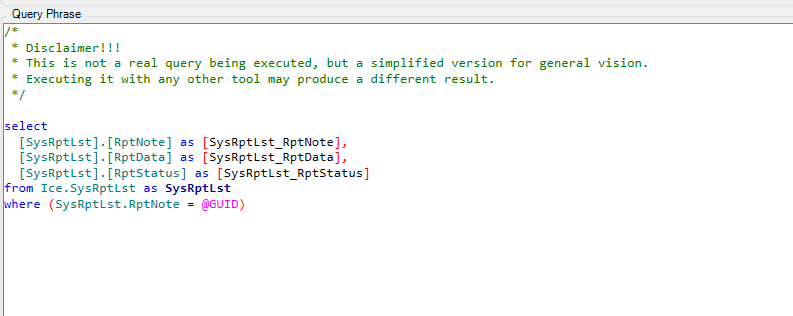
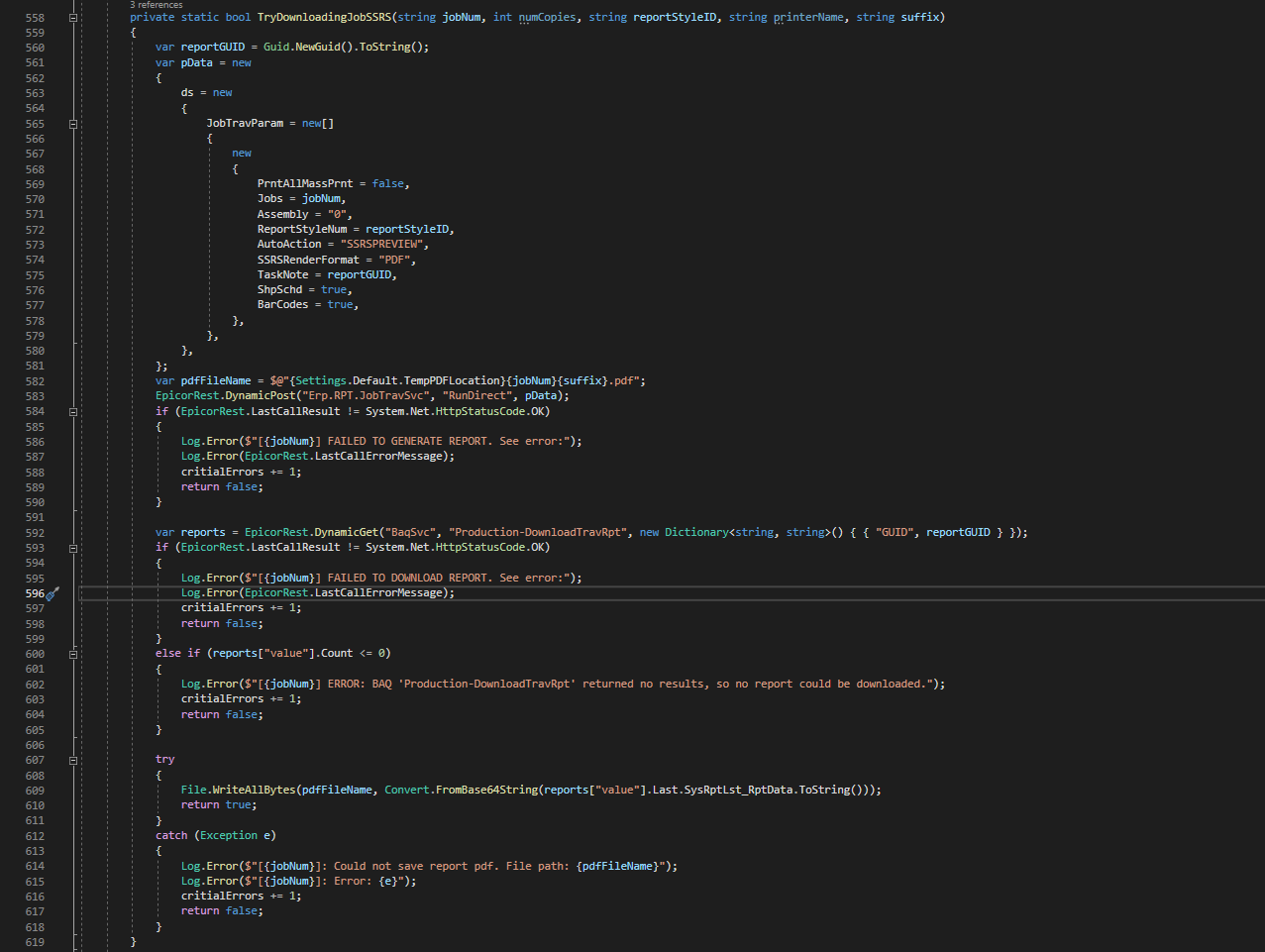
Also, the System Monitor is what retrieves the report when finished. That’s why logging into Epicor brings it up. Using the RunDirect method would work but you might have to retrieve it with the ReportMonitor service as shown in this thread.
Also, you are using SubmitToAgent and then immediately checking for the report, instead of waiting for it.
Use RunDirect. Then it should be available when RunDirect Completes.
Our prod server has a self-signed SSL certificate so it’s not ready for REST. I was working on that on our test server and in the process of converting this entire WinForms app to REST when this new request came up. I will see if I can get one of the other suggestions working but this will be the final solution.
Thanks for your time, Mark!
Kelly
Kevin, I can’t thank you enough!
I saw your presentation at Insights this year in Vegas. Had I known you were going to rescue me with this golden code, I would have bought you that cigar you needed to complete your alter identity!
Thanks again,
Kelly
I just put together the pieces of what the greats before me have done
To be honest, I’ve been needing to do this for a while for some stuff here at work, and
kept putting off learning it all. Your post was the push I needed to do that.
And those cigars were expensive, I would have appreciated it, but been a little miffed!
Edit: How did you end up printing it? (Curiosity!)