My question is: How does the magic happen on the back-end? We have spent the last few months trying to solidify our “STD BOMs”. We’ve taken the main part, and it’s mounting accessories, attached BOM, and routing, given that a part number. If we use the “Template BOM” method in EPICOR, do we need to create STD BOMs for all of our accessories?
We up-fit trucks. We start with a chassis, that determines what bodies we can offer, once a customer picks a body, we then have 1000s of accessory combos. We have STD BOMs for the chassis, and bodies already, do we need to create STD BOMs & MOMs for all of our accessories?
If not, how does the system bring together this information?
Marking a BOM on a quote as “Template”, allows it to be selected to pull into other things (like future quotes, and jobs), for their BOM.
What you need to do with accessories, depends on how the sales orders are structured, and how accessories might affect the initial build.
FWIW - we refer to Accessories as thing that can accompany the main part but are not physically attached at the time of shipment. For example, a removable bed liner a truck.
Options are integrated parts (or operations). Options usually replace or add to an existing integral feature. A bumper with an integral step would be an option, as it replaces the original bumper. If the step was just a part that is bolted on to the standard bumper, I’d still consider it an option.
The 400 page configurator pdf explained that there are 2 ways to setup configurators; 1. Super BOM 2. Template BOM. The template BOM is supposed to be hard to establish, and easier to maintain. All of our builds have 2 intregal parts (service bodies/Flatbeds), everything else is added(installed). Nothing leaves out of here uninstalled. So does that make everything else an OPTION?
I wasn’t asking about pulling the BOMs into anything. I want to know how, thru a configurator, does EPICOR know what materials, operations, and Methods to pull together. What do we have to do to make that happen?
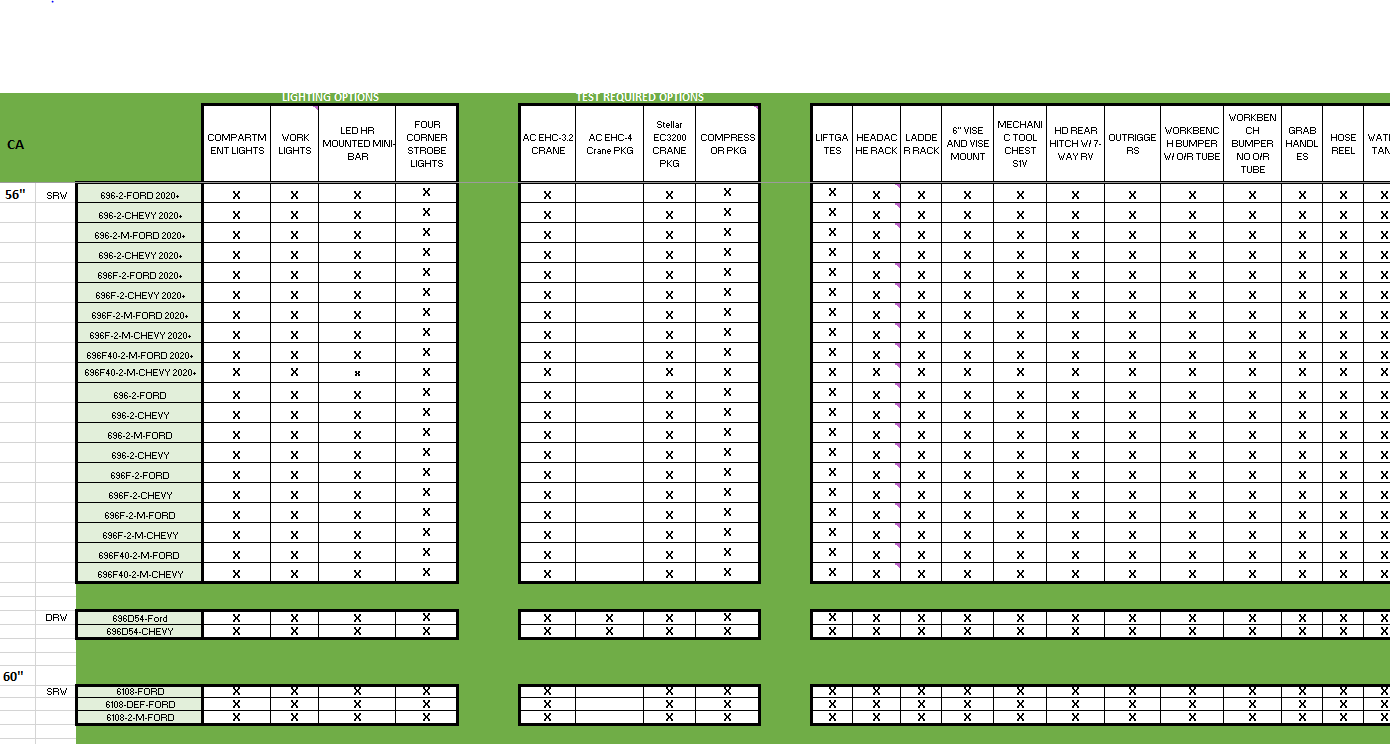
here is a snippet of some of our “options” as they relate to the “Integral part”
the “696” numbers are the service bodies that we mount onto chassis. The options across the top are all of the things that can get mounted on that service body. Do we need to create “std BOMs” for all of those option choices across the top, in order to pull in BOMs and Routing?
The Template BOM is best implemented when the number of components is relatively fixed. Each component in the BOM (as setup in Engineering Workbench) is really a placeholder for the final part in the Assembly. The Configurator rules then change the info of each material based on the inputs.
For example if you made extension cords, every cord needs: a plug, a socket, and the cable.
I’d setup my BOM (in Eng Workbench) like:
Mtl Seq  PartNum   Description      Qty Per  UOM
 10      PLG-001   120 V, 15A Plug        1  EA
 20      SKT-001   120 V, 15A Socket      1  EA
 30      CBL-001   Cable, 14/3 Orange     1  FT
The rules might have an entry for Mtl 30, of:
if(Inputs.cmbAmp.Value == '15'{
    if(Inputs.cmbColor.Value == 'Green'{
        JobMtl.PartNum = 'CBL-002';  /// Part num for green 14/3
        QuoteMtl.PartNum = 'CBL-002';
        }
    if(Inputs.cmbColor.Value == 'Orange'{
        JobMtl.PartNum = 'CBL-002';  /// Part num for Orange 14/3
        QuoteMtl.PartNum = 'CBL-002';
        }
    }
else if(Inputs.cmbAmp.Value == '20'{
    if(Inputs.cmbColor.Value == 'Green'{
        JobMtl.PartNum = 'CBL-003';  /// Part num for green 12/3 (20A)
        QuoteMtl.PartNum = 'CBL-003';
        }
    if(Inputs.cmbColor.Value == 'Orange'{
        JobMtl.PartNum = 'CBL-004';  /// Part num for Orange 12/3 (20A)
        QuoteMtl.PartNum = 'CBL-004';
        }
    }
JobMtl.QtyPer = Inputs.decLength.Value;
QuoteMtl.QtyPer = Inputs.decLength.Value;
(decLength is the control that the user enters the desired length)
A user selecting a current of “20”, color: “Orange”, and length of 100 FT, would develop a BOM of :
Mtl Seq  PartNum   Description      Qty Per  UOM
 10      PLG-002   120 V, 20A Plug        1  EA
 20      SKT-002   120 V, 20A Socket      1  EA
 30      CBL-004   Cable, 12/3 Orange   100  FT
(note that I didn;t show the rules for Mt;'s 10 and 20. They would only be based on the input for Current (15 or 20 Amp)
I can tell you that we do something similar to what @ckrusen outlined above. We take it a step further and use sub-configurators since our “extension cords” have components that also have options of their own. In the example above, our plug might have a thumb grip option.
Additonally we do not make use of (or try very hard to avoid) harcoding any parts or options in code because we want the configurators to be centered around methods of manufacture which we have found difficult when we hard code things in the configurator.
Your question here @Townes69 is a magnificent question and has a million answers. The easiest way to arrive at the “right” answer is to take what @ckrusen and others say and try it out with your approach.
The two things that I believe are important when creating a configurator are:
- User Interface/Ease of Use
- Management of the Configurator - can it be understood by engineers and anyone else who needs to understand it or maintain it. Is the approach sustainable for those who may have to work with it later? Can you easily add more products to it?
There are so many factors to consider, but you are on the right path if you have already started to read the tech ref guide.
We use both the “Template” and “Super” BOM’s for configurators.
As to which is easier to maintain, really depends on the skill level of the person that has to maintain them.
Super BOM’s are easier for people that don’t have a good grasp of programming. They basically just disable each material sequence that isn’t used. This can be done easier by non-programmers, as you’r just choosing what input values are required for the “Keep When”.
The down side is that if you have 15 different combos of wire gauge and color for your extension cords, you need to maintain 15 different “Keep When” rules.
And each of those materials would need a nearly identical rule for setting the qty.
I concur @ckrusen .
We use super BOMs with dummy parts. The part number is populated from a lookup table then use SetPartDetails, lastly set the quantity. This method requires only one dummy part in the BOM and it can contain any part number from an easy to maintain table.
So Pseudo-Super BOMs!
Hi Folks,
Sorry to resurrect, but I’m really struggling with understanding what I’m doing with trying to make what seems to be a simple configurator. I think Template BOM sounds like best approach. I’ve looked at the 400 page guide on the configurator and I must say, it’s not for the faint of heart.
I wonder if you can look at what I’ve done and am trying to do and let me know if you have any suggestions. I will have many of these configured pump models.
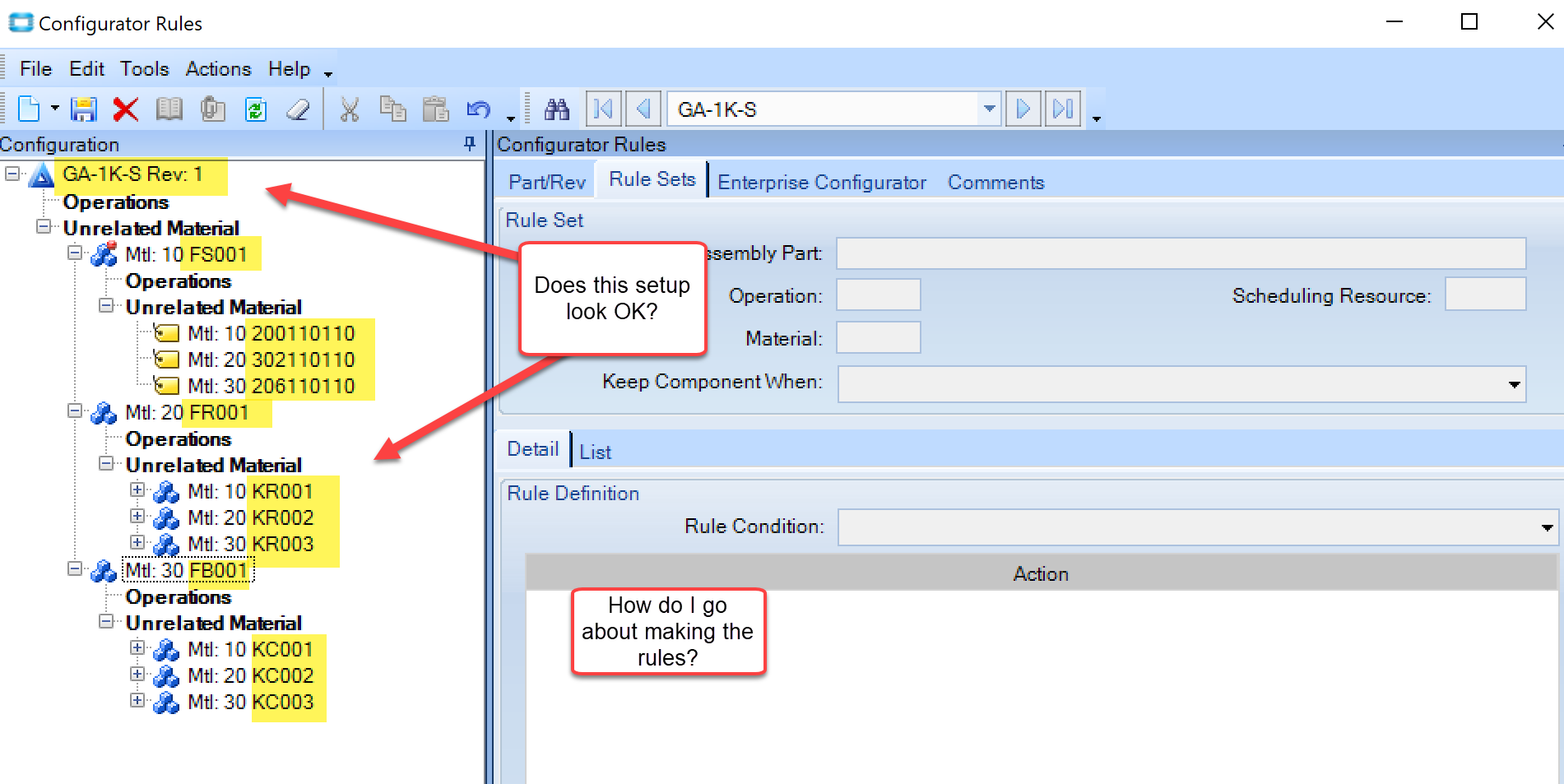
I have a pump, and it has three features, for sake of ease today. I think in designer I will need to provide dropdown list for each feature with the PartNo/Desc, to do the configuration. Here’s an example of data both in spreadsheet and in attempt to start configurator design. I made a method for the parent pump with placeholder feature partnos and then each feature has a choice, where user will pick one.
I’ve toyed with the configurator designer page, but I’m not really sure how to tie this all together. In what order should I make rules vs design?
Any assistance is greatly appreciated!
Thank you,
Nancy
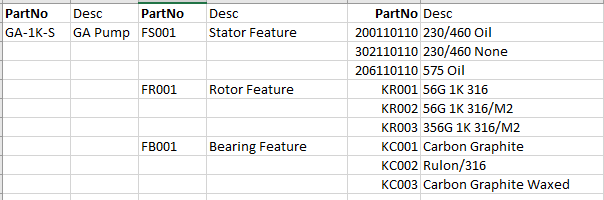
Definitely start with the Design. The elements of the design drive the rules.
And I’m not following that snippet of the spreadsheet.
Are there three variations, with each needing a Stator, Rotor, and a Bearing?
Like variant A uses:
- Oil - 200110110
- Rotor metal - KR001
- Bearing Mtl - KC001
And so on for Variants B and C ?
And from your MOM, it looks like you’re actually using the Super-BOM method (including all possible materials). In the Super BOM method, you pretty much just use Keep When rules, to include or exclude materials on the MOM, based on the users input…
If it was a template method it would have just one material as a place holder, and the rules would change the Mtl’s PartNum and Qty, based on the users inputs.
Here’s a screen shot of Cfg Rules from a Super BOM we have
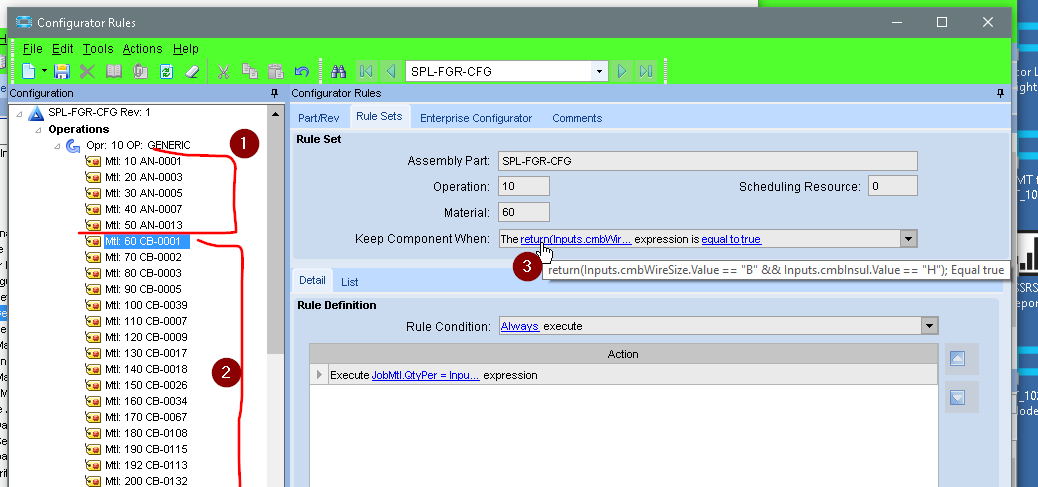
- These are the various Anodes the assembly could use
- The are the various cable wires the assembly could use
- This is the Keep When rule for Op 10, Mtl 60.
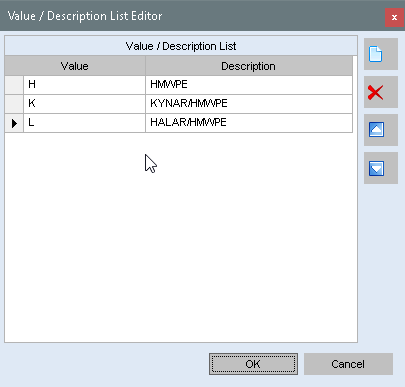
Inputs.cmbWireSize.ValueandInputs.cmbInsul.Valueare controls on the designer. They’re dropdown combos, with static values.
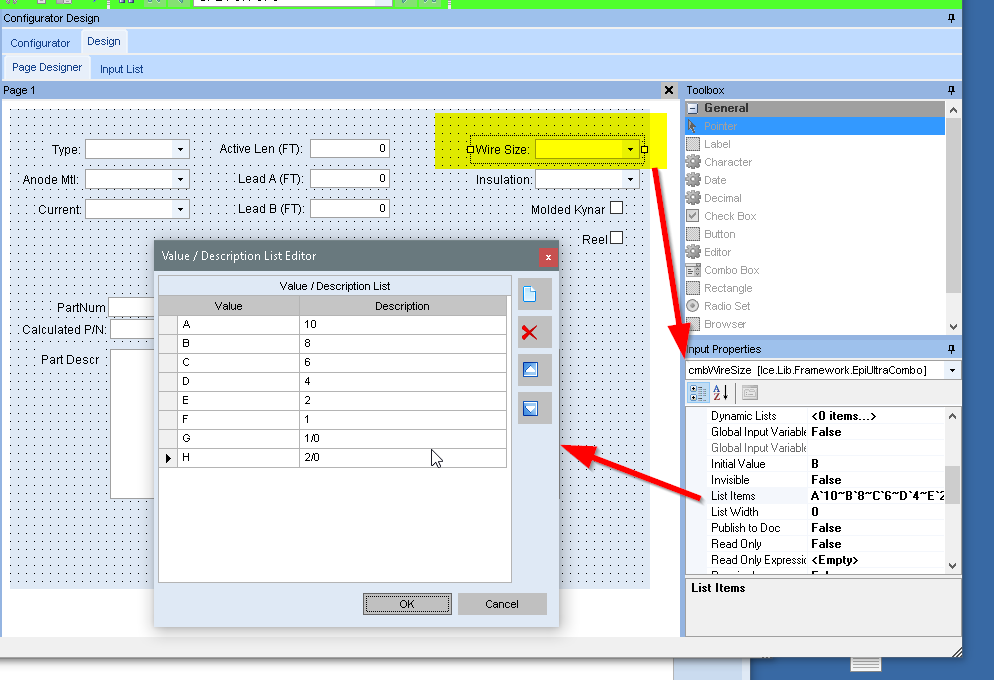
and for the Wire Insulation dropdown …
The user will see:
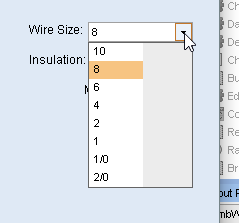
If they select 8, the value of that control is B.
So the row rule is:
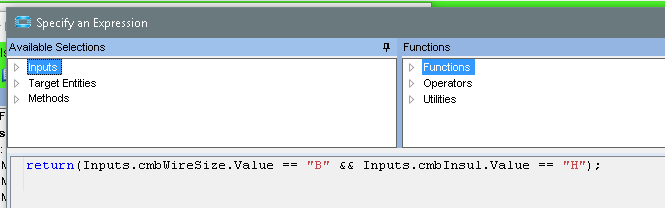
In other words Mtl #60 (P/N CB-0001) is only kept when:
-
Inputs.cmbWireSize.Value == "B"(Wire size “8” was selected)
AND -
Inputs.cmbInsul.Value == "H"(wire insulation “HMWPE” was selected)
clear so far?
I tried the same approach as you. However, I found that this changes the Part Number but not the description. How did you handle this?
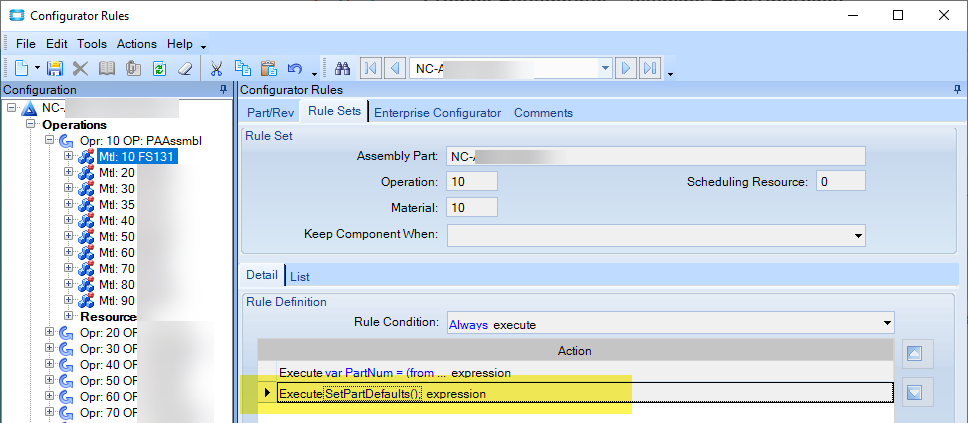
Thank you @Nancy_Hoyt, that’s just what we needed. I added SetPartDefaults() and it works.