Wonder if this is what is throwing off our grid summaries sometimes. 
Yes.
What’s super annoying is that it’s not consistent in a column. Copying from a grid to excel will paste some numbers as text and some as numbers. Excel wizard tip when that happens: Write a 1 in a cell outside your data, copy, and paste-special / multiply the troublesome column to convert numbers stored as text to numbers. (this is not an acceptable workaround)
It’s a client side presentation error. It has nothing to do with the size of numbers being individually handled as a different datatype. Hanlon’s razor applies: This is almost certainly a product of inexperience with data handling by the developer(s) writing the grid js, not knowing that float/numeric/real/etc are not a decimal equivalent and universally applying the wrong datatype to everything that might be a number.
Well I thought I was crazy on this.
@markdamen did you get a PRB or did they respond with anything. Creating a ticket to reference yours that we see this as well.
I have been trying to trace a negative balance error in AR invoices and stumbled across this and thought I was nuts.
My question is if you copy out a value that is like this and paste it back in the system is it going to now try and save the value with the rounding?
Some of this rounding is small enough of a value that excel doesn’t even pick it up and other is does so data integrity of the copy all out of grids is shot.
Sometimes the sum of a chart tracker grid column don’t match the account balance when it should. This is why. Grid presentation is modifying currency values by converting them to float, then hiding the problem by rounding the float to a plausible appearing decimal.
If you need precise currency amounts, don’t get data from grids.
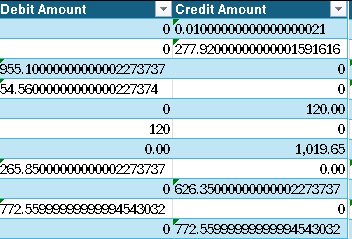
This isn’t limited to presentation. If Kinetic modifies a precision numerical value by converting it to an approximate datatype in an updatable field present anywhere when a user saves their work, the presented value is saved to the database.
For example, purchase orders. Unit cost is calculated as a precision decimal, which is converted to float for presentation at PO Receipt. When the user saves their work, the approximate unit cost is returned from the client and applied to your inventory value. When float approximation has converted a trailing ..5 to ..499999999999 at the edge of your rounding limit, a rounding error is produced and written to your database.
All numerical values are impacted. Whether a user updates the value or not, Kinetic is modifying the value at presentation, and Kinetic writes all presented values to the database when you save your work. I’m providing an example that produces a financial impact, because while we might shrug off a non-financial rounding error, businesses are likely to encounter strong opinions on random financial approximations.
That explains all the micro variances someone has in their posting rules. Kinetic should read the Companies desired decimal places… Which you can set in EAC during Company Setup.
odd they don’t…
They’re reading the decimal places and applying them as a rounding rule at storage and for display purposes. They’re doing everything right as far as rounding rules go.
But, handling precision numerical values with approximate datatypes is an only slightly less well known classic blunder than rolling your own ERP security (ahem). Float, Real, Numeric, etc. exist to exchange performance for precision. They’re smaller on storage and efficient to process. But, they’re binary values which can only approximate base 10 decimal values.
Quoting Microsoft’s own documentation:
…Especially critical when the results of conversion to an approximate datatype will be presented where it will deceive users and modify a client’s financial data.

 but here on Earth, he’s Vizzini.
As @GabeFranco and @HLalumiere noted above, JavaScript has only one kind of number: 64-bit Float. As Hugo mentioned, people use libraries like decimal.js to handle decimal arithmetic. As John states, handling precision in JavaScript is challenging.
It’s a solved challenge. Similar to calculating pi, which is quite a lot of work. That’s no reason to ignore the π button on the calculator. Or in this case, decimal.js