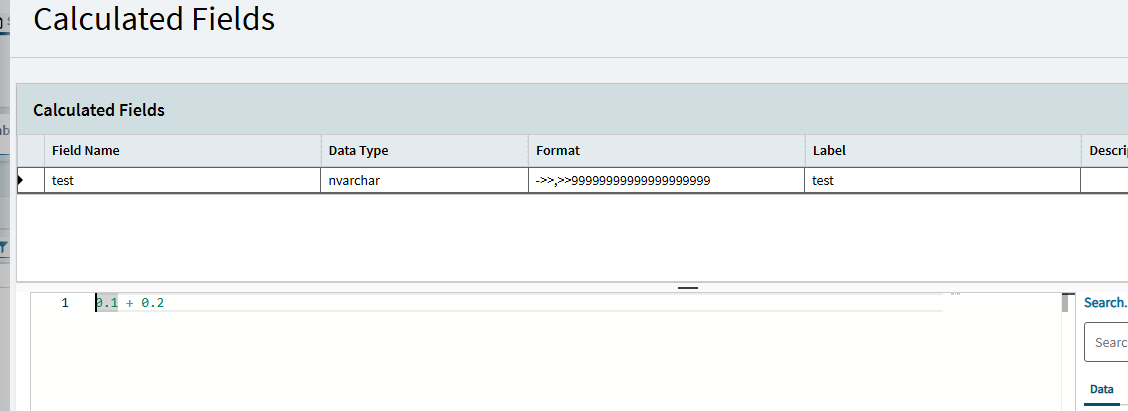
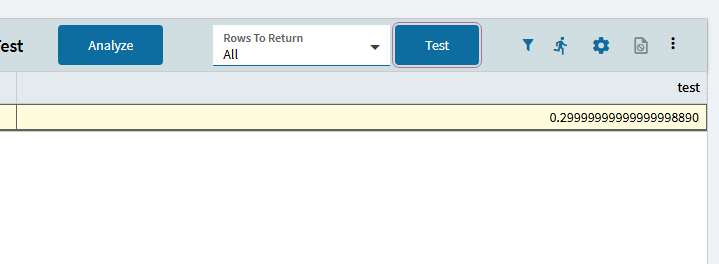
Here’s how to verify: Make a new BAQ. You don’t need to add any tables. Add one calculated decimal field, adding 0.1 + 0.2 and edit the format to show 20 decimal places.
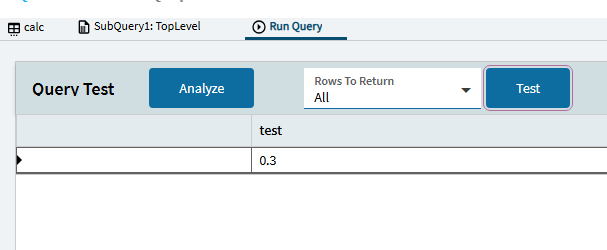
Then run it.
So what, I hear you say. You’ll never format decimals like that in a BAQ. Okay, format the decimal to one place and you’ll be shown “0.3”. Right click that result, copy all or selection or whatever, and paste somewhere. That’s not 0.3 on your clipboard. Decimal values are being passed around as floats regardless of the displayed value.
Why does this matter? When a value that should end with 5 is incorrectly reported as /499999… and rounded to the nearest relevant unit, the rounding is wrong. Best case scenario is that exported work will lose accuracy due to rounding error exposure. Worst case is that the software itself is consuming float math. Currency is a decimal. Exposing the GL to float-caused rounding errors is not something any of us wants to experience.
Epicor likes to sit on Kinetic data loss issues due to type conversion errors for some reason, I opened this PRB re: data loss using Longs in functions when outputting to kinetic 3 months ago which is Accepted, Not yet planned:
In Gabe’s story huge number is problem, it is rounded.
Sorry, offtop.
If it is really necessary to send such numbers in function, string can be used now.
But if it was reported only because of functions SysRevID processing, that was fixed last release.
It seems a really similar problem from my understanding, caused by javascript not having BigInt support in older versions..
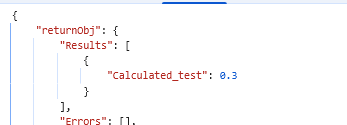
0.1 decimal + 0.2 decimal should become 0.3 decimal, not converted to float at any point, but it is handled as a float because browser javascript doesn’t have a numeric object to hold a decmial.
Same issue for a min/max int64, browser/js doesn’t have BigInt, so it’s handled as a float and rounded.
SysRevID is handled properly by the browser in BOs (it is a long, maybe they handle it as a string intermediate as you mention), so it just seems that logic needs to be applied a few more places.
Re: Formatting issue in grid, what do you see in the F12/Dev Tools call? is it being sent with the rounding or formatted with the rounding?
I don’t know about format, but I know about SysRevID, it was represented differently in function tablesets compared to BO. (Little vs Big Endian conversion of byte array).
Decimals here in the BAQ are no integers at all big or normal.
(Side note, does that mean it’s only SysRevID within a dataset that is fixed within function? If I have a dataset with a long that isn’t SysRevID, still broken? What about a long as a function output parameter?)
I have not seen this issue personally (because I haven’t looked), but having worked on JS apps plenty before, you need an external library (i.e. decimal.js) to handle precision issues due to floating point arithmetic client side. I suspect this is maybe because calculated fields are being evaluated client-side to try to help performance?




 randomly around the GL, which is nice.