Brandon,
I used a different site and a different way to get it on screen, but not in a dashboard.
I used the BAQ Zone in the Extended Properties for the Part.PartNum field to show a QR code for the part number:
- Create a shared BAQ on the Part table that returns the Part number and a Calc field that constructs the URL, here is mine:
'https://chart.googleapis.com/chart?cht=qr&chl=' + Part.PartNum + '&chs=180x180&choe=UTF-8&chld=L|2%27 alt=%27qr code%27'
Note the %27 is critial for the URL quote replacement. (manually URL encoding) - In Extended Properties, set the Zone BAQ to the BAQ
- Open Part Tracker and click on the BAQ Zone arrow to the right of the part number field:
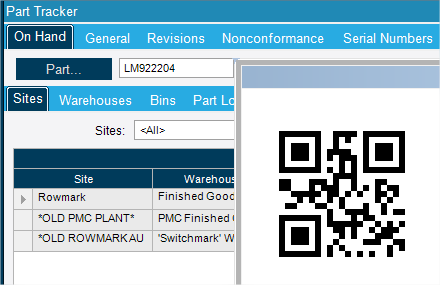
You can probably do something similar in a dashboard, the key being to have a calc field in your BAQ that the dashboard can use… I’ve never tried that … maybe I will.
-Rick
www.getaligned.solutions