If we want a job to get the correct scheduling resource and correct material from warehouse instead of manually updating every job. Would we need to create an alternative method to be selected for it to be all correct. My answer is yes but I need to convince my boss…LOL
I dont understand the question, are you saying you want different BOM & BOO when using quick jobs?
Do we need different BOM & BOO if the parts will come from different warehouses? Right now we have one Bom & Boo and when we create the job we have to manually change the warehouses the parts will come from. If we don’t want to do that we need a BOM &BOO that is for just that warehouse. correct. We are using the warehouse a like site (it is actually a different site)
Keeping in mind that computers in general are really good at YES and NO, and really REALLY SUCK at SOMETIMES and MAYBE, how would a particular job know when you need to take materials from one warehouse or the other?
If the warehouses you are talking about are separate physical locations, is there a transit time between them that needs to be accounted for (and possibly scheduled)? Does the Transfer Order functionality add too much complexity? Have you looked at the Shared Warehouse functionality under Site Configuration?
By default (and leaving Backflush out for the moment), Epicor will look for component parts in their Primary Warehouse and Primary Bin. Depending on (a) what you want to have happen; and (b) what you’re willing to put up with to get there, we can probably figure something out. But we need more details.
I should add here: “… in the Plant were the Job was created.”
No this is not a transfer at all. It all being build at the new warehouse (site). And yes some parts are shared at both locations so the parts at the new warehouse do not have the primary bin set as the new warehouse. we only have one site.
I have not looked at the Shared warehouse but that may be for just transfers.
I assume you are talking about the from warehouse on the Job material, this is set from the default warehouse on the default site of the part.
A simple solution would be to add a combo on the job header, with the available warehouses, then a BPM to update all the parts on the job.
However, each part will need a warehouse record in that site.
1 Like
Yes, the warehouse the job material is coming from. IT appears to automatically pull the primary warehouse, correct. Then we go in and update the warehouse on the job material. These Job materials are in both warehouses.
I was wondering if we needed a BPM to update the warehouses.
if using Quick Job Entry, you could add the combo to the Quick Job Screen
1 Like
If I remove the Stie Warehouse defaults on the Site configuration will it force it to pull based on the resource? this is where I saw this (I was looking for something else) and what the help files says.

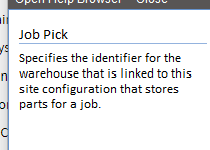
I dont believe so
I figured that would make it too easy. LOL
I believe if you are using backflush you could assign the warehouse and bin to the resource. Then if they clock into the resource associated with the second warehouse it would pull from that location.
That is what we are doing but not working properly
At least in my testing I was able to get it to do this properly. Much of that comes down to configurations and other settings though, too. Such as if you have amm and are using in/out bins properly and there is on-hand in the in bin, for example. In my testing we did not actually move material to the in bin. So it would pull from the backflush bin.