Hi, does anyone know how to calculate this worksheet? I checked the Field Help, but the instructions aren’t giving me the correct output. When I searched to see if anyone else had the answer, they mentioned they are still figuring it out.
To calculate it yourself manually?
If you don’t want to calculate it yourself, a simple GetByID on the quote will return dataset that includes a QuoteQty table that has the worksheet values.
2 Likes
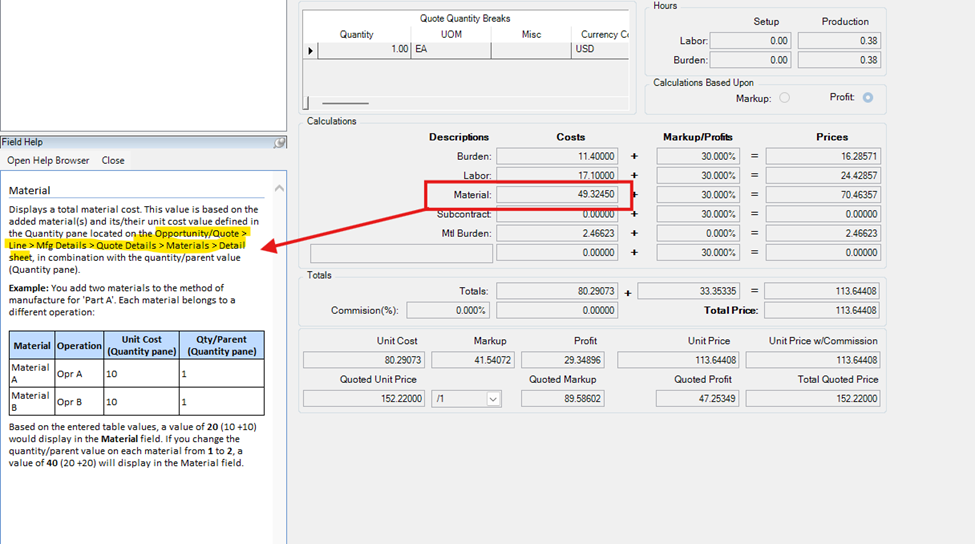
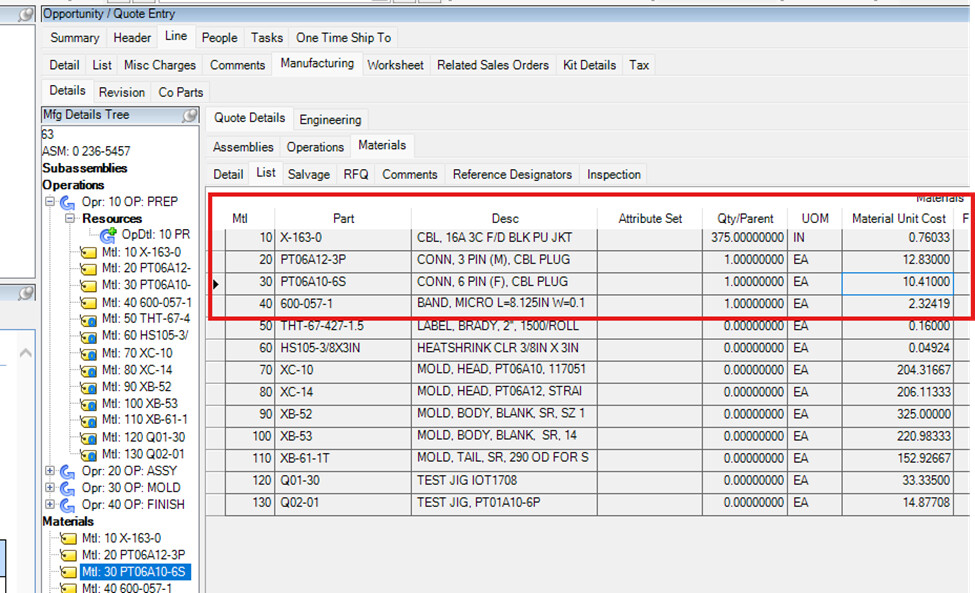
I only included the part with the quantity and multiplied it by the quantity.
| Part | qty | Cost | Total |
|---|---|---|---|
| X-163-0 | 375 | 0.76033 | 285.12375 |
| PT06A12-3P | 1 | 12.83 | 12.83 |
| PT06A10-6S | 1 | 10.41 | 10.41 |
| 600-057-1 | 1 | 2.32419 | 2.32419 |
| 26.32452 | 310.68794 |
how to do it?
I believe the field you are using for cost is the Material Unit Cost, not the Unit Cost.
How familiar are you with how costing works in Epicor? Also, what is your Cost Method?
I’m new to the Epicor environment and am still in the learning process.
You need to be careful when pulling costing. Each part is made up of 5 buckets.
Labor Cost
Burden Cost
Material Cost
Subcontract Cost
Material Burden Cost
These 5 buckets get summed to create the Unit Cost. Generally, purchased items only contain Material Cost, but not always. This is why you have to make sure you grab the Unit Cost and not one of the lower buckets.
1 Like
Landed costs…in the “material burden” bucket.
2 Likes
I have the material and material burden costs. Where can I find the labor and burden costs?
Thank you!
I think it’s QuoteMtl.EstUnitCost that has the five buckets rolled up into it…probably in the Quote Engineering screen