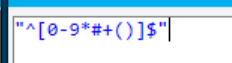
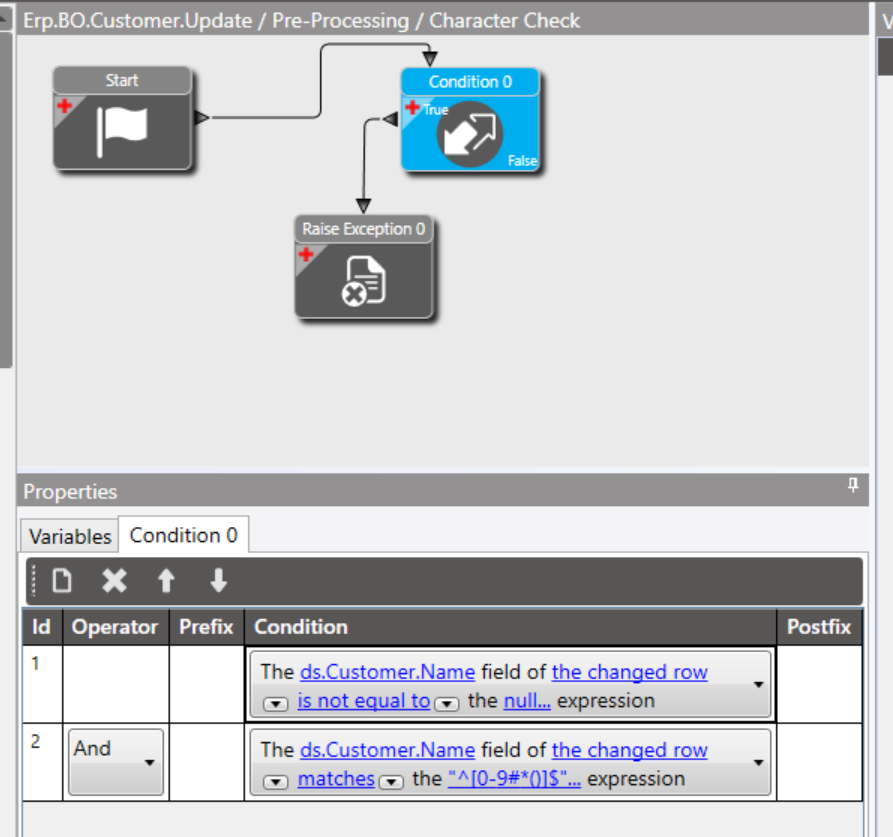
I have 3 Pre-Processing methods on Erp.BO.Customer.Update. 2 out of the 3 do a RegEx condition match for a Name field: “[^0-9()*#+]$” and a Reference Code:
and the last one does a validation check for email containing an “@” and “.”
I am able to get the errors working sometimes, for example the Reference Code throws the exception box the first time I input the numbers incorrectly, however when I input a “4” at the start and the correct number of digits (8) it should move to the next method but it doesn’t.
The below screenshot highlights my 3 method directives. I am unsure of how the order field and enabled checkbox work so I gave “Character Check” 30, “Reference Code (CRID)” 35, and “Email Contains @ and .” 40 and ticked enabled on all of them. I am unsure if this has anything to do with the sequencing of when the methods fire, in which order and if I’m missing something in the BPM to proceed once one method has been validated.
Ideally I would like the form to be filled out (incorrectly) and the validations to get raised one by one until they are all complete, I just don’t know what I’m doing wrong or if there’s a better to way approach this.
If more information is needed let me know and any help would be really appreciated!
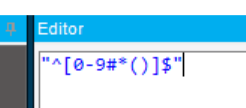
Thank you! that resolved the RegEx for the reference code. The RegEx for the name validation however isn’t working even though I removed the slashes and contained numeric values 0-9 and special characters I want matched *#+()
It throws another error relating to another field and completely skips the name validation error I need thrown. Is there something I am missing I’ve tried multiple combinations (added + to the end before the $ symbol) and checked the condition widgets and they are all correct.
Another thing is the loading time of the form. Due to my lack of knowledge of Epicor I am unsure whether to apply the old separation of concern, either splitting up all the method directive logic in each BPM, or making one large BPM containing all the logic combined with conditions. My gut tells me to keep the validation separated as that would usually reduce workload on the database but I am unsure.
Essentially I am matching a string (with regex in it) if it matches numbers [0-9] or these special characters #*() then it will raise an exception. I have done this for all my other fields and they seem to work.
Also in another field it will be the same logic I am trying to execute in the name, but the first two characters I want already displayed in the field when it loads will be “AC”. Do you use one of the wizards (such as form wizard) to set that? The only thing I can get working is an action in a condition → if field doesn’t begin with “AC” raise an exception. So it technically works but I would rather have the letters set already on the form when it loads.
Shaun let’s re-wind a bit can you give us an overview of the end goal. I get you are doing validation but it seems like a heck of a lot of it… what’s the end product here you are working towards
The end goal is basically as an employee, the user needs to submit new client information from a custom form that has been created.
This custom form contains many fields with the ones needing to be validated being the name, reference code and phone number. As this is an aged care solution I need these specific validations done as these are the constant use cases that keep coming up for example the specific characters are getting input and saved which creates confusion around what is a persons actual name / reference code / phone number the other field that requires “AC” at the front etc etc.
So to tackle this problem I need these conditions to solve these use cases.
Name field - if not null, cannot contain numbers, or these special characters # * ( ) → at the moment I’ve got it throwing an error when ONLY special characters are present, I need it to match any of those numbers or special characters when a user inputs their name.
A location field - if not null, I would like this one to be set to the characters “AC” at the start when the form loads and allow the user to only input 8 numeric digits after “AC.”
Phone Number - if not null, contain 10 numeric digits - a simple one.
A special ID field - if not null, Contains 10 numeric digits → This one I believe is a simple one solved by matching a Regex string condition.
A reference ID - if not null, 9 numbers followed by 1 character.
I believe these can all be done with BPM conditions right? won’t need to consider custom code or other methods to resolve these cases.
Yes, except one is out of scope of this BPM: I would like this one to be set to the characters “AC” at the start when the form loads
Here is how I would do it, if I was not using a code block.
Block 1
Check each field in order, let’s say Name.
Check condition 1, != null, set a BPM variable if it is null
Check condition 2, check if matches your (Regex), set a BPM variable if it matches
Block 2, 3…
Move on to field2, field3 etc.
When your conditions are all checked, you will have variables that define what is right or wrong.
Use that to craft a:
[Custom Message and Mark Call Completed] or [Custom Exception]. (Those should be functionally equivalent.)
I have set the conditions if the Name field is != null and it matches my regex expression it will throw the exception.
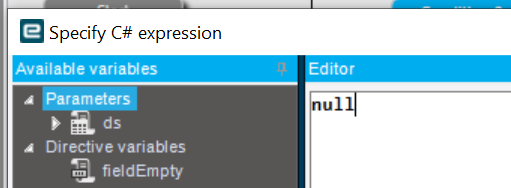
I have input characters that match the Regex expression and it hasn’t registered the exception and skipped over that BPM to my next method directive BPM error message. It should be raising my Name error message. Am I missing something? does the expression null not apply, should it be an empty string “”?
There are 3 already made BPM’s that are infront, I did not make those ones, as far as my BPM’s are concerned Name is Order: 30, then the Reference Code (the CRID error message bpm you see above) is Order: 35, then the Email field containing @ and . is Order: 40.
I’m really confused around the not null action as these fields can be left empty if the user doesn’t have the information to provide which is fine, but as it stands my validation doesn’t allow them to be empty because I’ve messed up the != null action.