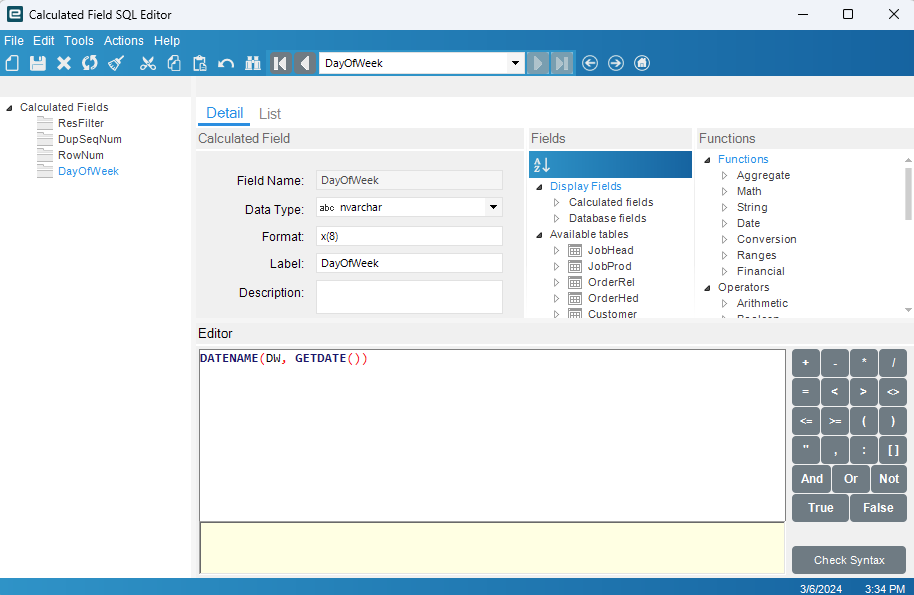
I am trying to write a query in which I set a date filter based on the results of a calculated field within a BAQ. I’ve got a BAQ in which I am returning the current day of the week. If the day of the week is a Monday, Tuesday, or Wednesday when my BAQ runs, I need to add 2 days to the current date for my date filter in the BAQ. If the current day of the week is Thursday or Friday, I need to add 4 days to the current date for my date filter.
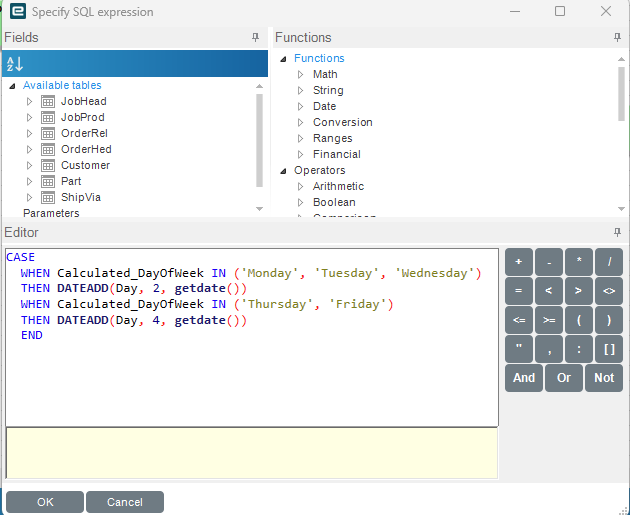
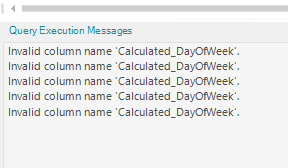
I’ve got the SQL to return the current day of the week in a column, is it possible to reference a calculated field within the filter value of a BAQ? This is looks like a valid case statement, but when I run the query, these are my errors
Excuse my ignorance, but is that a setting within the BAQ designer to expose those fields?
Here is my psuedo code
/*
 * Disclaimer!!!
 * This is not a real query being executed, but a simplified version for general vision.
 * Executing it with any other tool may produce a different result.
 */

select
	[JobHead].[Shift_c] as [JobHead_Shift_c],
	[JobHead].[Sequence_c] as [JobHead_Sequence_c],
	[JobHead].[Load_c] as [JobHead_Load_c],
	[JobHead].[ReqDueDate] as [JobHead_ReqDueDate],
	[OrderRel].[NeedByDate] as [OrderRel_NeedByDate],
	[OrderHed].[UserChar1] as [OrderHed_UserChar1],
	[JobHead].[JobNum] as [JobHead_JobNum],
	[Customer].[Name] as [Customer_Name],
	[Part].[SteelGauge_c] as [Part_SteelGauge_c],
	[Part].[Colors_c] as [Part_Colors_c],
	[Part].[Lining_c] as [Part_Lining_c],
	[JobHead].[ProdCode] as [JobHead_ProdCode],
	[JobProd].[OrderNum] as [JobProd_OrderNum],
	[JobProd].[ProdQty] as [JobProd_ProdQty],
	[JobHead].[PartNum] as [JobHead_PartNum],
	[JobHead].[PartDescription] as [JobHead_PartDescription],
	[JobProd].[OrderLine] as [JobProd_OrderLine],
	[JobProd].[OrderRelNum] as [JobProd_OrderRelNum],
	[ShipVia].[Description] as [ShipVia_Description],
	('No') as [Calculated_ResFilter],
	[JobHead].[ExactQty_c] as [JobHead_ExactQty_c],
	(CASE
   WHEN LAG(JobHead.Sequence_c, 1, 0) OVER (Order By JobHead.Sequence_c ASC) = JobHead.Sequence_c
   THEN 'Dup'
   Else ''
 END) as [Calculated_DupSeqNum],
	((ROW_NUMBER() OVER(ORDER BY JobHead.Sequence_c ASC))) as [Calculated_RowNum],
	(DATENAME(DW, GETDATE())) as [Calculated_DayOfWeek]
from Erp.JobHead as JobHead
left outer join Erp.JobProd as JobProd on
	JobHead.Company = JobProd.Company
	and JobHead.JobNum = JobProd.JobNum
left outer join Erp.OrderRel as OrderRel on
	OrderRel.Company = JobProd.Company
	and OrderRel.OrderNum = JobProd.OrderNum
	and OrderRel.OrderLine = JobProd.OrderLine
	and OrderRel.OrderRelNum = JobProd.OrderRelNum
left outer join Erp.OrderHed as OrderHed on
	OrderRel.Company = OrderHed.Company
	and OrderRel.OrderNum = OrderHed.OrderNum
left outer join Erp.Customer as Customer on
	OrderHed.Company = Customer.Company
	and OrderHed.BTCustNum = Customer.CustNum
left outer join Erp.ShipVia as ShipVia on
	OrderHed.Company = ShipVia.Company
	and OrderHed.ShipViaCode = ShipVia.ShipViaCode
inner join Erp.Part as Part on
	JobHead.Company = Part.Company
	and JobHead.PartNum = Part.PartNum
	and ( Part.ClassID <> '5'  and Part.ClassID <> '18'  and Part.ClassID <> '33'  )

where (JobHead.Plant = @CurrentPlant  and JobHead.JobReleased = 1  and JobHead.JobClosed = 0  and JobHead.JobComplete = 0  and JobHead.ReqDueDate = (CASE
  WHEN Calculated_DayOfWeek IN ('Monday', 'Tuesday', 'Wednesday')
  THEN DATEADD(Day, 2, getdate())
  WHEN Calculated_DayOfWeek IN ('Thursday', 'Friday')
  THEN DATEADD(Day, 4, getdate())
  END)  and JobHead.Shift_c = @Shift)
Oh there it is, that should be fine.
Since you are doing this in one top level query, you might need to perform the calculation as part of the where clause, since when this runs it hasn’t created the calculated field yet. You wrap the entire query in a subquery, then select all from the subquery and apply your constraints with the calculated fields there too
These are both great suggestions, let me test them out and see if I can get them to work.
A little bit of backstory may provide some color to this post. My end goal is to have an API call to a BAQ that pulls back some “production schedule” information. This is setup, I’m just running into an issue with dates.
How our production works at a high level is we produce two parts that make a finished good. One part is produced the day before the other part. We need to have record of the part that is produced the day before so that if there are ever any production issues, someone can take a look at a historical record and see what the demand was.
This plant is unique in that we don’t actually use MRP for scheduling, all of our jobs are scheduled via the order job wizard.
Now that I am talking this out loud, it may be better to build the logic in the API call rather than in the BAQ itself.