Is there a way to test RDD output via api? Like trigger the report and get only the RDD ds back?
I’ve seen RunDirect examples, but wonder if there’s a similar API for just the dataset not the pdf bytes.
Is there a way to test RDD output via api? Like trigger the report and get only the RDD ds back?
I’ve seen RunDirect examples, but wonder if there’s a similar API for just the dataset not the pdf bytes.
Thanks but querying
“TABLE_NAME_” + Parameters!TableGuid.Value
is only available within SSRS report, correct?
No way to get the just the ds via api, even if I had the TaskNote and resort to dynamic sql baq somehow. Reports db is just separate sandbox for cloudies, correct?
Same for on prem.
Thanks but on-prem can SQL it yet cloudies can’t, correct? Meaning it’s sandbox for both but blackbox for only cloud.
No, go read the whole thread.
You can finagle you a report to print it out, probably return it as xml if you want.
I didn’t take it any further.
Thanks for your reply. I read your threads. Lemme restate:
There’s no way to get data from api after ReportSvc\SubmitToAgent or \SubmitDirect aside from finagling the RDL to render text in output bytes.
Which is cool by the way, but involves mod’ing styles/RDLs for all my reports, AFAIK.
Just want the data of any submitted report, base or custom. Perferably in json format like the ds{Table[],Table[]} in the rdl but I’d settle for anything outside of RDL mod’ing.
Temp tables are somewhere after submit but not accessbile outside RDL so I can stop researching your awesome threads and stop trying to avoid RDL. Am I right?
Thanks again.
I’ve not deep dived into the architecture, but my understanding from the errors ive been running into with SSRS the last 2 months is that it’s a separate VM cluster from the one epicor is hosted on, and it’s 1:many in terms of SSRS servers serving epicor instances. The SSRS server has direct SQL access to the database hosting Epicor and builds the dataset you want to get a look at locally, so it’s probably not possible to pull into Epicor (unless they’ve built a BO for that)
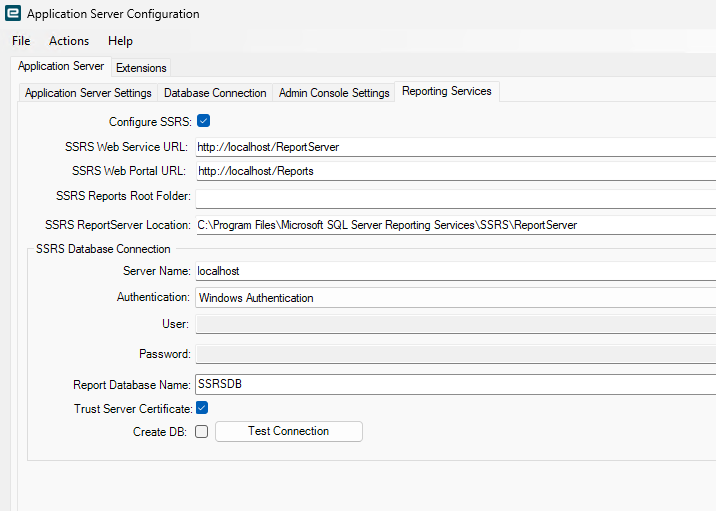
My understanding is the opposite. We define in our Application Server the location and creds to write to the SSRS database. The RDL creates the tables and appends the _GUID to each table. By default, SSRS has no access to the original Epicor database - although on-prem users can configure that. As mentioned in the above thread by @klincecum, Crystal Reports used to download these tables as an XML file and Crystal reported on that locally at the workstation. So, in a sense, there IS an API to get the data back to the user. When Epicor enabled the SSRS reporting, they mimicked the XML file as separate tables in the SSRS report database. In the old days, the XML files were stored on a share (EpicorData\Reports\username) but the security wasn’t great as you can imagine. At least in the SSRS database, these tables are not easily accessible to anyone on the network.
If I want to extract data, I’m going BAQ and not RDL, but your business use case has not been stated.
Wrong directionality! I was only guessing from the multitude of errors output from our SSRS reports that have been going on over the last 2 months. Does look like App Server pushes to SSRS server (to SQL over REST)
Program Ice.Services.Lib.RunTask when executing task 6242293 raised an unexpected exception with the following message: RunTask:
System.Net.Sockets.SocketException (11001): No such host is known.
   at System.Net.NameResolutionPal.ProcessResult(SocketError errorCode, GetAddrInfoExContext* context)
   at System.Net.NameResolutionPal.GetAddressInfoExCallback(Int32 error, Int32 bytes, NativeOverlapped* overlapped)
--- End of stack trace from previous location ---
   at System.Net.Http.AuthenticationHelper.SendWithNtAuthAsync(HttpRequestMessage request, Uri authUri, Boolean async, ICredentials credentials, Boolean isProxyAuth, HttpConnection connection, HttpConnectionPool connectionPool, CancellationToken cancellationToken)
   at System.Net.Http.HttpConnectionPool.SendWithVersionDetectionAndRetryAsync(HttpRequestMessage request, Boolean async, Boolean doRequestAuth, CancellationToken cancellationToken)
   at System.Net.Http.AuthenticationHelper.SendWithAuthAsync(HttpRequestMessage request, Uri authUri, Boolean async, ICredentials credentials, Boolean preAuthenticate, Boolean isProxyAuth, Boolean doRequestAuth, HttpConnectionPool pool, CancellationToken cancellationToken)
   at System.Net.Http.HttpMessageHandlerStage.Send(HttpRequestMessage request, CancellationToken cancellationToken)
   at System.Net.Http.DiagnosticsHandler.SendAsyncCore(HttpRequestMessage request, Boolean async, CancellationToken cancellationToken)
   at System.Net.Http.HttpMessageHandlerStage.Send(HttpRequestMessage request, CancellationToken cancellationToken)
   at System.Net.Http.RedirectHandler.SendAsync(HttpRequestMessage request, Boolean async, CancellationToken cancellationToken)
   at System.Net.Http.DecompressionHandler.SendAsync(HttpRequestMessage request, Boolean async, CancellationToken cancellationToken)
   at System.Net.Http.SocketsHttpHandler.Send(HttpRequestMessage request, CancellationToken cancellationToken)
   at Microsoft.Extensions.Http.Logging.LoggingHttpMessageHandler.<SendCoreAsync>g__Core|5_0(HttpRequestMessage request, Boolean useAsync, CancellationToken cancellationToken)
   at Microsoft.Extensions.Http.Logging.LoggingHttpMessageHandler.Send(HttpRequestMessage request, CancellationToken cancellationToken)
   at Microsoft.Extensions.Http.Logging.LoggingScopeHttpMessageHandler.<SendCoreAsync>g__Core|5_0(HttpRequestMessage request, Boolean useAsync, CancellationToken cancellationToken)
   at Microsoft.Extensions.Http.Logging.LoggingScopeHttpMessageHandler.Send(HttpRequestMessage request, CancellationToken cancellationToken)
   at System.Net.Http.HttpClient.Send(HttpRequestMessage request, HttpCompletionOption completionOption, CancellationToken cancellationToken)
   at Ice.Core.SsrsReporting.SsrsCaller.RestReportingService.GetItemDefinition(String itemPath) in F:\_Releases\12.0.100\Current\Source\Server\Internal\Lib\TaskLib\SsrsReporting\SsrsCaller\RestReportingService.cs:line 174
   at Ice.Core.SsrsReporting.ReportProcessorBase.IsLatestVersionDeployed(IReportingService reportingService, String itemPath, String contentHashForLatestVersion) in F:\_Releases\12.0.100\Current\Source\Server\Internal\Lib\TaskLib\SsrsReporting\ReportProcessorBase.cs:line 361
   at Ice.Core.SsrsReporting.ReportProcessorBase.DeployReportIfNeeded(String printProgram, String fullReportPath, SsrsConfigurationInformation configurationInfo, Func`1 reportingServiceCreator) in F:\_Releases\12.0.100\Current\Source\Server\Internal\Lib\TaskLib\SsrsReporting\ReportProcessorBase.cs:line 458
   at Ice.Core.SsrsReporting.ReportProcessorBase.RenderReport_HttpClient(String ssrsRenderFormat, String printProgram, Boolean ignorePageSettings) in F:\_Releases\12.0.100\Current\Source\Server\Internal\Lib\TaskLib\SsrsReporting\ReportProcessorBase.cs:line 335
   at Ice.Core.SsrsReporting.ReportProcessorBase.RenderReport(String ssrsRenderFormat, String printProgram, Boolean ignorePageSettings) in F:\_Releases\12.0.100\Current\Source\Server\Internal\Lib\TaskLib\SsrsReporting\ReportProcessorBase.cs:line 242
   at Ice.Core.SsrsReporting.ReportProcessorBase.RenderReportForPrintOrEmailReport(RenderedSsrsReport renderedReport, Boolean serverSidePrint, Boolean ignorePageSettings) in F:\_Releases\12.0.100\Current\Source\Server\Internal\Lib\TaskLib\SsrsReporting\ReportProcessorBase.cs:line 685
   at Ice.Core.SsrsReporting.ReportProcessorBase.ProcessReportPart(String reportLocation) in F:\_Releases\12.0.100\Current\Source\Server\Internal\Lib\TaskLib\SsrsReporting\ReportProcessorBase.cs:line 149
   at Ice.Core.SsrsReporting.StandardReportProcessor.ProcessReportParts() in F:\_Releases\12.0.100\Current\Source\Server\Internal\Lib\TaskLib\SsrsReporting\StandardReportProcessor.cs:line 31
   at Ice.Core.RoutingAndBreaking.ReportPersister.Persist(ReportInstanceInformation reportInstance, Func`2 reportsRenderer, Action`1 fillSysRptLstRow, Action`2 processReport, Func`3 filterTableAttachmentsFunc) in F:\_Releases\12.0.100\Current\Source\Server\Internal\Lib\TaskLib\RoutingAndBreaking\ReportPersister.cs:line 58
   at Ice.Core.RptBase.ReportSsrsDatabaseBuilder.RenderUnroutedSsrsReport() in F:\_Releases\12.0.100\Current\Source\Server\Internal\Lib\TaskLib\RptBase\ReportSsrsDatabaseBuilder.cs:line 355
   at Ice.Core.RptTaskBase`1.XMLClose() in F:\_Releases\12.0.100\Current\Source\Server\Internal\Lib\TaskLib\RptBase\RptTaskBase.cs:line 219
   at Erp.Internal.OM.SalesOrderAck.RunProcess(Int64 instanceTaskNum, String outputFileName) in C:\_releases\ERP\ERP12.0.100.0\Source\Server\Internal\OM\SalesOrderAck\SalesOrderAck.cs:line 447
   at Ice.Hosting.TaskCaller.InnerExecuteTask(IceDataContext newContext) in C:\_releases\ICE\ICE5.0.100.12\Source\Server\Framework\Epicor.Ice\Hosting\TaskCaller\TaskCaller.cs:line 70
   at Ice.Hosting.TaskCaller.ExecuteTask() in C:\_releases\ICE\ICE5.0.100.12\Source\Server\Framework\Epicor.Ice\Hosting\TaskCaller\TaskCaller.cs:line 61
   at Ice.Lib.RunTask.BpmFriendlyTaskLauncher.Run(String sessionIdPrefix, IceContext db, Action taskRunner) in C:\_releases\ICE\ICE5.0.100.12\Source\Server\Services\Lib\RunTask\BpmFriendlyTaskLauncher.cs:line 57
   at Ice.Services.Lib.RunTaskSvc.InnerRunTask(Int64 ipTaskNum, Boolean suppressTransaction) in C:\_releases\ICE\ICE5.0.100.12\Source\Server\Services\Lib\RunTask\RunTask.cs:line 411
Program Ice.Services.Lib.RunTask when executing task 6268283 raised an unexpected exception with the following message: RunTask:
System.Data.Entity.Core.EntityCommandExecutionException: An error occurred while reading from the store provider's data reader. See the inner exception for details.
 ---> Microsoft.Data.SqlClient.SqlException (0x80131904): Transaction (Process ID 1400) was deadlocked on lock resources with another process and has been chosen as the deadlock victim. Rerun the transaction.
   at Microsoft.Data.SqlClient.SqlConnection.OnError(SqlException exception, Boolean breakConnection, Action`1 wrapCloseInAction)
   at Microsoft.Data.SqlClient.TdsParser.ThrowExceptionAndWarning(TdsParserStateObject stateObj, SqlCommand command, Boolean callerHasConnectionLock, Boolean asyncClose)
   at Microsoft.Data.SqlClient.TdsParser.TryRun(RunBehavior runBehavior, SqlCommand cmdHandler, SqlDataReader dataStream, BulkCopySimpleResultSet bulkCopyHandler, TdsParserStateObject stateObj, Boolean& dataReady)
   at Microsoft.Data.SqlClient.SqlDataReader.TryHasMoreRows(Boolean& moreRows)
   at Microsoft.Data.SqlClient.SqlDataReader.TryReadInternal(Boolean setTimeout, Boolean& more)
   at Microsoft.Data.SqlClient.SqlDataReader.Read()
   at System.Data.Entity.Core.Common.Internal.Materialization.Shaper`1.StoreRead()
ClientConnectionId:33ff2287-0908-415d-80a5-c448e9fa4987
Error Number:1205,State:51,Class:13
   --- End of inner exception stack trace ---
   at System.Data.Entity.Core.Common.Internal.Materialization.Shaper`1.HandleReaderException(Exception e)
   at System.Data.Entity.Core.Common.Internal.Materialization.Shaper`1.StoreRead()
   at System.Data.Entity.Core.Common.Internal.Materialization.Shaper`1.SimpleEnumerator.MoveNext()
   at System.Linq.Enumerable.TryGetFirst[TSource](IEnumerable`1 source, Boolean& found)
   at System.Linq.Enumerable.FirstOrDefault[TSource](IEnumerable`1 source)
   at Ice.IceDataContextExtensions.ReadCurrent[TRow](IceDataContext dataContext, TRow& row, LockHint lockHint) in C:\_releases\ICE\ICE5.0.100.12\Source\Server\Framework\Epicor.System\Data\EntityFramework\IceDataContextExtensions.cs:line 200
   at Erp.Internal.OM.SalesOrderAck.RunProcess(Int64 instanceTaskNum, String outputFileName) in C:\_releases\ERP\ERP12.0.100.0\Source\Server\Internal\OM\SalesOrderAck\SalesOrderAck.cs:line 548
   at Ice.Hosting.TaskCaller.InnerExecuteTask(IceDataContext newContext) in C:\_releases\ICE\ICE5.0.100.12\Source\Server\Framework\Epicor.Ice\Hosting\TaskCaller\TaskCaller.cs:line 70
   at Ice.Hosting.TaskCaller.ExecuteTask() in C:\_releases\ICE\ICE5.0.100.12\Source\Server\Framework\Epicor.Ice\Hosting\TaskCaller\TaskCaller.cs:line 61
   at Ice.Lib.RunTask.BpmFriendlyTaskLauncher.Run(String sessionIdPrefix, IceContext db, Action taskRunner) in C:\_releases\ICE\ICE5.0.100.12\Source\Server\Services\Lib\RunTask\BpmFriendlyTaskLauncher.cs:line 57
   at Ice.Services.Lib.RunTaskSvc.InnerRunTask(Int64 ipTaskNum, Boolean suppressTransaction) in C:\_releases\ICE\ICE5.0.100.12\Source\Server\Services\Lib\RunTask\RunTask.cs:line 411
Program Ice.Services.Lib.RunTask when executing task 6242273 raised an unexpected exception with the following message: RunTask:
System.OutOfMemoryException: Exception of type 'System.OutOfMemoryException' was thrown.
   at System.Text.StringBuilder.ExpandByABlock(Int32 minBlockCharCount)
   at System.Text.StringBuilder.AppendWithExpansion(Char& value, Int32 valueCount)
   at System.Text.StringBuilder.Append(String value)
   at Ice.Core.RptBase.SqlTableBuilder.BuildTable(String tableName, IEnumerable`1 columns, SqlObjectsCreated sqlObjectsCreated, Boolean accessedDirectly, Boolean dropExistingTables) in F:\_Releases\12.0.100\Current\Source\Server\Internal\Lib\TaskLib\RptBase\SqlTableBuilder.cs:line 86
   at Ice.Core.RptBase.DatabaseReportDataStorage.BuildTableSchemas(Boolean buildRelationships, Boolean dropExistingTables) in F:\_Releases\12.0.100\Current\Source\Server\Internal\Lib\TaskLib\RptBase\DatabaseReportDataStorage.cs:line 91
   at Ice.Core.RptBase.ReportDataBuilderBase.XSDOpen() in F:\_Releases\12.0.100\Current\Source\Server\Internal\Lib\TaskLib\RptBase\ReportDataBuilderBase.cs:line 358
   at Ice.Core.RptTaskBase`1.XMLOpen(String fileName) in F:\_Releases\12.0.100\Current\Source\Server\Internal\Lib\TaskLib\RptBase\RptTaskBase.cs:line 358
   at Erp.Internal.SR.PackingSlipPrint.RunProcess(Int64 Instance_TaskNum, String OutputFile) in C:\_releases\ERP\ERP12.0.100.0\Source\Server\Internal\SR\PackingSlipPrint\PackingSlipPrint.cs:line 887
   at Ice.Hosting.TaskCaller.InnerExecuteTask(IceDataContext newContext) in C:\_releases\ICE\ICE5.0.100.12\Source\Server\Framework\Epicor.Ice\Hosting\TaskCaller\TaskCaller.cs:line 70
   at Ice.Hosting.TaskCaller.ExecuteTask() in C:\_releases\ICE\ICE5.0.100.12\Source\Server\Framework\Epicor.Ice\Hosting\TaskCaller\TaskCaller.cs:line 61
   at Ice.Lib.RunTask.BpmFriendlyTaskLauncher.Run(String sessionIdPrefix, IceContext db, Action taskRunner) in C:\_releases\ICE\ICE5.0.100.12\Source\Server\Services\Lib\RunTask\BpmFriendlyTaskLauncher.cs:line 57
   at Ice.Services.Lib.RunTaskSvc.InnerRunTask(Int64 ipTaskNum, Boolean suppressTransaction) in C:\_releases\ICE\ICE5.0.100.12\Source\Server\Services\Lib\RunTask\RunTask.cs:line 411
Program Ice.Services.Lib.RunTask when executing task 6129165 raised an unexpected exception with the following message: RunTask:
System.Data.Entity.Core.EntityException: An error occurred while starting a transaction on the provider connection. See the inner exception for details.
 ---> Microsoft.Data.SqlClient.SqlException (0x80131904): New transaction is not allowed because there are other threads running in the session.
   at Microsoft.Data.SqlClient.SqlConnection.OnError(SqlException exception, Boolean breakConnection, Action`1 wrapCloseInAction)
   at Microsoft.Data.SqlClient.TdsParser.ThrowExceptionAndWarning(TdsParserStateObject stateObj, SqlCommand command, Boolean callerHasConnectionLock, Boolean asyncClose)
   at Microsoft.Data.SqlClient.TdsParser.TryRun(RunBehavior runBehavior, SqlCommand cmdHandler, SqlDataReader dataStream, BulkCopySimpleResultSet bulkCopyHandler, TdsParserStateObject stateObj, Boolean& dataReady)
   at Microsoft.Data.SqlClient.TdsParser.Run(RunBehavior runBehavior, SqlCommand cmdHandler, SqlDataReader dataStream, BulkCopySimpleResultSet bulkCopyHandler, TdsParserStateObject stateObj)
   at Microsoft.Data.SqlClient.TdsParser.TdsExecuteTransactionManagerRequest(Byte[] buffer, TransactionManagerRequestType request, String transactionName, TransactionManagerIsolationLevel isoLevel, Int32 timeout, SqlInternalTransaction transaction, TdsParserStateObject stateObj, Boolean isDelegateControlRequest)
   at Microsoft.Data.SqlClient.SqlInternalConnectionTds.ExecuteTransaction2005(TransactionRequest transactionRequest, String transactionName, IsolationLevel iso, SqlInternalTransaction internalTransaction, Boolean isDelegateControlRequest)
   at Microsoft.Data.SqlClient.SqlInternalConnection.BeginSqlTransaction(IsolationLevel iso, String transactionName, Boolean shouldReconnect)
   at Microsoft.Data.SqlClient.SqlConnection.BeginTransaction(IsolationLevel iso, String transactionName)
   at System.Data.Entity.Infrastructure.Interception.InternalDispatcher`1.Dispatch[TTarget,TInterceptionContext,TResult](TTarget target, Func`3 operation, TInterceptionContext interceptionContext, Action`3 executing, Action`3 executed)
   at System.Data.Entity.Infrastructure.Interception.DbConnectionDispatcher.BeginTransaction(DbConnection connection, BeginTransactionInterceptionContext interceptionContext)
   at System.Data.Entity.Core.EntityClient.EntityConnection.BeginDbTransaction(IsolationLevel isolationLevel)
ClientConnectionId:efec96de-8ec4-433e-a86b-578a65e7b5f5
Error Number:3988,State:1,Class:16
   --- End of inner exception stack trace ---
   at System.Data.Entity.Core.EntityClient.EntityConnection.BeginDbTransaction(IsolationLevel isolationLevel)
   at System.Data.Entity.Core.Objects.ObjectContext.ExecuteInTransaction[T](Func`1 func, IDbExecutionStrategy executionStrategy, Boolean startLocalTransaction, Boolean releaseConnectionOnSuccess)
   at System.Data.Entity.Core.Objects.ObjectContext.SaveChangesToStore(SaveOptions options, IDbExecutionStrategy executionStrategy, Boolean startLocalTransaction)
   at System.Data.Entity.Core.Objects.ObjectContext.SaveChangesInternal(SaveOptions options, Boolean executeInExistingTransaction)
   at Ice.IceDataContext.SaveChanges(SaveOptions options) in C:\_releases\ICE\ICE5.0.100.11\Source\Server\Framework\Epicor.System\Data\EntityFramework\EF6\IceDataContext.cs:line 587
   at Ice.IceDataContext.Validate() in C:\_releases\ICE\ICE5.0.100.11\Source\Server\Framework\Epicor.System\Data\EntityFramework\EF6\IceDataContext.cs:line 511
   at Ice.Internal.FileDataExportTask.FileDataExportTask.SaveExportBytesToRptList(Int64 instanceTaskNum, Byte[] stream) in C:\_releases\ICE\ICE5.0.100.0\Source\Server\Internal\Task\FileDataExportTask\FileDataExportTask.cs:line 282
   at Ice.Internal.FileDataExportTask.FileDataExportTask.RunProcess(Int64 instanceTaskNum, String outputFileName) in C:\_releases\ICE\ICE5.0.100.0\Source\Server\Internal\Task\FileDataExportTask\FileDataExportTask.cs:line 53
   at Ice.Hosting.TaskCaller.InnerExecuteTask(IceDataContext newContext) in C:\_releases\ICE\ICE5.0.100.11\Source\Server\Framework\Epicor.Ice\Hosting\TaskCaller\TaskCaller.cs:line 70
   at Ice.Hosting.TaskCaller.ExecuteTask() in C:\_releases\ICE\ICE5.0.100.11\Source\Server\Framework\Epicor.Ice\Hosting\TaskCaller\TaskCaller.cs:line 61
   at Ice.Lib.RunTask.BpmFriendlyTaskLauncher.Run(String sessionIdPrefix, IceContext db, Action taskRunner) in C:\_releases\ICE\ICE5.0.100.11\Source\Server\Services\Lib\RunTask\BpmFriendlyTaskLauncher.cs:line 57
   at Ice.Services.Lib.RunTaskSvc.InnerRunTask(Int64 ipTaskNum, Boolean suppressTransaction) in C:\_releases\ICE\ICE5.0.100.11\Source\Server\Services\Lib\RunTask\RunTask.cs:line 411
Somewhere in there is also an error about bad SQL username/pw, but my case on epiccare is so long it lags my browser out. I need a faster computer to search it! (side note, i wish epicor would fix our ssrs issues)
In the Application Server configuration for SSRS, on-prem people see:
AFAIK, the only two authentication methods are Windows Auth and SQL Auth. Entra is possible in later versions but not in Kinetic. I think I entered an Idea for it. If the automation software Epicor uses to maintain the creds is broken, I can see how you’d get those auth errors zipping by.
I’ve have not tried it in a while but if you are just looking to do this for testing I believe it is still possible to switch the report style output location to XML instead of database. Then if you run Your report in generate only I believe you can get the xml of the data of the RDD from the reports location under the Epicor data directory (server file download)
Sorry it’s not API and sorry if leading you down a garden path that has been removed.
case:
point:
RDD is a ds definition, submit creates the temp tables, just wanna know if the ds is available as already defined rather than recreating via rdl or baq.
That’s all. Thanks all.
Have a great weekend!
Easy trick is to change the Output to XML then use server file download to get the XML file to examine.
Thanks gentlemen.
Might worth a look to avoid RDL.
I wonder where it goes for cloud tried:
Server File Download
\Reports
\Company\Processes\username
\Company\Temp\Username
\user\temp
\admin\whatever\whatever
It works from System MOntor. Oh well. I’ll keep trying things. Thanks again.
These are good questions, Josh. I don’t think Epicor knows exactly how the integration will go yet. I’m sure they have some ideas otherwise they wouldn’t have cut the deal. If I were a betting person, I’m thinking there might be a REST interface. But, who knows? 
Turns out the XML output is some sort of rendered report transformation. Not an XML version of the standard ds{Table[],Table[]} I was hoping for. Thanks again. Take Care.
Where did you change to xml?
It needs to be in report style maintenance. Not the report submission app.
If done on the latter then yes it is SSRS that is still driving that.
Ah I see now. Yeah that output looks like RDD def plus data. This could actually work. Thanks Ben. Thanks all.
PS- Must dig back into @klincecum s posts about ServerFileDownload. Postman doesn’t find the path when using same request as browser. Thanks again.
Update: So this was a series of many dead ends.
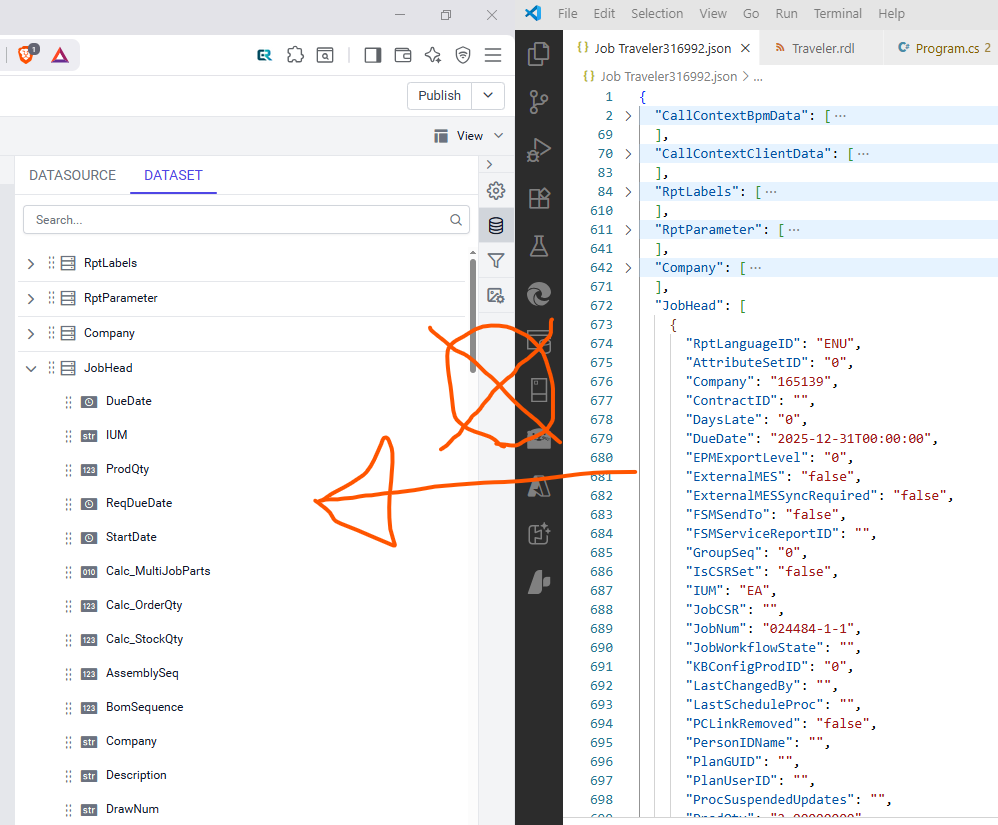
Was hoping maybe Bold Reports treated XML/JSON as queryables but it simply imports and flattens nested file sources.
Even if we middleware-pulled and separated the source into individual files by table, querying joins like inside RDL would still require a relational engine.
Hooking up to SQL Azure just for the engine and doing OPENJSON might work but that involves a middleware also doing signficant, fragile transformation of already poor dynamic SQL expressions in Epicor RDLs.
Basically no way to get from here to there:
My guess is they’ll just open up the Reportsdb as a shared connection and keep eveything as-is.
Anyway, it was a learning experience. Back to MSReportBuilder. For now.