Requisition Entry - Total Value of all Lines in Header JSON help needed

Hi,

My user wants to show the total value of all lines on the Requisition header screen to assist approvers. So I need to sum ReqDetail.DocExtCost. I’ve created a UD column ReqHead.TotalLineValue_c to hold the value and this is bound to a text box on the header scree.

I have an event that fires whenever the unit cost is changed. I can set absolute value OK. But I cannot figure the correct syntax to perform the sum. I’ve tried a few AI examples, but nothing works, I either get 0 or an object error.

I’m new to JSON having worked with Epicor Avante in the past. If anyone can guide me to some good JSON examples I would appreciate it.

You could do the sum client-side without a need for the UD column like so:

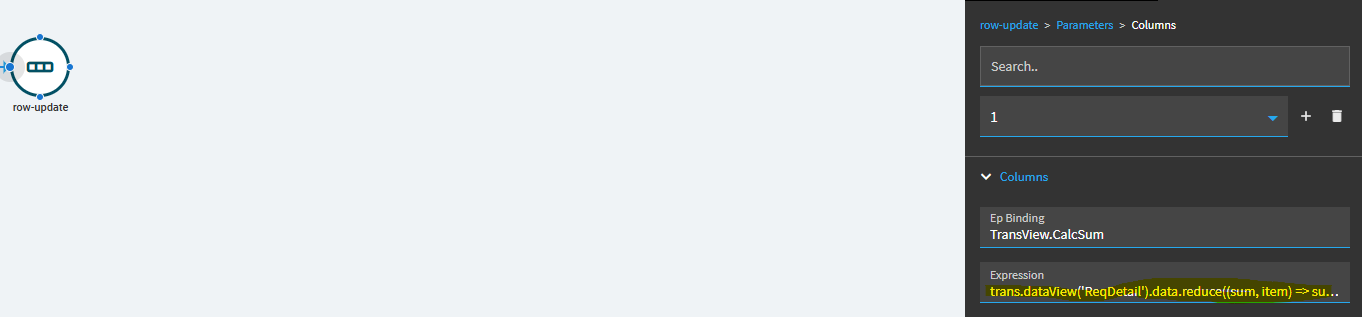
Textbox > epBinding > TransView.TotalLineValue
Event: trigger on KeyValue changed
Row-update > TransView.TotalLineValue

Expression:

trans.dataView('ReqDetail').data.reduce((sum, item) => sum + item.DocExtCost, 0)
5 Likes

Hi, thanks, a lot of new concepts for me there. Are there examples in base I can look at as a reference. I learn best by reverse engineering!

PS. I added a CalcTotalLineValue field to the ReqHead view and then bound that to my text box. I pasted in the code above into the Value field, but it didnt’t accept the format. Does this need to go into the Expression or the Value box?

It goes in the Expression (JavaScript) property.

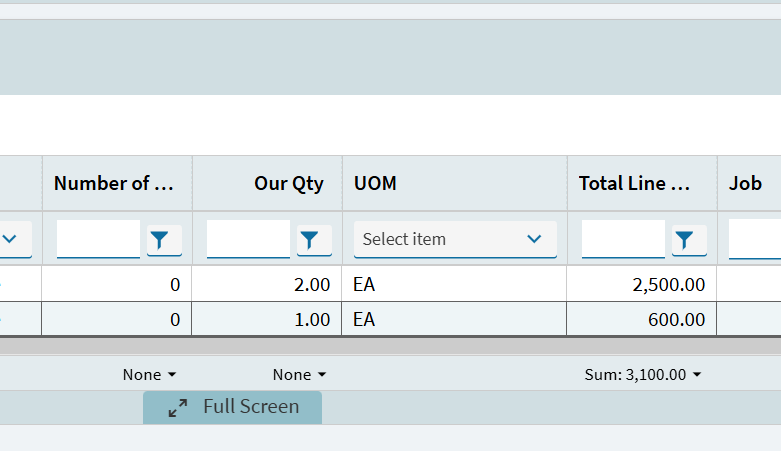
We are slowly converting all our classic forms to Kinetic and haven’t got to Requisitions yet but in classic we had summarised the total on the grid and saved the layout for the customisation. Guessing it’s not that easy in Application Studio \ Kinetic?

1 Like

Yes try it in the Expression property. Also, if needed you could surround the expression like so:
#_<expression>_# which tells the evaluator that it’s javascript.

There are not many OOTB examples of client-side javascript, unfortunately.

I cannot find this in AppStudio, but here’s an example on ReturnMiscEntry App where they use it instead of the dataview-condition action which is the ‘widget way’ of looping rows client-side. Perhaps the name ‘Quickly’ gives away their reasoning for going javascript.

   {/****************** SLOW WAY *****************************/
      "id": "getPartListQueryFromSearchResults",
      "description": "",
      "actions": [
        {
          "type": "row-update",
          "param": [
            {
              "columns": [
                {
                  "epBinding": "_ngGlobal.partListQuery",
                  "value": ""
                }
              ]
            }
          ]
        },
        {
          "type": "event-next",
          "value": "getPartListQueryFromSearchResults_outerLoop"
        },
        {
          "type": "data-commit",
          "param": {
            "dataview": "_ngGlobal"
          }
        }
      ]
    },
    {
      "id": "getPartListQueryFromSearchResults_outerLoop",
      "description": "",
      "actions": [
        {
          "type": "dataview-condition",
          "param": {
            "dataview": "searchResult",
            "result": "getPartListQueryFromSearchResults_PartList",
            "expression": "Constant.CompanyID = Constant.CompanyID",
            "iterativeEvent": "getPartListQueryFromSearchResults_innerLoop"
          }
        }
      ]
    },
    {
      "id": "getPartListQueryFromSearchResults_innerLoop",
      "description": "",
      "actions": [
        {
          "type": "condition",
          "param": {
            "expression": "'{_ngGlobal.partListQuery}' != ''",
            "onSuccess": [
              {
                "type": "row-update",
                "param": [
                  {
                    "columns": [
                      {
                        "epBinding": "_ngGlobal.partListQuery",
                        "value": "{_ngGlobal.partListQuery} OR "
                      }
                    ]
                  }
                ]
              }
            ]
          }
        },
        {
          "type": "row-update",
          "param": [
            {
              "columns": [
                {
                  "epBinding": "_ngGlobal.partListQuery",
                  "value": "{_ngGlobal.partListQuery}(PartNum = '{getPartListQueryFromSearchResults_PartList.PartNum}')"
                }
              ]
            }
          ]
        }
      ]
    },
    {/****************** FAST WAY *****************************/
      "id": "getPartListQueryFromSearchResultsQuickly",
      "description": "",
      "actions": [
        {
          "type": "row-update",
          "param": [
            {
              "columns": [
                {
                  "epBinding": "_ngGlobal.partListQuery",
/* EXPRESSION >*/ "expression": "trans.dataView('searchResult').data.reduce((a,e) => a.length?a += (` OR (PartNum = '` + e.PartNum.trim() + `')`):a = (`(PartNum = '` + e.PartNum.trim() + `')`),'')"
                }
              ]
            }
          ]
        },
        {
          "type": "data-commit",
          "param": {
            "dataview": "_ngGlobal"
          }
        }
      ]
    },

Setting it up in Kinetic is easy:

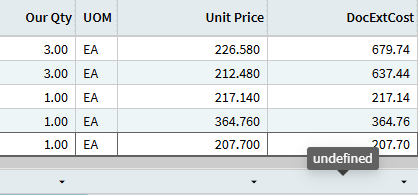
Saving Layout and having it actually work when you re-open the form is… problematic:

undefined?? what?

Others have struggled with it as well. Below is one example.

One of those things we hope they’ll fix… eventually.

Wait Goodbye GIF by Silicon Valley

1 Like

Thanks for the advice… and here was me thinking we had some simple customisations :woman_facepalming:

2 Likes

@jbooker… just wanted to add… I love your solution here. I had to test it out myself. My approach for this had always been a dataview-condition event with an iterative to sum the values.

Your approach is WAY easier than setting all that up!

1 Like

Yeah and perfoms way better too. Even Epicor thinks so.

See getPartListQueryFromSearchResultsQuickly above.

1 Like

Here’s what I came up with. This is from an email to our internal team about this issue:

Just a note, in case you run into this.

On the Install Admin dashboard there are a bunch of numeric columns, but probably only a couple that will be used often.

In this dashboard, I pulled the grid out from the panel card so we can collapse the grid in the layer and then expand it at run time.

When I got to the grid summaries, I had trouble setting the Show Summaries and having the footer appear.

I saw this earlier, where I tried clicking a few things before it worked and then I didn’t touch it again. :blush:

So, on this one, I collapsed the grid in the designer and expanded it again and the footers showed with “None” in the aggregate boxes in the footer.

I saved that, and it didn’t stick when published.

I set one of the numeric columns to Sum to see if it would make the footer show. It did, but then only the column I set to Sum had anything in the aggregate selection boxes (unable to turn on the rest). And going back into the layer, the designer had the same problem. And I couldn’t make it go away.

Luckily, I saved a copy just before starting the summaries.

I loaded the copy, collapsed and expanded the grid, set all the numeric columns that might ever be used to Sum. That worked when published.

Then I went back and set most of the numeric columns back to None and saved again. That seemed to work as well, so the two columns most likely to sum are set to Sum and the rest are set to None, but can be set by the user.

I learned to be sure to collapse the grid again after making changes, by the way.

These dang workarounds are slowing me down. Ah, well.

Recap:

Take grid out of filter panel card.
Collapse the grid
Expand the grid
Select Show Summaries
Set values in aggregate boxes
Collapse the grid
Make sure Expand at Runtime is off
Test and celebrate if it works

Notes:

The trick is in the expanding of the grid from a collapsed state at runtime. When the grid expands, it reads the summaries info you set on the grid in App Studio.

If you set the column to some aggregate and save it, and then go back and change it to None, None is what the user will see and then they can set it to whatever aggregate they want. If you leave it at SUM, SUM is what they get.

You might get it to work by saving the grid in the collapsed state and checking the expand at runtime box.

Luck!
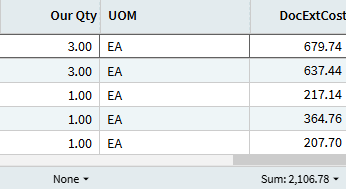
I’ve added a Column to the grid mapped to DocExtCost. Seems to work slightly better than using the base “DocExtCost” column and I was able to give it a user friendly heading:

1 Like

Like this? #<trans.dataView(‘ReqDetail’).data.reduce((sum, item) => sum + item.DocExtCost, 0)>#

Sorry to be a bit of a dummy on this, the above just returns a null. Do I need other parentheses?

I didn’t need the #_ _# bracketing when I tested it:

Expression:
trans.dataView('ReqDetail').data.reduce((sum, item) => sum + item.DocExtCost, 0)

… worked for me.

If you want to protect against nulls, you can use this tweak:

trans.dataView('ReqDetail').data.reduce((sum, item) => sum + (item.DocExtCost ?? 0),0)

Basically the “??” operator tells the expression that if item.DocExtCost is null or undefined, use 0 instead.

and… you can also guard against the field passing in string values instead of numbers and use the below. It worked as well:

Number(trans.dataView('ReqDetail').data.reduce((sum, item) => sum + Number(item.DocExtCost ?? 0),0))

3 Likes

Crap… forgot to mention… if you’re still not getting a value… your original post mentioned:

… but when an “approver” is opening an existing requisition, those values aren’t “changing”. Opening a requisition record calls a GetByID based on the ReqNum and the ReqDetail dataview is populated by that rest call.

To trigger your event when someone opens an existing Requisition, try using the following trigger: Event > after > AfterGetByID

1 Like

Thanks! Working on something else now, but will give that a try later.