How come when i print a sales order the printed sales order number does not match the one in the system?
when you print, check to see if an order number is stored in the filter. If there is an order in the filter, click actions - remove defaults.
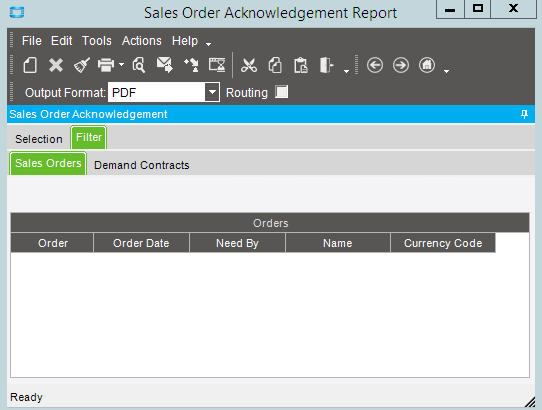
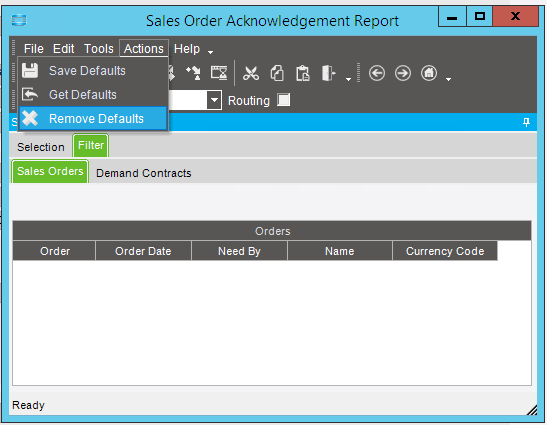
We have seen this with Sales Order Acknowledgements from time to time. To fix this, when you bring up the print dialog box for the SO Acknowledgement, in the
Action menu click on Remove Defaults.
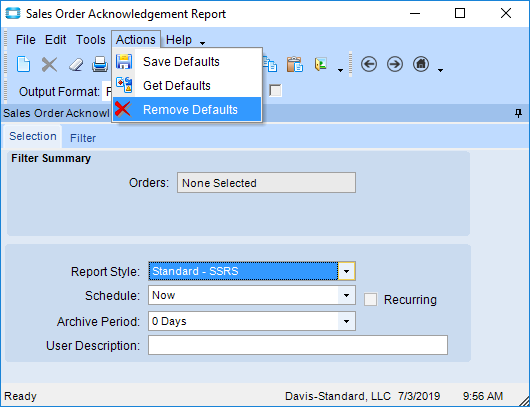
We’ve also had this issue recently. Once the print dialog box is open, it retains the order# from the transaction when it was opened. It does not change even if you change order #'s in the Order Entry form. And it will not close automatically, but it’s also not ‘modal’ so it will end up behind other windows.
Our user was having an issue where (with many windows open) she was losing sight of the print dialog and assuming it was closed. When she went to another order # and ‘opened’ the print dialog, it was really just bringing the currently open dialog box “to the top” - so when she clicked print - it was a previously printed order#.
HTH