I am working with a user and when they manually resize columns in a landing page for example, and then hit Save Layout. It will not save their change. I have no issue with this and when I resize columns and hit Save Layout it will save. Is there something that I am missing?
2 Likes
Only thing I can think of…does the user not have Allow Personalizations enabled on their account?
3 Likes
I thought the same thing. Yes, user has Allow Personalization enabled on their account.
1 Like
Welp…I’m out. 
Can you check the Browser F12 Dev Tools network tab when you click Save Layout, maybe the network call is returning anything that could be useful?
1 Like
Just tried this and not finding anything
1 Like
My only other thought is to check if the user has a personalization saved already on that screen, and delete it. Maybe something is weird with the saved one preventing it from being updated.
2 Likes
This was my next thought. Some corrupt personalization causing an issue saving the new one.
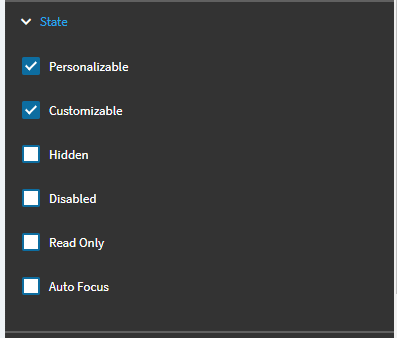
Are you running in browser or old smart client?
If browser and if you’re on 2025.2.x, see if use has existing personalization on the application in question. If so you can delete the existing then have user retry --may want to clear their browser cache too before having them retry.

1 Like
Where do I find this Customizable check box?
1 Like
Nevermind. I found it. The customizable check box is checked.
1 Like
We are in the browser. We tried clearing user cache and also deleted the personalization that was originally on the Purchase Advisor screen and user is still unable to save layout changes.
1 Like
We are browser too. In your case I’d try another browser or incognito/private mode if you only have one browser. Also use the Dev Tools to trace on the user’s browser and your own to trace what occurs when saving a layout to see if there is differences.
1 Like
What is your version number for Kinetic/Epicor? I recall this happening in early version of the Kinetic UX
1 Like
2024.2.7…we are upgrading soon
1 Like