Scheduling Build Project Analysis, how to refresh the project list?

Making a new topic to avoid a necro post of Automation of Build Project Analysis possibly through BPM or any other method

We have tested that BPA does indeed allow the full number of Projects now, but the problem is that we want to run this for all Active Projects, and that list is Dynamic.

We have an Azure Function App, which currently does this for us when the main issue was the list was too big. (we had to get around Epicor’s limit at the time). There’s a few issues we have with it and it would be nice to put it all back into Epicor somehow.

Would there be an easy way to set it up so it can be fed by a BAQ we design? And still run on a schedule?

1 Like

:100:

At another company, we thought of two things that we never got around to try.

  • Have a BAQ search for Project/Phase activity in various tables (PartTran, PODetail, etc.) to come up with a list of projects that need BPA.

  • Add directives to those tables to mark that project with a Data Tag. Later use the tagged Projects to run BPA and then remove the Data Tag.

I would think an Epicor Function could run the BAQ, create the selection list, and then submit the BPA to run on a schedule. :thinking:

1 Like

I suspected that a function was the answer, but I don’t know how to do that yet. It’s likely fairly easy, running a BAQ and feeding the results to BPA. But the particulars are not known to me, running the BAQ is easy enough, but how to feed BPA is not something I know yet.

I don’t mean to underestimate you and don’t know how generic/specific you mean this.

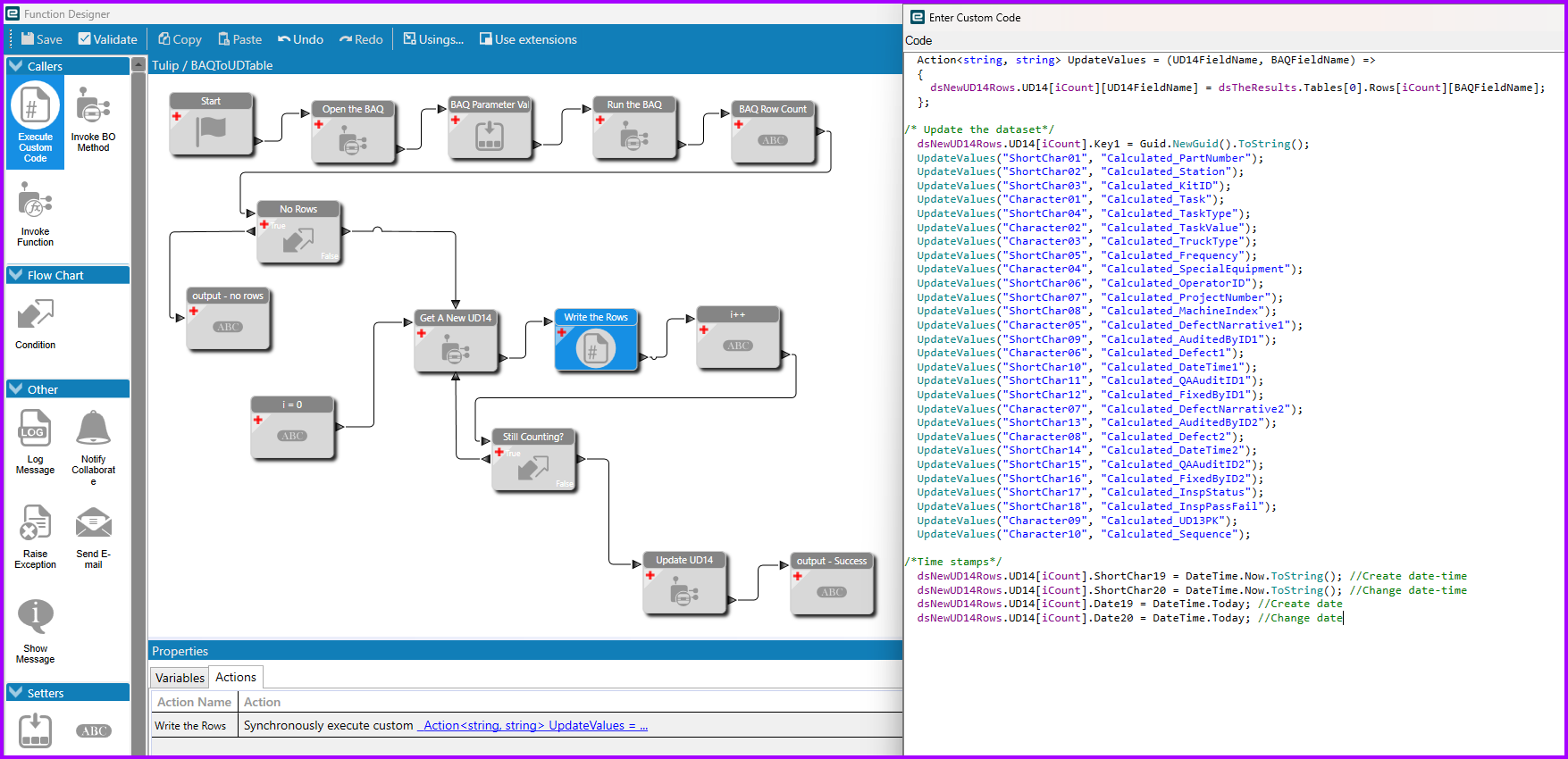
But I was just reviewing a Function where we take a BAQ (with parameter) and shove the results into a UD table, so it’s fresh if you’d like some guidance.

I don’t do BPA (odd, though, it’s the 3rd or 4th post on it that I have responded to in the last week or so). But I assume there is enough overlap as far as making a Function, that this should help.

I’ll spare you the details for now until you ask for them. But this is the overview.

Don’t tell @Banderson that there is some code in there.

Though he actually is the one that showed me how

All this does is spares me from dozens of Set Field widgets. It can be done without code.

  Action<string, string> UpdateValues = (UD14FieldName, BAQFieldName) =>
  {
    dsNewUD14Rows.UD14[iCount][UD14FieldName] = dsTheResults.Tables[0].Rows[iCount][BAQFieldName];  
  };

/* Update the dataset*/
  dsNewUD14Rows.UD14[iCount].Key1 = Guid.NewGuid().ToString();
  UpdateValues("ShortChar01", "Calculated_PartNumber");
  UpdateValues("ShortChar02", "Calculated_Station");
  UpdateValues("ShortChar03", "Calculated_KitID");
  UpdateValues("Character01", "Calculated_Task");
  UpdateValues("ShortChar04", "Calculated_TaskType");
  UpdateValues("Character02", "Calculated_TaskValue");
  UpdateValues("Character03", "Calculated_TruckType");
  UpdateValues("ShortChar05", "Calculated_Frequency");
  UpdateValues("Character04", "Calculated_SpecialEquipment");
  UpdateValues("ShortChar06", "Calculated_OperatorID");
  UpdateValues("ShortChar07", "Calculated_ProjectNumber");
  UpdateValues("ShortChar08", "Calculated_MachineIndex");
  UpdateValues("Character05", "Calculated_DefectNarrative1");
  UpdateValues("ShortChar09", "Calculated_AuditedByID1");
  UpdateValues("Character06", "Calculated_Defect1");
  UpdateValues("ShortChar10", "Calculated_DateTime1");
  UpdateValues("ShortChar11", "Calculated_QAAuditID1");
  UpdateValues("ShortChar12", "Calculated_FixedByID1");
  UpdateValues("Character07", "Calculated_DefectNarrative2");
  UpdateValues("ShortChar13", "Calculated_AuditedByID2");
  UpdateValues("Character08", "Calculated_Defect2");
  UpdateValues("ShortChar14", "Calculated_DateTime2");
  UpdateValues("ShortChar15", "Calculated_QAAuditID2");
  UpdateValues("ShortChar16", "Calculated_FixedByID2");
  UpdateValues("ShortChar17", "Calculated_InspStatus");
  UpdateValues("ShortChar18", "Calculated_InspPassFail");
  UpdateValues("Character09", "Calculated_UD13PK");
  UpdateValues("Character10", "Calculated_Sequence");

/*Time stamps*/
  dsNewUD14Rows.UD14[iCount].ShortChar19 = DateTime.Now.ToString(); //Create date-time
  dsNewUD14Rows.UD14[iCount].ShortChar20 = DateTime.Now.ToString(); //Change date-time
  dsNewUD14Rows.UD14[iCount].Date19 = DateTime.Today; //Create date
  dsNewUD14Rows.UD14[iCount].Date20 = DateTime.Today; //Change date
2 Likes

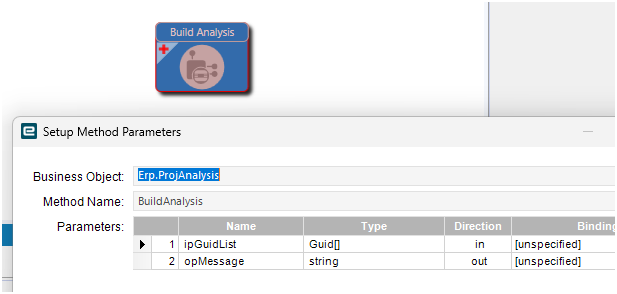
That looks like it would be an… interesting trace…

GUID list?! Not a Project list? Not a ProjectTableset like the output of the other methods in there?

That’s bizarre, on the screen, you pick a list of project ids (strings), guids don’t make a lot of sense to me.

2 Likes

Yeah, I would definitely do a trace. That may be some kind of helper function internal to Kinetic.

But you get the idea. Run the BAQ to get the list of projects, submit the BPA using the list as one of the parameters. If you can do directives, you can do functions!

1 Like

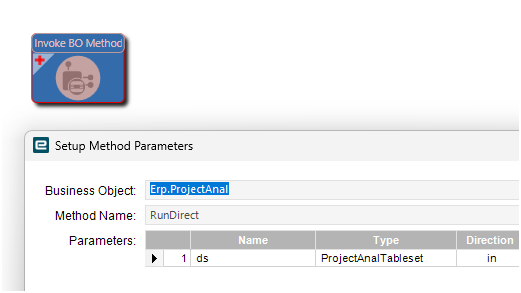
We use the RunDirect method because we want to wait until the process is done before executing other tasks that depend on it’s completion.
We don’t have any project filters, but I assume you use the ProjectList param
This should be the same syntax as submitting the task to the task agent with SubmitToAgent

// Start process
await mErpRestClientFactory.BuildRequest()
    .WithAppOnly().GetService<ErpPROCProjectAnalSvc>().RunDirectAsync(new()
    {
        Ds = new()
        {
            ProjAnalParam =
            [
                new()
                {
                    AsOfDate = DateTime.Today,
                    RegenAnal = true,
                    RegenEntireProject = true,
                    SaveCopy = true,
                    RowMod = "A",
                    ProjectList = "your projects here"
                }
            ]
        }
    }, cancellationToken);
2 Likes

OK, glad you chimed in; like I said BPA is not my area.

I see it now - Project Analysis exists as a Process as well as the “Business Object” version that I looked at.

Yeah this looks “fun.”

I found it’s storing the list for BPA as a parameter in Ice.SysTaskParam:
image
Looks like a standard Epicor ~ delimited character field. If I wanted to be clever and use an SQL solution, I could just update that list. But that really doesn’t seem like a sustainable solution :slight_smile:

Edit: sorry, didn’t notice you already told me this while I was looking at it :slight_smile:

1 Like

This is where the SubmitToAgent stores the parameters. You just need to do what Mr. Bayley is doing and provide the ProjectList as a “~” delimited string of project IDs and you’re all set. He’s running it directly, so it waits, but you can use the SubmitToAgent to have it run as a Task.

2 Likes