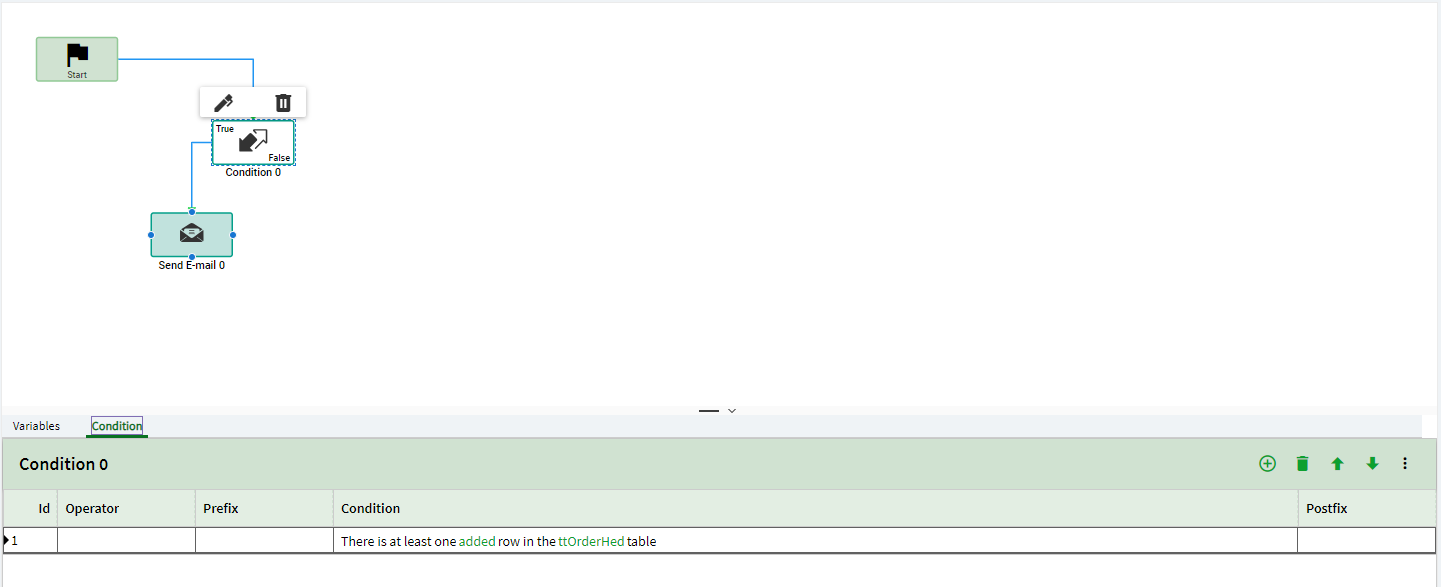
@PaulC You could write a data directive on the OrderHed table and add a condition where there is a row added to the table. I just tested this for a quote and it sent an email.
The crux of this request is, what information do you want to include in the email?
If it is just an alert that a SO is created… then it should be easy. Like @tsimon shows, a DD on OrderHed looking for added rows should get you an email “alert”.
But if you want the email to include information on what is IN the sales order… its a lot tougher. You only have to enter the customer in order to save a new Sales Order, but that’s about it.
If you want line item details, SO total value, etc… it becomes muddy. There’s no out-of-the-box trigger for the system to know the user is done working on the sales order… time to send out the email alert. This is very dependent on how your company operates.
I’ve gone a slightly different route here and use a function to send out a sales order alert every day at 7AM. This is populated by a BAQ that specifically looks at orders entered (or changed) the previous day. My company president wanted to see values… so, the “super good enough” solution for me was to get him a summary of what happened yesterday.
@tsimon - Thank you, I think I overthink this one resorting to Method directives. I would start with this and probably polish along the way. Thank you and much appreciated
@dcamlin - Thank you, The idea of this function is also a great Idea to what Sales Director would require as well. By any chance if it’s alright - Can I get some walkthrough in starting this? Maybe too much to ask, My Apologies.
The other option would be to use APR to send the Sales order acknowledgement to the customer. Your order process would require the user generating that report as part of the steps. I am sure you could automate that with a function/bpm as well.
An example of using emails in a function are in the technical guides which you can download from Epicweb or the online help (search for Kinetic Guides Download)
Well, I’m not going to take credit for other people’s work. My function was gleaned from the below post and then tweaked for my use case.
@SueLowden’s example was emails for PO Approvals… but I just tweaked it to send out daily summaries based on a sales data BAQ I created.
So, the outline for something like this is to build your BAQ to contain all the data you want included in the email… then create a function to run the BAQ, package the results in HTML format, and send it out via email.
I can’t say I’m any kind of expert at this. I’ve pulled it off exactly (1) time. But, I’m 1-for-1!! … and if I can stumble my way through it, I’m sure you can too.
If/when you go down this path, if you have any specific questions, I can do my best to help!