set another service not on 6071 then, if you still want tray there.
i just want to be able to gracefully do these tasks for both 6071 and 6072
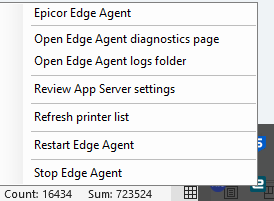
End Task and run exe is the supported method for restarting the service? Okeedokee THanks again.
Local EA is totally different, you can change port for it, but all will have to use it, so unless you are determined to change everyone, leave it on 6071.
It is simpler to change port for network EA in your case.
Not trying to be obtuse, but I’m new, trying to go live, very little clue, and docs aren’t much help.
We want to keep it as simple as possible with the following requirements:
- 100% browser plus EKW
- some stations with local EA some without
- Network printers available on both pilot and live (for those without local EA and for EKW)
- EA Network services on one machine, handsfree (if 2 svcs then launch both on boot and IT admins able to start/stop/config/logs on both)
When you say ‘change everyone’ I take that to mean 6071 is default for local installs so best to leave 6071 local-only and run all network instances on alt ports.
To do that, set alt port on EA Config App in ERP, correct? And local installs are good with that, correct? Perhaps I misunderstood but thought maybe local defaults come from EA Config App.
Local EA: 6071 (default port specified somewhere else?)
Network EA LIVE: 6072 (put this port in EA Config App on Live)
Network EA PILOT: 6073 (put this port in EA Config App on Pilot)
Am I close? Thanks again.
No you have it backward.
EA Config App in ERP only matters for Local EA. And it uses 6071 by default, so you don’t need to change anything there.
So you just need Network EA LIVE: 6072 and Network EA PILOT: 6073 and no changes in EA Config App)
After that you go to network printers and setup them there to work with EA
2 Likes
Gotcha. Makes sense now.
Local EA: EA Config App sets defaults, entry only needed to override
Network EA: service registers agents w environments, 1 svc per env cuz APIKey, alt ports only needed when running two svs on same machine, no tray tooling.
Thanks again again. Have a nice weekend.
3 Likes