We have an on-prem Print Server used for Development (and one for Prod), and I am wondering if it’s possible to install and configure Edge Agent to connect to both Pilot and Third environments?
I know we can choose multiple environments when it’s installed as a local install, but it appears that it is only able to connect to one environment if it’s installed as Network. I hope this is not the only option, so I wanted to check if anyone else installed it for multiple environments.
No, only one connection is possible. It creates web socket with the app server so it should know which server to connect.
But starting 2025.+ you will be able to install several installations on the same machine.
Your signature shows 2024.2
Yes, it should be available in 2025.1. When you install EA, it asks you for the port and app server, set other values than the first installation.
I was able to install the first installation with Port 6071 (default) and connected it to Pilot. I then ran the installation again and chose port 6072 to discover that it allowed me to enter new info for the other environment! This is great. Thanks for your response!
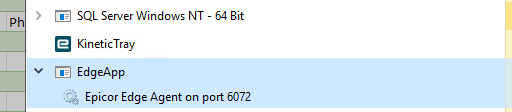
The setup stopped the first instance of EdgeAgent.exe so 6071 wasn’t running after installing 6072. I see two installs in RunOnPort dir and tried to launch \6071\EdgeAgent.exe but that didnt work. So tried \6071\KineticTray.exe and that worked. Now Taskmgr looks like this:
Tried launching \6072\KineticTray.exe but that said ‘6071 in use’ So is util only single instance? How do I do tray functions on 6072 without crashing 6071?
are they both the same latest version? They should run together
Also EdgeApp it is for network install, not local EA, is it what you are trying to install?
6071 was prolly an earlier version before I reran setup today (without uninstall) may that’s it?
Steps:
Some version NEtwork installed on 6071
download and install NEtwork version 6071 > Pilot
test 6071 works
rerun same download 6072 > Live
test 6072 works, 6071 down
etc, etc
So now you must have 2 services running, and no Kinetic tray.
Network installation only for network printing, so I am not sure what exactly you want to achieve with 2 network EA on 1 machine
well, you could use just one for both, but if you want separate, it should be fine too. For Network EA port is not important, except for showing the status page on https://localhost:PORT. It is working through SignalR connection.