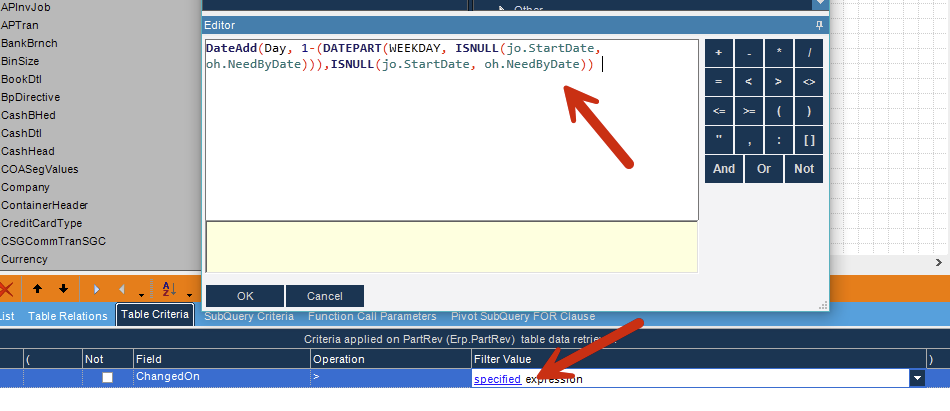
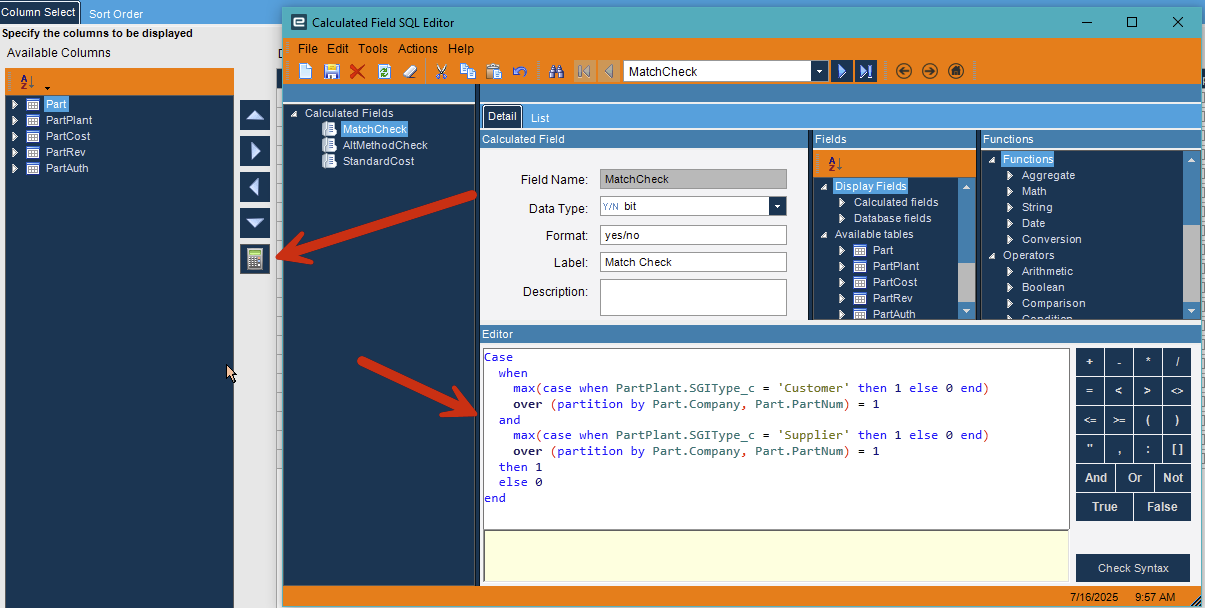
I have written a SQL query that displays the JobNum and related info along with the production slots available for the week that the job falls with, however I’m struggling to translate this query into a BAQ. The query reads the JobNum from JobHead and joins in the JobOper table to get the start date of the build. I then have a sub-query that reads the ProdCalDay table to determine how many work days fall within the week range. Week range is calculated by using date functions as follows:
1st day of week = DateAdd(Day, 1-(DATEPART(WEEKDAY, ISNULL(jo.StartDate, oh.NeedByDate))),ISNULL(jo.StartDate, oh.NeedByDate)) & the last day of week = DateAdd(Day, 7-(DATEPART(WEEKDAY, ISNULL(jo.StartDate, oh.NeedByDate))),ISNULL(jo.StartDate, oh.NeedByDate)). This where I’m running into issues in the BAQ. I have no clue how to utilize these date calculation in a sub-query. Below is my SQL Query. Any help would be appreciated, Thanks.
Select jh.JobNum,
	   oh.Character01 As JobName,
	   Case
	   		When LEN(jh.PartDescription) = 39 Then jh.PartDescription
	   		When LEN(jh.PartDescription) = 69 Then jh.PartDescription
	   		Else 'INVALID MODEL NUMBER'
	   End ModelNo,
	   SUBSTRING(CONVERT(varchar(10), DateAdd(Day, 1-(DATEPART(WEEKDAY, ISNULL(jo.StartDate, oh.NeedByDate))),ISNULL(jo.StartDate, oh.NeedByDate)), 10), 1, 5) + ' - ' + SUBSTRING(CONVERT(varchar(10), DateAdd(Day, 7-(DATEPART(WEEKDAY, ISNULL(jo.StartDate, oh.NeedByDate))),ISNULL(jo.StartDate, oh.NeedByDate)), 10), 1, 5) As WeekRange,
	   ISNULL(jo.StartDate, oh.NeedByDate) As StartDate,
	   ISNULL(jo.DueDate, oh.NeedByDate) As DueDate,
	   DateAdd(Day, 1-(DATEPART(WEEKDAY, ISNULL(jo.StartDate, oh.NeedByDate))),ISNULL(jo.StartDate, oh.NeedByDate)) As WeekStartDate,
	   DateAdd(Day, 7-(DATEPART(WEEKDAY, ISNULL(jo.StartDate, oh.NeedByDate))),ISNULL(jo.StartDate, oh.NeedByDate)) As WeekEndingDate,
	   (13 * (5 - ISNULL(RS.NonWorkDays,0))) As SlotsAvailable,
	   SUM(RS2.SlotsUsed) As SlotsUsed,
	   ISNULL(RS.NonWorkDays,0) As NonWorkDays
From Kinetic.dbo.JobHead jh
Left Join Kinetic.dbo.JobOper jo
On  jo.Company = 'KCC'
And jh.JobNum = jo.JobNum
And jo.AssemblySeq = 0
And jo.OprSeq = 40
Join Kinetic.Erp.JobProd jp
On jp.Company = 'KCC'
And jp.JobNum = jh.JobNum
left join Kinetic.dbo.OrderHed oh
on  oh.Company = 'KCC'
And oh.OrderNum = jp.OrderNum
left join Kinetic.dbo.OrderDtl od
on  od.Company = 'KCC'
And od.OrderNum = jp.OrderNum
And od.OrderLine = jp.OrderLine
Left Join (Select  Company,
		           Count(ModifiedDay) As NonWorkDays,
				   ModifiedDay,
		           CalendarID
                   FROM [Kinetic].[Erp].[ProdCalDay]
				   Group By CalendarID,ModifiedDay,Company
) RS
On RS.Company = 'KCC'
And RS.CalendarID = 'LTCL-3'
And RS.ModifiedDay Between DateAdd(Day, 1-(DATEPART(WEEKDAY, ISNULL(jo.StartDate, oh.NeedByDate))),ISNULL(jo.StartDate, oh.NeedByDate))
                   AND DateAdd(Day, 7-(DATEPART(WEEKDAY, ISNULL(jo.StartDate, oh.NeedByDate))),ISNULL(jo.StartDate, oh.NeedByDate))
Left Join (Select  Company,
                   Count(*) As SlotsUsed,
                   StartDate,
				   AssemblySeq,
				   OprSeq
                   FROM Kinetic.Erp.JobOper
				   Group By Company,StartDate,AssemblySeq,OprSeq
) RS2
On  RS2.Company = 'KCC'
And RS2.AssemblySeq = 0
And RS2.OprSeq = 40
And RS2.StartDate Between DateAdd(Day, 1-(DATEPART(WEEKDAY, ISNULL(jo.StartDate, oh.NeedByDate))),ISNULL(jo.StartDate, oh.NeedByDate))
                 AND DateAdd(Day, 7-(DATEPART(WEEKDAY, ISNULL(jo.StartDate, oh.NeedByDate))),ISNULL(jo.StartDate, oh.NeedByDate))

where LEN(jh.PartNum) = 7
And Substring (jh.PartDescription,1,3) In ('OAB','OAD','OAN','HAE')
And jh.ProdCode In ('HVAC', 'VKNG')
And jh.PartNum = Substring (jh.PartDescription,1,7)
and jh.JobClosed = 0
and jh.JobComplete = 0
and ISNULL(jh.StartDate, jh.ReqDueDate) > dateadd(dd, -10, GetDate())
Group By jh.JobNum, oh.Character01, jh.PartDescription, jo.StartDate,oh.NeedByDate,jo.DueDate,RS.NonWorkDays
order by StartDate