I need to sum operations defined in quotes. I need all operations done by machines in one column and manual operations summed in another. Simple enough, but I can’t figure out how to do it.
Attempt 1 was summing the columns in calculated field by when I did a case on the Operation Code column in the QuoteOpr table I get error: is invalid in the select list because it is not contained in either an aggregate function or the GROUP BY clause. If I group on that column the results are wrong.
Attempt 2. Created 2 inner sub queries where I selected the machine operations in one and manual operations in the other. Problem is the values are duplicated in summing.
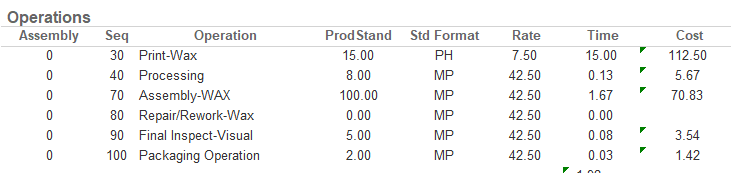
Exp.
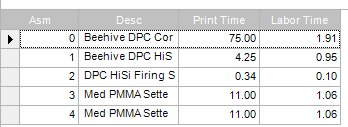
There is only one Machine operation for this Assembly. So the sum should be 15. But because the value is repeated for all the Manual operations the sum turns out to be 75
Any SQL expert that can help a quy out? Thanks for your help.
I kinda of can tell what you’re trying to do, but not quite. You want the total of operations done my machines, and manaual operation. Is this a row per quote? Or a row per assembly? Can you make an example of what you want the final outcome to be? (If you make a grid in excel and then copy paste it in here, the forum software will make a nice little grid for you)
I 100% sure that I can help you get what you need, I just need a clearer picture of what you’re looking for.
Also, if you can post some more screen shots of what you’ve done so far, I can tell tell you what you need to change.
Further clarification. There is one operation in the above report that is not being selected by design. That is why the total is 75(15 x 5) instead of 90(15 x 6) 6 being the total number of operations for that assembly.
Not that you need it now, but this is also a perfect case for windowed functions. Group by can have non-intuitive impacts on other parts of your query and often trips up future maintainers. Something like,
sum(
	case
		when resourcetype = 'M' then <whatever field you're summing>
		else 0
	end
) over(partition by <comma separated list of fields that you need a distinct sum over>)
moves all of the grouping elements into the over(partition by... set of fields, and may even eliminate the need for subqueries.
The problem seemed to be: When I selected the rows from both subqueries, if sq1 did not have a row , but sq2 did then instead of sq1 returning a null it would repeat the previous value.
The solution you gave was to do the calculated fields in the sub queries themselves and include them in the top query display… I needed to group on them in the top query to get beyond the “… **is invalid in the select list because …” error. But that didn’t change the results and I look like a genius at work, but everyone here knows better
Something still isn’t right, as it shouldn’t be doing that. The error for that you are getting is from a calculated field in your top level. You might be getting information correct for this specific instance, but I wouldn’t trust that query to always be right, because something is wrong in your joins to get the behavior you describe. Grouping on the top level is covering up an issue, not fixing it.
I’m not trying to be jerk, just trying to give you a heads up to watch out for issues.