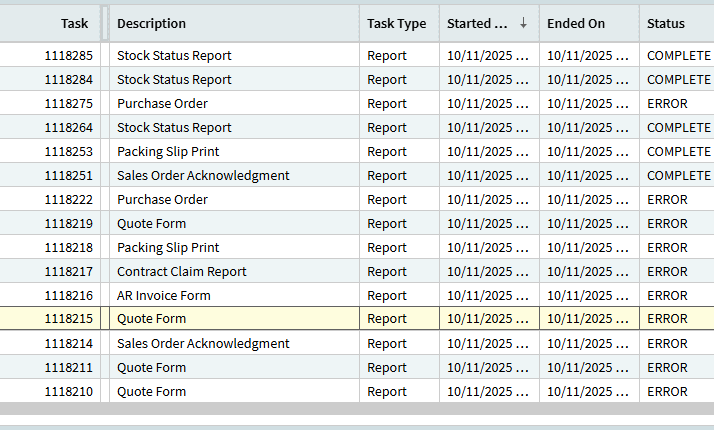
SSRS 2025.2.3 Public Cloud - Epicor reporting not seeing uploaded RDL

Hey,

I was struggling with an order ack RDL. I made a change that gave me an error. Then I went to an older version and saved it to the same name. A number of times. I could never get rid of the error.

Then I tried uploading one of my incremental saves.

Here’s the file on the report style:

And the successful upload:

And then the error, where is says it can’t find the file:

Does Epicor cache the folder and then lose track of it? Or something?

Whatcha think?

Thanks,

Joe

1 Like

Addendum. Logged out and in on three browsers.

FWIW.

Kinetic Report Style is broke I’ve been using Classic to upload the RDLs

Hmm. I don’t have Classic available here.

1 Like

Don’t worry, on my end at 2025.1.15 classic report style upload is broken too. It lets me upload stuff but no changes are reflected. Support said there’s 2-3 customers with an open case same issue right now.

They tried having me run conversion workbench 410, didn’t help.

SSRS VM : AppServer VM is 1:Many, so issue might be decoupled from AppServer version.

Conversion 410 looks like it’s set up to pull .rdl from SSRS side into Epicor Db side (so yes, there are multiple copies, not sure if you’d call it a ‘cache’)

To me the issue is we are successfully updating the Epicor database side - but it’s not getting pushed to the SSRS side. And no error output.

CS0005177212 opened 10/30
linked to PRB0303452 opened 3 months ago (and marked completed) (which was from another case we opened with the same problem. But this appears to be a different cause, as epicor CS tried the fix in that PRB and no effect.)

PRB states this, so if you wanted to get creative you could attempt that:

Unable to print a modified version of a custom report in cloud environment.

The cause of the reason is Ice.ReportStore view in Kinetic DB is returning wrong values for SystemFlag and IsActive columns.

It is returning SystemFlag as 1 and IsActive as 0

Correct values should be ALWAYS (for custom reports) SystemFlag as 0 and IsActive as 1.

Modyfing the view to return IsActive as 1 fixed the problem.
2 Likes

I struggled with this myself.

The workaround is to “copy” the report style and specify a new folder Name.
Try CustomReports/SalesOrderAcknowledgement2/SOForm-TEG_Good1

DaveO

2 Likes

Yes, the other advice given to us was to create a whole new report style. Both of these actions are causing a “new” .rdl to be created that properly has the flags set in Db, so if that works, it indicates the PRB is the likely issue/fix.

But the root cause fix would be to make sure custom reports are always written out with the correct booleans…

1 Like

I’ll try that. Thanks!

1 Like

Sadly, I get results with a different folder name.

Ah, well.

Adding a new report style also had no effect.

1 Like

Gabe,

You mention setting an “IsActive” value in the Ice.ReportStore view. Where did you do this? I tried customizing Report Style but didn’t see a dataview with that name or any dataview with IsActive as a column.

Thanks,

Joe

It used to be visible in a BAQ table listing, but the table is not exposed anymore. as I recall you may be able to use it in a function
Or advanced bpm ubaq. Best thing is to ask for a data fix based on that PRB.

Good deal. Thanks.

BTW, I ran the 410 conversion with no effect. But then created a new style with a new folder from the dialog box, and that seemed to work. So far.

Joe

1 Like

So where are they publishing this for everyone else that needs to know how to do this? Do they have to search the forum to figure out how to use something that should just work? Or is there an announcement? I am having trouble just figuring out what I need to do based on this thread.

2 Likes

I asked for an update on my case, and it was announced to the room full of one person:
“We have received a few reports of this issue, and we are currently investigating it.”

For funsies since I like to poke things with sticks, I wrote an advanced uBAQ to poke Epicor in the nether regions and list out the relevant bits from Ice.ReportStore. There is no code for the .Update bits, it only has a BPM on .GetList to read out the Ice.ReportStore table.

There is some interesting output from my data collection:

It would seem the problem here could be one of two things:

SystemFlag: true makes it readonly and we’re seeing a silent failure on upload

Or, there is a duplicate entry in the Ice.ReportStore table, one of the entries is stored at a different path (capitalization in Reports), and it is marked as SystemFlag = true. I would guess that when uploading, Epicor’s logic is updating one of these entries, and when rendering ssrs, it is rendering the other one (which never gets updated)

The likely fix here is either marking the row SystemFlag = false, or deleting one of these rows (we could tell which one by editing the .rdl to add some identifiable stuff, figuring out which one did not get updated, then deleting that row from Ice.ReportStore)

I’ve let Epicor know in my Case.

Here’s the BAQ If anyone would like to examine their Ice.ReportStore and see if it’s the same problem (SystemFlag = true on a Custom Report Style):

GF_DynamicCSharp.baq (38.3 KB)

GF_DynamicCSharp.GetList/Based Code:

// Here there be dragons
var t = result.Tables[0];
//t.Columns.Add(Ice.IceColumn.Create("ReportName", typeof(String)));
//t.Columns.Add(Ice.IceColumn.Create("IsActive", typeof(Boolean)));
//t.Columns.Add(Ice.IceColumn.Create("SystemFlag", typeof(Boolean)));
var rstore = Db.ReportStore.AsEnumerable();
foreach (var r in rstore) {
    var nr = t.NewRow();
    nr["PrintProgram"] = r.PrintProgram;
    nr["IsActive"] = r.IsActive;
    nr["SystemFlag"] = r.SystemFlag;
    t.Add(nr);
}

GF_DynamicCSharp.Update/Based Code:

return;

We are having the same issue with this. Only the standard SSRS reports are working, none of our customised ones.

Trish, are you saying that none of the custom reports are even running or that you can’t see the changes to any modifications you’ve made?

Not running. When we had no errors in Pilot.