We have a SSRS Breaking/Routing set up to automatically email AR invoices to customers that have a valid primary billing contact. It works well - except for this unexplained issue…
For some reason, when we try the routing on 2 specific customers, it does not send the email to them. We are blind-copied on every invoice emailed out, and we receive the email every time. Oddly, when we enter an internal email address, such as my own, we still don’t receive the invoice, yet, the blind copied recipients still receive it. This make no sense to me, whatever. Can anyone explain this?
To clarify, I can put my own email address in the primary billing contact’s email field, and I do not receive the email. Yet, if I was blind copied on it, I would receive it…
Another detail I didn’t include previously:
On all of the “successful” emailed invoices, where it actually sends the email to the customer, it shows the “TO” email address (in Outlook). On the 2 specific customers where it fails, the “TO” email address is empty.
I would set an archive period and look at the ssrs tables generated to see if the data is getting generated to begin with.
If it is I would move to the mailQueue and mailQueueBody tables.
Try changing the customer primary contact email address to be your email address.
I would suspect something in the primary customer contact email.
Also, look at the ShipTo field to see if the primary customer contact is in the list of the ShipTo?
DaveO
Hi Nolan. This probably will seem like an odd question for the circumstances, but for the 2 specific customers, do you also actually have two other contacts with the same customer contact number (CustCnt.ConNum), and your primary billing contacts are not linked to any ship-to record while the other contacts with the same customer contact number are linked to ship-to records?
Now that you guys mentioned the ShipTo’s, I discovered something very odd. For each of the 2 problem customers, we have at least 1 other contact set up under a ShipTo, but does not have an email specified. When I placed my email address under the ShipTo contact email, as well as the main customer’s primary billing contact email, the email breaking/routing emailed invoice goes through.
Obviously, ShipTo’s can and do have different contacts and different email addresses. Do you know of a way to “break” the link between the primary billing contact email and the other contacts?
And the ConNum for each of those other ship-to contacts is exactly the same as the ConNum for the primary billing contact, right?
Yes, there is a way to get the result that you want, but you’re not really breaking a link. You’re just adding some precision to the selection of the contact record. We had the very same issue and it was very aggravating until we finally resolved it. I will research what we did and then reply again.
1 Like
Yes, the ConNum is the exact same…I don’t understand why, or how it is the same, but it is.
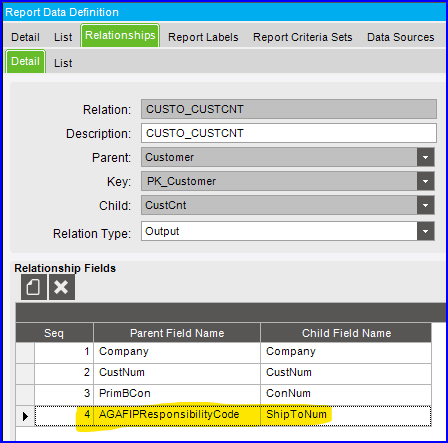
We copied and modified the RDD used with ARForm, where we added a relationship linking Customer and CustCnt and specified a field relation between CustCnt.ShipToNum and a Customer field that we were quite certain would never be used and therefore would always be null. Yes, there obviously is a risk that the field might be used in the future, but we believe that risk is miniscule. Prior to resorting to modifying the RDD, we attempted to use filtering in the SSRS report, but we were not able to filter the contact records reliably. If anyone has a better method to accomplish the objective, then I’m certainly open to any suggestion.
2 Likes
We used your solution and it seems to be working. Thanks!
1 Like