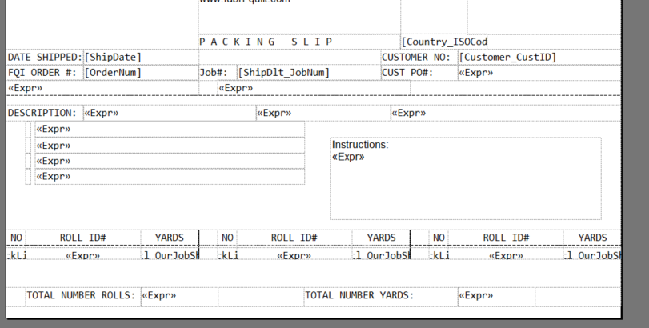
When I have run into this issue in the past, it was because the textboxes were slightly misaligned, even if only by a pixel. I would suggest checking that the textboxes in each column are the same sizes and at the same heights.
I was just going to make the same comment at Ross. What I do to troubleshoot is set box borders or background colors. That helps visually see what’s going on.
Edit: Also check the alignment of the text boxes to ensure there aligned.
I believe all of the alignment is correct. But I could be looking at something totally different, therefore I am attaching the rdl file if you could take a minute to verify as well
I really like that Font for things like Packing Slips, got to file that one away in the good ideas list.
Maybe try making sure all of the elements are set to ‘Cannot Grow’.
Very low expectation of this being a solution, but sometimes to make sure elements stay put, placing an empty rectangle to sort of confine the space has worked for me.
If you have text boxes that need to stay aligned horizontally, put them inside rectangles. Otherwise SSRS will always do this to you.
I pretty much never put a text box directly on a report - ALWAYS add the rectangles first.
I’ll attempt to explain, but it’s not likely that this is the issue. I would be looking at the ‘CanGrow’ option and the sizing like others were pointing out. But you might use this trick in the future.
It is more related to when you have text boxes that you are trying to prevent SSRS from shifting around to reclaim unused space. You don’t put the rectangle around the row, rather you would place an empty rectangle ‘close by’ in order to give the renderer something to ‘pin’ against. Let me see if I can find the example where I was using it…
This is a very important point if the textboxes are not inside rectangles that may also cause the issue you are seeing @ygpatel. If you haven’t found a solution in a few hours I may be able to look at the rdl as well.
The report has 3 tablixs 4,5 and 6 for each column. If you look at Tablix 4 it has two blank columns at the end which is probably causing Tablix 5 to shift down.
Please review