Hello dr_dan,
Did you ever resolve this?
Here are some steps I found in EpicCare that are closely related. However, you can go a step further and not have to create the label in QuickShip every time.
After going through the QuickShip setup below, go to ERP > Ship Via Maintenance and create a Code that matches your QuicKShip Ship Code. (ex. “UPSRet” the description with be UPS Ground Returns.)
Then, when you create a Misc Shipment you choose UPSRet as the Ship Via Code. When you Freight the Pack it should print your return label. I believe it will generate an email as well but I’m still tweaking that part.
Hope this helps.
=========================================================
QuickShip Return Label Setup
Setup a new ship code called UPS Ground Returns.
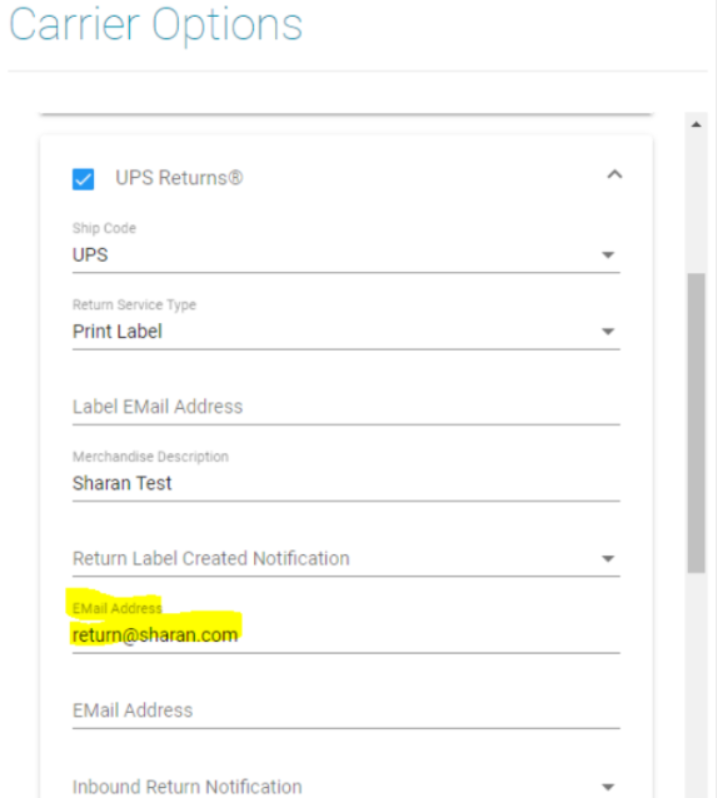
Select the below 4 parameters so that it will allow you to freight the shipment.
- Ship-Code
- Return Service Type
- Merchandise Description
- E-mail address Field under the “Return Label Created Notification”
We need to fill only these 4 fields under the “UPS Returns” Carrier Options.