Hello,
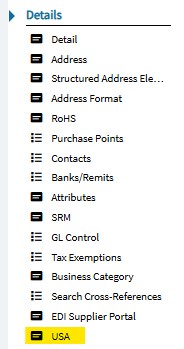
In App Studio I am trying to hide the Supplier - USA page based on the user security group. The USA page is nowhere to be found. It is showing on the Supplier Entry screen. Does anyone know how to hide it?
Hello,
In App Studio I am trying to hide the Supplier - USA page based on the user security group. The USA page is nowhere to be found. It is showing on the Supplier Entry screen. Does anyone know how to hide it?
That’s interesting, I can’t find it anywhere in the layer either. If you are trying to control who can modify that data its probably simpler to just implement field security.
Alisa, thanks for your reply.
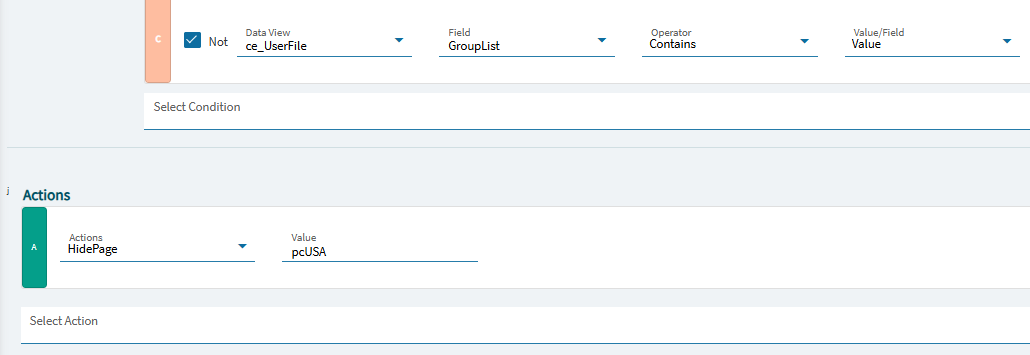
After hours of trial and error I entered pcUSA in the HidePage value area and it worked.
Sorry, but I am fascinated now - what is this USA page? I don’t see it in my 2024.2 environment. Maybe a module I do not have?
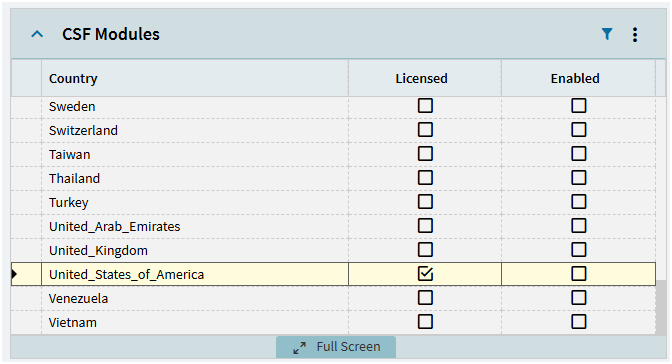
Do you have the US CSF? I think that is what enables it.
Kind of…
Am I supposed to enable it? We’ve survived 9 years without it…
I mean I can do it in Dev anyway.
Yeah when you enable it then you get the 1099 settings.
“Licensed” but not “Enabled” is an increasingly common issue in new Epicor cloud instances, both in PILOT and LIVE environments. Always good to check (just sort on the “Licensed” column and follow the checkboxes all the way down).
EAC has a “enable all licensed” button I think, also.
We bought (classic) configurator… 6 years ago? But I’ve never enabled it in production (only dev sometimes). I would love it if Epicor let us cancel that part of the contract. We will never use it; there are better options now.
Also, I still cannot get the USA page to show, but I have not exactly followed a guide for CSF… I’ll do a separate thread if I still cannot get it. Maybe even ask Epicor support!
What if you don’t want the 1099/CSF settings? Not sure what happened but my Supplier Entry broke today. Why?