10.1.500.26
Hey folks!
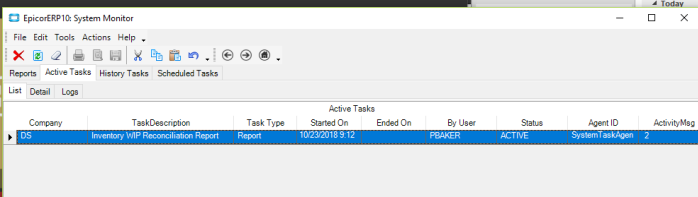
In System Monitor there is a column labelled ActivityMsg.
Can anyone tell me what the the numeric messages in this column mean? My “Inventory WIP Reconciliation Report” shows an ActivityMsg of 1.
Thanks,
Ben
10.1.500.26
Hey folks!
In System Monitor there is a column labelled ActivityMsg.
Can anyone tell me what the the numeric messages in this column mean? My “Inventory WIP Reconciliation Report” shows an ActivityMsg of 1.
Thanks,
Ben
I still need help with this.
I have a report that seems to be stuck.
Can anybody tell me what ActivityMsg “2” means?
Ben
If you navigate to “Help” in the top menu bar and reference application help it will give you descriptions for the fields in the active tasks list view. Currently it looks like there is not a description for that field so I would assume its an increment created of what tasks need to processed next. If your task has been stuck for a bit you can open admin console and restart the task agent service for the application server to see if it kicks off the task again.
It also took some addressing of the ice.systask and ice.systaskKill tables.
Thanks,
Ben