We do not use Avalara. We may need to soon. But regardless…
I have set up taxes already in our system. It’s quite the process, but it’s worked just fine for 3 years.
Now I am told that I need to make a condition based on FOB. I have never done this. The logic given is as the chart below. (We are in South Carolina [SC])
We used Avalera, and they were adamant in the sales pitch and training, that sales and use tax is always applied at the place where it is used. At least that was the legal interpretation.
For example, We’re in PA which has a 6% sales and use tax. Delaware has no sales tax. If we ordered some expensed equipment, and had it delivered to a ware house in DE, the seller would mostlikely not charge sales tax. If we then had that equipment transported to PA for use in our factory, we would owe PA the 6% sales tax on it.
This was a real problem for us as we often ship our products to the customers warehouse, which might be in a different tax jurisdiction than where it eventually ends up. We send Avalera the tax we collected for being shipped to tax area ‘A’, and then Avalera sends that tax collected to the tax collector of area ‘A’. If it ends up in Are ‘B’, then are B gets screwed out of the tax. We rationalize this with the understanding that we did what was right with the info we had. Even though sometimes we know where the end location is and that it differs from the ship to.
Anyway… If you collect that S.C. tax for “FOB Origin”, do you end up sending ito to S.C? If so, do you inform them of its actual destination? If the destinations tax rate is higher than 9%, how is that ever collected?
I deliberately presented this here as it was presented to me, but this was my thought as well - that tax on the goods and services is based on destination, not FOB.
Avalara’s site actually has an interesting section on this, that FOB can help everyone avoid taxes on the shipping fees. But that’s not saying that FOB changes the tax region of the goods.
I’ll ask again internally for clarification. Perhaps they just were referring to tax on freight.
FYI, this change (with the FOB thing) is not implemented yet here.
Hi Jason. I believe I have seen you state that you work for a fairly small company. If you don’t mind sharing, I’m curious how you manage sales tax without Tax Connect. Do you simply not have many taxing jurisdictions to manage? If you do have many (e.g. more than 10), how do you manage to stay current with changing rates and such? Not to mention, if you ship into states like Alabama, California, Colorado, Louisiana and/or Texas, how in the world do you manage all of the counties, cities, districts and special jurisdictions that are involved??? At my company, we went from having nexus in 2 states pre-Wayfair to having nexus in 41 states post-Wayfair. I simply cannot imagine trying to manage that burden (and it is just that, regardless of whatever opinion any court may have!) with the standard out-of-the-box sales tax functionality!
Short answer is that we mostly deal with companies that are tax-exempt to us, or they self-assess. For example, the majority is to dealers, so they are reselling our product anyway.
Beyond that, I set up what I am told and keep my nose out of the other business.
With Avalara this is much easier as we use a different Product Tax Category on the frieght based on FOB Dest vs Origin. However, with the Epicor Tax Engine you can do something similar by using Product Tax Categories and then adding them to the Tax Type rules for exemption.
I’m not Jason, but we have one of our companies using Avalara, and the other one doing it manually (large $, low volume of orders). It’s not too bad creating them by hand when you get the process down. Just lots of screens. The cost of Avalara didn’t justify the small volume of orders.
If someone got too frustrated with the process, maybe we’d create a customization that does it all on one screen from a handful of entry textboxes.
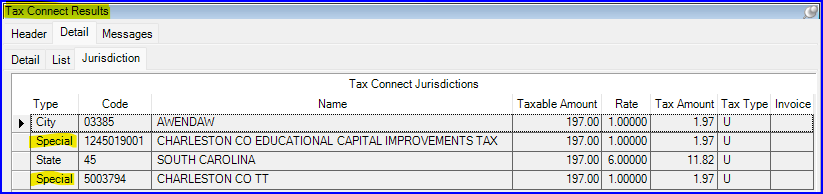
OK, I guess I can understand that, @askulte . Still, I’m really not wondering about how you guys manage the mechanics of the setups, but rather about how you know WHAT to set up! Here’s a good example that I just saw today in one of our sales orders:
If I were creating the tax setups on my own, I’m certain that I’d get the state right and fairly confident that I’d even nail the city jurisdiction, too. But, I also know there’s no way in hell that I would be aware of those “special” jurisdictions for which taxes must be collected!
I wish I had that option. Take a guess who finally convinced our director of finance that the Wayfair decision completely changed the sales tax game and that we had better adapt to the new rules or we’d find ourselves getting red carded!