I did a restore of Live to Pilot today.
Everything went as usual, but when I tried to run a report nothing happened.
The report form says Task submitted for previewing.
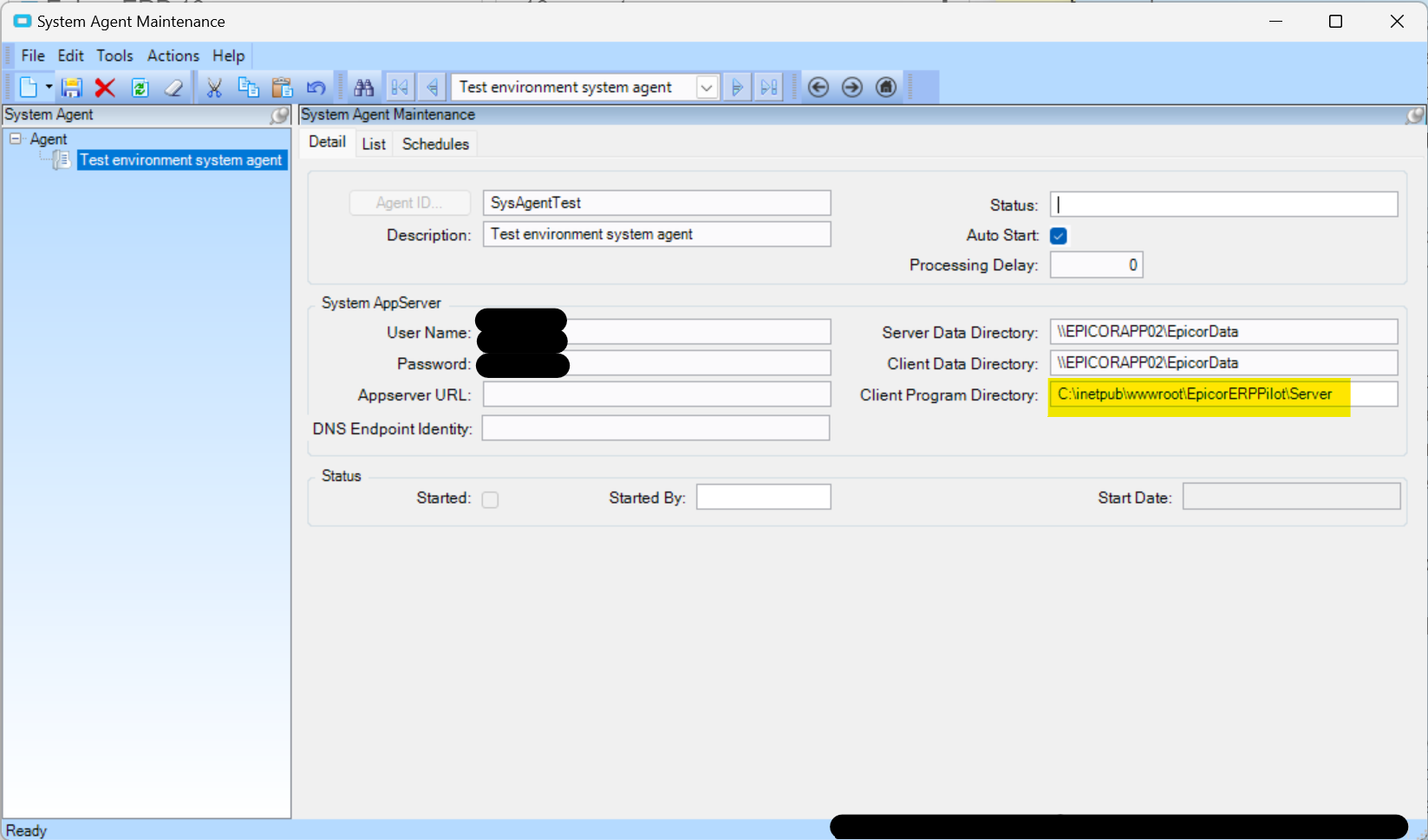
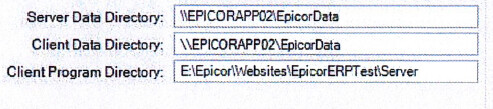
I did a little digging and I noticed that in System Agent Configuration > Client Program Directy is all wrong
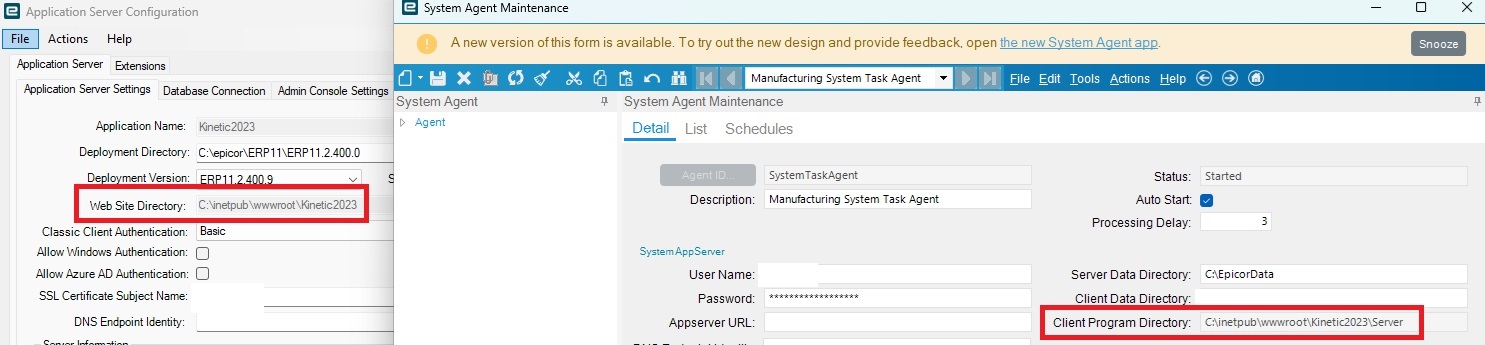
Are you sure it’s “wrong”? What does the App Server say in the Epicor Admin Console? That path is going to depend on where the environment was deployed and C:\inetpub\wwwroot is the default path. The Client Program Directory just goes a level deeper into the \Server folder.
Edit: When you say nothing happened… are your reports stuck under Scheduled Tasks or is there an error? You should be getting one or the other if you don’t get a report.
The tasks make it to the agent, then ERROR at 5%.
No error is ever presented by the client in the UI though.
In [EpicorERPPilot].[Ice].[SysTask] I see all of my failed tasks with a 1 for ActivityMsg and History.
I changed my config to open Pilot on our second app server.
Now when I check System Agent Maintenance, Client Program Directory is correct.
If you look in Company Maintenance, on the Reporting tab, has the SSRS Report Server section been configured by chance? That would be something you would need to update each time you copy an environment if so.
Or related idea, again in the app server, check the SSRS tab to make sure you haven’t cross pollenated the Reports database. These are generally different between your environments as well and it’s possible one got point to the wrong db during deployment if it’s never worked.
I’m not sure why you would not get any error messages in the System Monitor though.
I looked in [EpicorERPPilot].[Ice].[SysTaskLog] and found the following error message related to my failed tasks:
Program Ice.Services.Lib.RunTask raised an unexpected exception with the following message:
RunTask: System.Web.Services.Protocols.SoapException:
The item '/EpicorERPPilot/reports/CustomReports/SalesOrderAcknowledgement/SOFormLM' cannot be found.
---> Microsoft.ReportingServices.Diagnostics.Utilities.ItemNotFoundException: The item '/EpicorERPPilot/reports/CustomReports/SalesOrderAcknowledgement/SOFormLM' cannot be found.
at System.Web.Services.Protocols.SoapHttpClientProtocol.ReadResponse(SoapClientMessage message, WebResponse response, Stream responseStream, Boolean asyncCall)
at System.Web.Services.Protocols.SoapHttpClientProtocol.Invoke(String methodName, Object[] parameters)
at Ice.Core.SsrsReportService.ReportExecutionService.LoadReport(String Report, String HistoryID)
in C:\_Releases\ICE\UD10.2.500.40FW\Source\Server\Internal\Lib\TaskLib\Web References\SsrsReportService\Reference.cs:line 287
at Ice.Core.SsrsReporting.SsrsRendererBase.ConfigureReportServerForReport(String reportPath, ParameterValue[] parameters)
in C:\_Releases\ICE\UD10.2.500.40FW\Source\Server\Internal\Lib\TaskLib\SsrsReporting\SsrsRendererBase.cs:line 163
at Ice.Core.SsrsReporting.SsrsSingleDocumentRenderer.<>c__DisplayClass1_0.<RenderDocument>b__0()
in C:\_Releases\ICE\UD10.2.500.40FW\Source\Server\Internal\Lib\TaskLib\SsrsReporting\SsrsSingleDocumentRenderer.cs:line 49
at Ice.Core.SsrsReporting.SsrsRendererBase.<>c__DisplayClass12_0.<TraceReportRendered>b__0()
in C:\_Releases\ICE\UD10.2.500.40FW\Source\Server\Internal\Lib\TaskLib\SsrsReporting\SsrsRendererBase.cs:line 87
at Epicor.Hosting.Trace.TraceHandle.TimeAction(Action actionToTime)
in C:\_Releases\ICE\UD10.2.500.40FW\Source\Framework\Epicor.System\Hosting\Trace\TraceHandle.cs:line 92
at Epicor.Hosting.Trace.TraceHandle.AddTimedIfEnabled(String traceFlag, Action actionToTime, Func`2 messageBuilder)
in C:\_Releases\ICE\UD10.2.500.40FW\Source\Framework\Epicor.System\Hosting\Trace\TraceHandle.cs:line 39
at Ice.Core.SsrsReporting.SsrsRendererBase.TraceReportRendered(String printProgram, String ssrsRenderFormat, Func`1 timedAction)
in C:\_Releases\ICE\UD10.2.500.40FW\Source\Server\Internal\Lib\TaskLib\SsrsReporting\SsrsRendererBase.cs:line 95
at Ice.Core.SsrsReporting.ReportProcessorBase.RenderReportForPreviewOrGenerate(RenderedSsrsReport renderedReport)
in C:\_Releases\ICE\UD10.2.500.40FW\Source\Server\Internal\Lib\TaskLib\SsrsReporting\ReportProcessorBase.cs:line 264
at Ice.Core.SsrsReporting.ReportProcessorBase.ProcessReportPart(String reportLocation)
in C:\_Releases\ICE\UD10.2.500.40FW\Source\Server\Internal\Lib\TaskLib\SsrsReporting\ReportProcessorBase.cs:line 158
at Ice.Core.SsrsReporting.StandardReportProcessor.ProcessReportParts()
in C:\_Releases\ICE\UD10.2.500.40FW\Source\Server\Internal\Lib\TaskLib\SsrsReporting\StandardReportProcessor.cs:line 31
at Ice.Core.RoutingAndBreaking.ReportPersister.Persist(ReportInstanceInformation reportInstance, Func`2 reportsRenderer, Action`1 fillSysRptLstRow, Action`2 processReport, Func`3 filterTableAttachmentsFunc)
in C:\_Releases\ICE\UD10.2.500.40FW\Source\Server\Internal\Lib\TaskLib\RoutingAndBreaking\ReportPersister.cs:line 59
at Ice.Core.RptBase.ReportSsrsDatabaseBuilder.RenderUnroutedSsrsReport()
in C:\_Releases\ICE\UD10.2.500.40FW\Source\Server\Internal\Lib\TaskLib\RptBase\ReportSsrsDatabaseBuilder.cs:line 303
at Ice.Core.RptBase.ReportSsrsDatabaseBuilder.RunSsrsReportIfEnabled()
in C:\_Releases\ICE\UD10.2.500.40FW\Source\Server\Internal\Lib\TaskLib\RptBase\ReportSsrsDatabaseBuilder.cs:line 228
at Ice.Core.RptBase.ReportSsrsDatabaseBuilder.ProcessReportWithDataInPlace(Func`2 executeCommand, Func`2 executeReader, SqlObjectsCreated sqlObjectsCreated)
in C:\_Releases\ICE\UD10.2.500.40FW\Source\Server\Internal\Lib\TaskLib\RptBase\ReportSsrsDatabaseBuilder.cs:line 111
at Ice.Core.RptBase.ReportDatabaseBuilder.XMLClose()
in C:\_Releases\ICE\UD10.2.500.40FW\Source\Server\Internal\Lib\TaskLib\RptBase\ReportDatabaseBuilder.cs:line 93
at Ice.Core.RptTaskBase`1.XMLClose()
in C:\_Releases\ICE\UD10.2.500.40FW\Source\Server\Internal\Lib\TaskLib\RptBase\RptTaskBase.cs:line 229
at Erp.Internal.OM.SalesOrderAck.RunProcess(Int64 instanceTaskNum, String outputFileName)
in C:\_Releases\ERP\UD10.2.500.40\Source\Server\Internal\OM\SalesOrderAck\SalesOrderAck.cs:line 691
at Ice.Core.TaskBase`1.StartProcess(Int64 instanceTaskNum, String outputFileName)
in C:\_Releases\ICE\UD10.2.500.40FW\Source\Server\Internal\Lib\TaskLib\TaskBase\TaskBase.cs:line 83
at Ice.Hosting.TaskCaller.InnerExecuteTask(IceDataContext newContext)
in C:\_Releases\ICE\UD10.2.500.40FW\Source\Framework\Epicor.Ice\Hosting\TaskCaller\TaskCaller.cs:line 117
at Ice.Hosting.TaskCaller.ExecuteTask()
in C:\_Releases\ICE\UD10.2.500.40FW\Source\Framework\Epicor.Ice\Hosting\TaskCaller\TaskCaller.cs:line 59
at Ice.Lib.RunTask.BpmFriendlyTaskLauncher.Run(String sessionIdPrefix, IceContext db, Action taskRunner)
in C:\_Releases\ICE\RL10.2.500.0FW\Source\Server\Services\Lib\RunTask\BpmFriendlyTaskLauncher.cs:line 63
at Ice.Services.Lib.RunTaskSvc.InnerRunTask(Int64 ipTaskNum, Boolean suppressTransaction)
in C:\_Releases\ICE\RL10.2.500.0FW\Source\Server\Services\Lib\RunTask\RunTask.cs:line 452
The good news is that this is an easy fix. Your custom report is missing from this report database. Standard reports should work, but your custom ones won’t.
You can export it from production and import it to pilot and you should be good. The tedious part is that you have to do this for all your custom reports. Alternatively, you could use the solution builder.
I copied this specific report, now I am getting this error
Program Ice.Services.Lib.RunTask raised an unexpected exception with the following message: RunTask:
System.Web.Services.Protocols.SoapException: An error has occurred during report processing. ---> Microsoft.ReportingServices.ReportProcessing.ProcessingAbortedException: An error has occurred during report processing. ---> Microsoft.ReportingServices.ReportProcessing.ReportProcessingException: Query execution failed for dataset 'OrderHed'. ---> System.Exception: For more information about this error navigate to the report server on the local server machine, or enable remote errors
   at System.Web.Services.Protocols.SoapHttpClientProtocol.ReadResponse(SoapClientMessage message, WebResponse response, Stream responseStream, Boolean asyncCall)
   at System.Web.Services.Protocols.SoapHttpClientProtocol.Invoke(String methodName, Object[] parameters)
   at Ice.Core.SsrsReportService.ReportExecutionService.SetExecutionParameters(ParameterValue[] Parameters, String ParameterLanguage) in C:\_Releases\ICE\UD10.2.500.40FW\Source\Server\Internal\Lib\TaskLib\Web References\SsrsReportService\Reference.cs:line 497
   at Ice.Core.SsrsReporting.SsrsRendererBase.ConfigureReportServerForReport(String reportPath, ParameterValue[] parameters) in C:\_Releases\ICE\UD10.2.500.40FW\Source\Server\Internal\Lib\TaskLib\SsrsReporting\SsrsRendererBase.cs:line 163
   at Ice.Core.SsrsReporting.SsrsSingleDocumentRenderer.<>c__DisplayClass1_0.<RenderDocument>b__0() in C:\_Releases\ICE\UD10.2.500.40FW\Source\Server\Internal\Lib\TaskLib\SsrsReporting\SsrsSingleDocumentRenderer.cs:line 49
   at Ice.Core.SsrsReporting.SsrsRendererBase.<>c__DisplayClass12_0.<TraceReportRendered>b__0() in C:\_Releases\ICE\UD10.2.500.40FW\Source\Server\Internal\Lib\TaskLib\SsrsReporting\SsrsRendererBase.cs:line 87
   at Epicor.Hosting.Trace.TraceHandle.TimeAction(Action actionToTime) in C:\_Releases\ICE\UD10.2.500.40FW\Source\Framework\Epicor.System\Hosting\Trace\TraceHandle.cs:line 92
   at Epicor.Hosting.Trace.TraceHandle.AddTimedIfEnabled(String traceFlag, Action actionToTime, Func`2 messageBuilder) in C:\_Releases\ICE\UD10.2.500.40FW\Source\Framework\Epicor.System\Hosting\Trace\TraceHandle.cs:line 39
   at Ice.Core.SsrsReporting.SsrsRendererBase.TraceReportRendered(String printProgram, String ssrsRenderFormat, Func`1 timedAction) in C:\_Releases\ICE\UD10.2.500.40FW\Source\Server\Internal\Lib\TaskLib\SsrsReporting\SsrsRendererBase.cs:line 95
   at Ice.Core.SsrsReporting.ReportProcessorBase.RenderReportForPreviewOrGenerate(RenderedSsrsReport renderedReport) in C:\_Releases\ICE\UD10.2.500.40FW\Source\Server\Internal\Lib\TaskLib\SsrsReporting\ReportProcessorBase.cs:line 264
   at Ice.Core.SsrsReporting.ReportProcessorBase.ProcessReportPart(String reportLocation) in C:\_Releases\ICE\UD10.2.500.40FW\Source\Server\Internal\Lib\TaskLib\SsrsReporting\ReportProcessorBase.cs:line 158
   at Ice.Core.SsrsReporting.StandardReportProcessor.ProcessReportParts() in C:\_Releases\ICE\UD10.2.500.40FW\Source\Server\Internal\Lib\TaskLib\SsrsReporting\StandardReportProcessor.cs:line 31
   at Ice.Core.RoutingAndBreaking.ReportPersister.Persist(ReportInstanceInformation reportInstance, Func`2 reportsRenderer, Action`1 fillSysRptLstRow, Action`2 processReport, Func`3 filterTableAttachmentsFunc) in C:\_Releases\ICE\UD10.2.500.40FW\Source\Server\Internal\Lib\TaskLib\RoutingAndBreaking\ReportPersister.cs:line 59
   at Ice.Core.RptBase.ReportSsrsDatabaseBuilder.RenderUnroutedSsrsReport() in C:\_Releases\ICE\UD10.2.500.40FW\Source\Server\Internal\Lib\TaskLib\RptBase\ReportSsrsDatabaseBuilder.cs:line 303
   at Ice.Core.RptBase.ReportSsrsDatabaseBuilder.RunSsrsReportIfEnabled() in C:\_Releases\ICE\UD10.2.500.40FW\Source\Server\Internal\Lib\TaskLib\RptBase\ReportSsrsDatabaseBuilder.cs:line 228
   at Ice.Core.RptBase.ReportSsrsDatabaseBuilder.ProcessReportWithDataInPlace(Func`2 executeCommand, Func`2 executeReader, SqlObjectsCreated sqlObjectsCreated) in C:\_Releases\ICE\UD10.2.500.40FW\Source\Server\Internal\Lib\TaskLib\RptBase\ReportSsrsDatabaseBuilder.cs:line 111
   at Ice.Core.RptBase.ReportDatabaseBuilder.XMLClose() in C:\_Releases\ICE\UD10.2.500.40FW\Source\Server\Internal\Lib\TaskLib\RptBase\ReportDatabaseBuilder.cs:line 93
   at Ice.Core.RptTaskBase`1.XMLClose() in C:\_Releases\ICE\UD10.2.500.40FW\Source\Server\Internal\Lib\TaskLib\RptBase\RptTaskBase.cs:line 229
   at Erp.Internal.OM.SalesOrderAck.RunProcess(Int64 instanceTaskNum, String outputFileName) in C:\_Releases\ERP\UD10.2.500.40\Source\Server\Internal\OM\SalesOrderAck\SalesOrderAck.cs:line 691
   at Ice.Core.TaskBase`1.StartProcess(Int64 instanceTaskNum, String outputFileName) in C:\_Releases\ICE\UD10.2.500.40FW\Source\Server\Internal\Lib\TaskLib\TaskBase\TaskBase.cs:line 83
   at Ice.Hosting.TaskCaller.InnerExecuteTask(IceDataContext newContext) in C:\_Releases\ICE\UD10.2.500.40FW\Source\Framework\Epicor.Ice\Hosting\TaskCaller\TaskCaller.cs:line 117
   at Ice.Hosting.TaskCaller.ExecuteTask() in C:\_Releases\ICE\UD10.2.500.40FW\Source\Framework\Epicor.Ice\Hosting\TaskCaller\TaskCaller.cs:line 59
   at Ice.Lib.RunTask.BpmFriendlyTaskLauncher.Run(String sessionIdPrefix, IceContext db, Action taskRunner) in C:\_Releases\ICE\RL10.2.500.0FW\Source\Server\Services\Lib\RunTask\BpmFriendlyTaskLauncher.cs:line 63
   at Ice.Services.Lib.RunTaskSvc.InnerRunTask(Int64 ipTaskNum, Boolean suppressTransaction) in C:\_Releases\ICE\RL10.2.500.0FW\Source\Server\Services\Lib\RunTask\RunTask.cs:line 452
This morning I enabled remote errors in SSRS.
Here is the new error:
Program Ice.Services.Lib.RunTask raised an unexpected exception with the following message: RunTask:
System.Web.Services.Protocols.SoapException: An error has occurred during report processing. ---> Microsoft.ReportingServices.ReportProcessing.ProcessingAbortedException: An error has occurred during report processing. ---> Microsoft.ReportingServices.ReportProcessing.ReportProcessingException: Query execution failed for dataset 'OrderHed'. ---> System.Data.SqlClient.SqlException: Invalid object name 'OrderHed_4c547f6c74f848fb88018721573e63a4'.
   at System.Web.Services.Protocols.SoapHttpClientProtocol.ReadResponse(SoapClientMessage message, WebResponse response, Stream responseStream, Boolean asyncCall)
   at System.Web.Services.Protocols.SoapHttpClientProtocol.Invoke(String methodName, Object[] parameters)
   at Ice.Core.SsrsReportService.ReportExecutionService.SetExecutionParameters(ParameterValue[] Parameters, String ParameterLanguage) in C:\_Releases\ICE\UD10.2.500.40FW\Source\Server\Internal\Lib\TaskLib\Web References\SsrsReportService\Reference.cs:line 497
   at Ice.Core.SsrsReporting.SsrsRendererBase.ConfigureReportServerForReport(String reportPath, ParameterValue[] parameters) in C:\_Releases\ICE\UD10.2.500.40FW\Source\Server\Internal\Lib\TaskLib\SsrsReporting\SsrsRendererBase.cs:line 163
   at Ice.Core.SsrsReporting.SsrsSingleDocumentRenderer.<>c__DisplayClass1_0.<RenderDocument>b__0() in C:\_Releases\ICE\UD10.2.500.40FW\Source\Server\Internal\Lib\TaskLib\SsrsReporting\SsrsSingleDocumentRenderer.cs:line 49
   at Ice.Core.SsrsReporting.SsrsRendererBase.<>c__DisplayClass12_0.<TraceReportRendered>b__0() in C:\_Releases\ICE\UD10.2.500.40FW\Source\Server\Internal\Lib\TaskLib\SsrsReporting\SsrsRendererBase.cs:line 87
   at Epicor.Hosting.Trace.TraceHandle.TimeAction(Action actionToTime) in C:\_Releases\ICE\UD10.2.500.40FW\Source\Framework\Epicor.System\Hosting\Trace\TraceHandle.cs:line 92
   at Epicor.Hosting.Trace.TraceHandle.AddTimedIfEnabled(String traceFlag, Action actionToTime, Func`2 messageBuilder) in C:\_Releases\ICE\UD10.2.500.40FW\Source\Framework\Epicor.System\Hosting\Trace\TraceHandle.cs:line 39
   at Ice.Core.SsrsReporting.SsrsRendererBase.TraceReportRendered(String printProgram, String ssrsRenderFormat, Func`1 timedAction) in C:\_Releases\ICE\UD10.2.500.40FW\Source\Server\Internal\Lib\TaskLib\SsrsReporting\SsrsRendererBase.cs:line 95
   at Ice.Core.SsrsReporting.ReportProcessorBase.RenderReportForPreviewOrGenerate(RenderedSsrsReport renderedReport) in C:\_Releases\ICE\UD10.2.500.40FW\Source\Server\Internal\Lib\TaskLib\SsrsReporting\ReportProcessorBase.cs:line 264
   at Ice.Core.SsrsReporting.ReportProcessorBase.ProcessReportPart(String reportLocation) in C:\_Releases\ICE\UD10.2.500.40FW\Source\Server\Internal\Lib\TaskLib\SsrsReporting\ReportProcessorBase.cs:line 158
   at Ice.Core.SsrsReporting.StandardReportProcessor.ProcessReportParts() in C:\_Releases\ICE\UD10.2.500.40FW\Source\Server\Internal\Lib\TaskLib\SsrsReporting\StandardReportProcessor.cs:line 31
   at Ice.Core.RoutingAndBreaking.ReportPersister.Persist(ReportInstanceInformation reportInstance, Func`2 reportsRenderer, Action`1 fillSysRptLstRow, Action`2 processReport, Func`3 filterTableAttachmentsFunc) in C:\_Releases\ICE\UD10.2.500.40FW\Source\Server\Internal\Lib\TaskLib\RoutingAndBreaking\ReportPersister.cs:line 59
   at Ice.Core.RptBase.ReportSsrsDatabaseBuilder.RenderUnroutedSsrsReport() in C:\_Releases\ICE\UD10.2.500.40FW\Source\Server\Internal\Lib\TaskLib\RptBase\ReportSsrsDatabaseBuilder.cs:line 303
   at Ice.Core.RptBase.ReportSsrsDatabaseBuilder.RunSsrsReportIfEnabled() in C:\_Releases\ICE\UD10.2.500.40FW\Source\Server\Internal\Lib\TaskLib\RptBase\ReportSsrsDatabaseBuilder.cs:line 228
   at Ice.Core.RptBase.ReportSsrsDatabaseBuilder.ProcessReportWithDataInPlace(Func`2 executeCommand, Func`2 executeReader, SqlObjectsCreated sqlObjectsCreated) in C:\_Releases\ICE\UD10.2.500.40FW\Source\Server\Internal\Lib\TaskLib\RptBase\ReportSsrsDatabaseBuilder.cs:line 111
   at Ice.Core.RptBase.ReportDatabaseBuilder.XMLClose() in C:\_Releases\ICE\UD10.2.500.40FW\Source\Server\Internal\Lib\TaskLib\RptBase\ReportDatabaseBuilder.cs:line 93
   at Ice.Core.RptTaskBase`1.XMLClose() in C:\_Releases\ICE\UD10.2.500.40FW\Source\Server\Internal\Lib\TaskLib\RptBase\RptTaskBase.cs:line 229
   at Erp.Internal.OM.SalesOrderAck.RunProcess(Int64 instanceTaskNum, String outputFileName) in C:\_Releases\ERP\UD10.2.500.40\Source\Server\Internal\OM\SalesOrderAck\SalesOrderAck.cs:line 691
   at Ice.Core.TaskBase`1.StartProcess(Int64 instanceTaskNum, String outputFileName) in C:\_Releases\ICE\UD10.2.500.40FW\Source\Server\Internal\Lib\TaskLib\TaskBase\TaskBase.cs:line 83
   at Ice.Hosting.TaskCaller.InnerExecuteTask(IceDataContext newContext) in C:\_Releases\ICE\UD10.2.500.40FW\Source\Framework\Epicor.Ice\Hosting\TaskCaller\TaskCaller.cs:line 117
   at Ice.Hosting.TaskCaller.ExecuteTask() in C:\_Releases\ICE\UD10.2.500.40FW\Source\Framework\Epicor.Ice\Hosting\TaskCaller\TaskCaller.cs:line 59
   at Ice.Lib.RunTask.BpmFriendlyTaskLauncher.Run(String sessionIdPrefix, IceContext db, Action taskRunner) in C:\_Releases\ICE\RL10.2.500.0FW\Source\Server\Services\Lib\RunTask\BpmFriendlyTaskLauncher.cs:line 63
   at Ice.Services.Lib.RunTaskSvc.InnerRunTask(Int64 ipTaskNum, Boolean suppressTransaction) in C:\_Releases\ICE\RL10.2.500.0FW\Source\Server\Services\Lib\RunTask\RunTask.cs:line 452
Have you confirmed that the standard reports work and it’s only the custom ones that do not?
When you run one of these custom reports, you can set the archive setting to something more than 0 and it will keep the tables in the reporting database for that amount of time. You can then go look in the SQL db to confirm that it does exist in the correct place. That OrderHed_4c547f6c74f848fb88018721573e63a4 won’t be there anymore unless you already had the archive duration set, but you can run another one and see.
When you copy the report from one environment to the other, the cleanest way to do so is via Report Style maintenance. While you have the custom form selected, you can choose Download Report from the Actions menu. Likewise, when you import it into the other environment you can do the reverse. When you have the custom report style selected, you can choose Upload Report from the Actions menu. This makes sure that you get all related reports/subreports as well.
Unfortunately, after moving all of our custom reports from Live to Pilot I am still seeing this error.
Strangely, SalesOrderAck now works perfectly!
I tried Green Tags and Pack Slip and I get this error
Program Ice.Services.Lib.RunTask raised an unexpected exception with the following message: RunTask:
System.Web.Services.Protocols.SoapException: An error has occurred during report processing. ---> Microsoft.ReportingServices.ReportProcessing.ProcessingAbortedException: An error has occurred during report processing. ---> Microsoft.ReportingServices.ReportProcessing.ReportProcessingException: Query execution failed for dataset 'RptParameter'. ---> System.Data.SqlClient.SqlException: Invalid object name 'RptParameter_6b343594457444698d793273b1c0297d'.
   at System.Web.Services.Protocols.SoapHttpClientProtocol.ReadResponse(SoapClientMessage message, WebResponse response, Stream responseStream, Boolean asyncCall)
   at System.Web.Services.Protocols.SoapHttpClientProtocol.Invoke(String methodName, Object[] parameters)
   at Ice.Core.SsrsReportService.ReportExecutionService.Render(String Format, String DeviceInfo, String& Extension, String& MimeType, String& Encoding, Warning[]& Warnings, String[]& StreamIds) in C:\_Releases\ICE\UD10.2.500.40FW\Source\Server\Internal\Lib\TaskLib\Web References\SsrsReportService\Reference.cs:line 633
   at Ice.Core.SsrsReporting.SsrsRendererBase.Render(SsrsRenderInformationBase renderInformation) in C:\_Releases\ICE\UD10.2.500.40FW\Source\Server\Internal\Lib\TaskLib\SsrsReporting\SsrsRendererBase.cs:line 142
   at Ice.Core.SsrsReporting.SsrsRendererBase.<>c__DisplayClass12_0.<TraceReportRendered>b__0() in C:\_Releases\ICE\UD10.2.500.40FW\Source\Server\Internal\Lib\TaskLib\SsrsReporting\SsrsRendererBase.cs:line 87
   at Epicor.Hosting.Trace.TraceHandle.TimeAction(Action actionToTime) in C:\_Releases\ICE\UD10.2.500.40FW\Source\Framework\Epicor.System\Hosting\Trace\TraceHandle.cs:line 92
   at Epicor.Hosting.Trace.TraceHandle.AddTimedIfEnabled(String traceFlag, Action actionToTime, Func`2 messageBuilder) in C:\_Releases\ICE\UD10.2.500.40FW\Source\Framework\Epicor.System\Hosting\Trace\TraceHandle.cs:line 39
   at Ice.Core.SsrsReporting.SsrsRendererBase.TraceReportRendered(String printProgram, String ssrsRenderFormat, Func`1 timedAction) in C:\_Releases\ICE\UD10.2.500.40FW\Source\Server\Internal\Lib\TaskLib\SsrsReporting\SsrsRendererBase.cs:line 95
   at Ice.Core.SsrsReporting.ReportProcessorBase.RenderReportForPreviewOrGenerate(RenderedSsrsReport renderedReport) in C:\_Releases\ICE\UD10.2.500.40FW\Source\Server\Internal\Lib\TaskLib\SsrsReporting\ReportProcessorBase.cs:line 264
   at Ice.Core.SsrsReporting.ReportProcessorBase.ProcessReportPart(String reportLocation) in C:\_Releases\ICE\UD10.2.500.40FW\Source\Server\Internal\Lib\TaskLib\SsrsReporting\ReportProcessorBase.cs:line 158
   at Ice.Core.SsrsReporting.PackSlipReportProcessor.ProcessReportParts() in C:\_Releases\ICE\UD10.2.500.40FW\Source\Server\Internal\Lib\TaskLib\SsrsReporting\PackSlipReportProcessor.cs:line 57
   at Ice.Core.RoutingAndBreaking.ReportPersister.Persist(ReportInstanceInformation reportInstance, Func`2 reportsRenderer, Action`1 fillSysRptLstRow, Action`2 processReport, Func`3 filterTableAttachmentsFunc) in C:\_Releases\ICE\UD10.2.500.40FW\Source\Server\Internal\Lib\TaskLib\RoutingAndBreaking\ReportPersister.cs:line 59
   at Ice.Core.RptBase.ReportSsrsDatabaseBuilder.RenderUnroutedSsrsReport() in C:\_Releases\ICE\UD10.2.500.40FW\Source\Server\Internal\Lib\TaskLib\RptBase\ReportSsrsDatabaseBuilder.cs:line 303
   at Ice.Core.RptBase.ReportSsrsDatabaseBuilder.RunSsrsReportIfEnabled() in C:\_Releases\ICE\UD10.2.500.40FW\Source\Server\Internal\Lib\TaskLib\RptBase\ReportSsrsDatabaseBuilder.cs:line 228
   at Ice.Core.RptBase.ReportSsrsDatabaseBuilder.ProcessReportWithDataInPlace(Func`2 executeCommand, Func`2 executeReader, SqlObjectsCreated sqlObjectsCreated) in C:\_Releases\ICE\UD10.2.500.40FW\Source\Server\Internal\Lib\TaskLib\RptBase\ReportSsrsDatabaseBuilder.cs:line 111
   at Ice.Core.RptBase.ReportDatabaseBuilder.XMLClose() in C:\_Releases\ICE\UD10.2.500.40FW\Source\Server\Internal\Lib\TaskLib\RptBase\ReportDatabaseBuilder.cs:line 93
   at Ice.Core.RptTaskBase`1.XMLClose() in C:\_Releases\ICE\UD10.2.500.40FW\Source\Server\Internal\Lib\TaskLib\RptBase\RptTaskBase.cs:line 229
   at Erp.Internal.SR.PackingSlipPrint.RunProcess(Int64 Instance_TaskNum, String OutputFile) in C:\_Releases\ERP\UD10.2.500.40\Source\Server\Internal\SR\PackingSlipPrint\PackingSlipPrint.cs:line 1075
   at Ice.Core.TaskBase`1.StartProcess(Int64 instanceTaskNum, String outputFileName) in C:\_Releases\ICE\UD10.2.500.40FW\Source\Server\Internal\Lib\TaskLib\TaskBase\TaskBase.cs:line 83
   at Ice.Hosting.TaskCaller.InnerExecuteTask(IceDataContext newContext) in C:\_Releases\ICE\UD10.2.500.40FW\Source\Framework\Epicor.Ice\Hosting\TaskCaller\TaskCaller.cs:line 117
   at Ice.Hosting.TaskCaller.ExecuteTask() in C:\_Releases\ICE\UD10.2.500.40FW\Source\Framework\Epicor.Ice\Hosting\TaskCaller\TaskCaller.cs:line 59
   at Ice.Lib.RunTask.BpmFriendlyTaskLauncher.Run(String sessionIdPrefix, IceContext db, Action taskRunner) in C:\_Releases\ICE\RL10.2.500.0FW\Source\Server\Services\Lib\RunTask\BpmFriendlyTaskLauncher.cs:line 63
   at Ice.Services.Lib.RunTaskSvc.InnerRunTask(Int64 ipTaskNum, Boolean suppressTransaction) in C:\_Releases\ICE\RL10.2.500.0FW\Source\Server\Services\Lib\RunTask\RunTask.cs:line 452