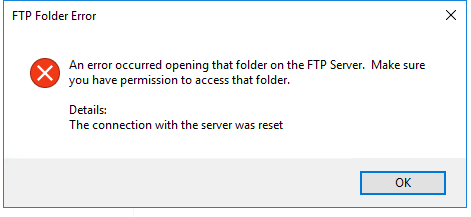
I am trying to Create a .BT File for my Bartender report which will act as a MAP File.
In have Bartender Integration And Bartender Admin Console in Place.
the only thing here is I am creating the.BT File from the Output of a BAQ using Below Code
///////////////////////////////// BPM Code triggering from Data Directive UD01  /////////////////////////////////////

string JobNum = string.Empty;
//string OrderNum = string.Empty;

var ttUD01Var = (from ds in ttUD01 where ds.Company == Session.CompanyID &&  ds.RowMod == "A" select ds).FirstOrDefault();
if(ttUD01Var != null)
{
JobNum = ttUD01Var.Character02.ToString();


List<string> JobList = new List<string>();

string[] subs = JobNum.Split(',');

foreach (var sub in subs)
{
    JobList.Add(sub);

    var DbJobhead = (from ds in Db.JobHead where ds.Company == Session.CompanyID &&  ds.JobNum == sub select ds).FirstOrDefault();
    if(DbJobhead != null)
    {
        DbJobhead.TravelerLastPrinted = DateTime.Today;
        Db.Validate();
        Db.SaveChanges();
    }
}
try
  {
    Ice.Contracts.DynamicQuerySvcContract boDynamicQuery2 = Ice.Assemblies.ServiceRenderer.GetService<Ice.Contracts.DynamicQuerySvcContract>(Db);
    Ice.Tablesets.QueryExecutionTableset dsQueryExecution = new QueryExecutionTableset();

    foreach(string JobNumParam in JobList)
    {
      ExecutionParameterRow drRow10 = new ExecutionParameterRow();
      drRow10.ParameterID = "JobNum";
      drRow10.ParameterValue = JobNumParam;
      drRow10.ValueType = "nvarchar";
      drRow10.IsEmpty = false;
      drRow10.RowMod = "A";
      drRow10.SysRowID = new Guid();
      dsQueryExecution.ExecutionParameter.Add(drRow10);
    }


    DataSet dsResults = boDynamicQuery2.ExecuteByID("MYBAQData", dsQueryExecution);
    DataTable dtResults = dsResults.Tables[0];
    if( dtResults.Rows.Count == 0)
    {
      this.PublishInfoMessage("No record found", Ice.Common.BusinessObjectMessageType.Information, Ice.Bpm.InfoMessageDisplayMode.Individual, "ABCCode", "Update");
      return;
    }
    try
    {
      DateTime DateTime = DateTime.Now;
      //IMPORTANT NOTE!!!
      // BTWLocation can be set on the SHIPTO,CUSTOMER,USERCODE (field name BTWLocation_c) (format C:\BARTENDER\Labels\RcvLabelPCID.btw)
      //string BTWLocation = "\""+ "c:\\Bartender\\Labels\\BartenderReport.btw" + "\"";
      string BTWLocation = "\""+ "c:\\Bartender\\Labels\\BartenderReport" + "\"";
      //string BTWFile = UserCode.CodeDesc;
      string BTWFile = "BTW File";
      //string FileName = UserCode.LongDesc;
      string FileName = "File Name";

      int NumberOfPrints = 1;
      NumberOfPrints = NumberOfPrints == 0 ? 1 : NumberOfPrints;
      for( int i = 1 ; i <= NumberOfPrints ; i++)
      {
        string BTWFileFormat = @"\\MyMountedDrive\\Site\\Production\\Bartender\\";
        string PrefixFileName = "FileName";
        string postFix = DateTime.Now.ToString("yyyy-dd-M--HH-mm-ss");
        string NewFileName = BTWFileFormat + PrefixFileName +"" + postFix + ".bt";
        //string NewFileName = BTWFileFormat + "sp.bt";
        using (StreamWriter sw = File.CreateText(NewFileName))
        {
          //this.PublishInfoMessage("Create New File", Ice.Common.BusinessObjectMessageType.Information, Ice.Bpm.InfoMessageDisplayMode.Individual, "ABCCode", "Update");
          string PRNValue = "\""+ "\\\\Printer\\Job Traveler" + "\"";
          if(PRNValue == string.Empty)
          {
            this.PublishInfoMessage("Network not found on the printer", Ice.Common.BusinessObjectMessageType.Information, Ice.Bpm.InfoMessageDisplayMode.Individual, "ABCCode", "Update");

            return;
          }
          if(BTWLocation == string.Empty || FileName == string.Empty)
          {
            this.PublishInfoMessage("BTW file value or FileName Value shouldn't be empty", Ice.Common.BusinessObjectMessageType.Information, Ice.Bpm.InfoMessageDisplayMode.Individual, "ABCCode", "Update");
            return;
          }
          string ConfigString = "%BTW% /AF=" + BTWLocation + " /D=\"<Trigger File Name>\" /PRN=" +  PRNValue + " /DBTEXTHEADER=3 /R=3 /P " ;
          string ConfigEndString = "%END%";
          sw.WriteLine(ConfigString);
          sw.WriteLine(ConfigEndString);
          DataTable table = dtResults;
          bool firstCol = true;
          foreach (DataColumn col in table.Columns)
          {
            if (!firstCol)
            sw.Write(",");
            sw.Write("\"" + col.ColumnName+ "\"" );
            firstCol = false;
          }
          sw.WriteLine();
          foreach (DataRow row in table.Rows)
          {
            firstCol = true;
            foreach (DataColumn col in table.Columns)
            {
              if (!firstCol)
              sw.Write(",");
              sw.Write("\"" + row[col].ToString() + "\"" );
              firstCol = false;
            }
          sw.WriteLine();
          }
        }
      }
    }
    catch(Exception E)
    {
      this.PublishInfoMessage(E.Message.ToString(), Ice.Common.BusinessObjectMessageType.Information, Ice.Bpm.InfoMessageDisplayMode.Individual, "ABCCode", "Update");
    }
      this.PublishInfoMessage("Submitted to Printing!", Ice.Common.BusinessObjectMessageType.Information, Ice.Bpm.InfoMessageDisplayMode.Individual, "ABCCode", "Update");
  }
  catch(Exception E)
  {
  this.PublishInfoMessage(E.Message.ToString(), Ice.Common.BusinessObjectMessageType.Information, Ice.Bpm.InfoMessageDisplayMode.Individual, "ABCCode", "Update");
  }
}

////////// Code END /////////
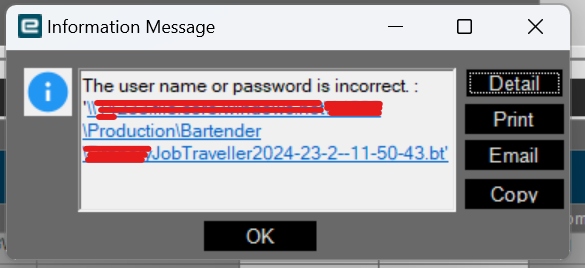
Before Couple of Weeks I was able to successfully create the.BT File there was no Problem But Suddenly System started throwing below Error message of Username and password.
Any help is much appreciated.