Go with Dashboard, that sets the prefix and then you just give it an ID
I have to create a panel grid card first, right? Then I have to link my BAQ dv to this grid. I think I did this with the panel grid wizard. I think I missed your step 6 though. I want the grid to load from the BAQ when I first open the dash. Now it loads with no data, so I think I have to tell it to get the data from the dv. I set the dv to the one I created in step 5, but I still dont get any data. What do I have to call to get data to pull into the grid panel?
If you used the Dataview wizard to make your dvOJI data view. It should have created the dataview and an event called dvOJI_Get. That event will have no trigger. If you want that to load when the window loads you could do an event-next on your window_onLoad event and the event ID will be dvOJI_Get. That will populate your dataview.
The panel card grid is really just showing the data, but it doesn’t have to be on the screen for the data to be in your dataview.
Thank you for your help today. You have pulled me back from the ledge.
You’re welcome, I think it helps that I only started learning kinetic a year ago, so I’ve never done any kind of customization in classic at all. I’ve only learned one way that it can work.
Also I’m invested in the success of this dashboard now so you’ve gotta let me know when it’s working.
I actually think there was an issue with this in 2024.1.
I ended up using a hack and firing the event off of the OnCreate event of a random control on the screen. 
You may be past this point–I didn’t read the rest. 
Should be row-add widget not row-update to initialize
You could try our dashboard template. It creates the TransView for you. Taming the Dashboard Dragons of Application Studio
I am having trouble with the combo box. It looks like it is trying to get the data, the payload shows:
{queryID: "getPartRev",…}
executionParams
:
{ExecutionSetting: [{Name: "Select", Value: "PartRev_RevShortDesc,PartRev_PartNum"},…]}
ExecutionSetting
:
[{Name: "Select", Value: "PartRev_RevShortDesc,PartRev_PartNum"},…]
0
:
{Name: "Select", Value: "PartRev_RevShortDesc,PartRev_PartNum"}
Name
:
"Select"
Value
:
"PartRev_RevShortDesc,PartRev_PartNum"
1
:
{Name: "Where", Value: "(PartRev_PartNum=‘1234’)"}
Name
:
"Where"
Value
:
"(PartRev_PartNum=‘1234’)"
queryID
:
"getPartRev"
And the response shows that the call must be formatted wrong:
{
    "returnObj": {
        "Results": [],
        "Errors": [
            {
                "ErrorType": "Error",
                "ErrorText": "Bad SQL statement.\r\nReview the server event logs for details.",
                "TableName": "",
                "FieldName": "",
                "ErrorRowIdent": "",
                "CorrelationId": "8264ce17-3ec1-413e-9fcb-301020d79f08"
            }
        ],
        "ExecutionInfo": [
            {
                "Name": "ExecutionTime",
                "Value": "10.1776"
            }
        ]
    }
}
My combo box is set as follows: (seriously there needs to be a better way to share this)
id: myRev
Data > EpBinding: Transview.myRev
Reusable > Hidden Columns: PartRev_PartNum (HERE HERE IS THE PROBLEM!)
Reusable > Filters: PartRev_PartNum=‘?{PartNumCol}’
Reusable > Filter Params: PartNumCol=?[myPartNum]
Advanced > BAQ: getPartRev
Advanced > TextField and ValueField: PartRev_RevShortDesc
Advanced > Columns: Added PartRev_PartNum, PartRev_RevShortDesc
getPartRev BAQ:
select
	[PartRev].[RevisionNum] as [PartRev_RevisionNum],
	[PartRev].[RevShortDesc] as [PartRev_RevShortDesc],
	[PartRev].[PartNum] as [PartRev_PartNum]

from Erp.PartRev as [PartRev]
EDIT: I put my hidden column in the wrong place, it should be in Hidden Column Append. Trial and Error FTW!
I noticed during my testing that if my BAQ feeding my combo box returns a lot of data (6.7MB, my whole job list), then the entire browser locks up until I close and restart it. I am trying to get my filter working but each fail I have to close and reopen everything. Is there a better way to test my filters on my combo box?
I am now working on the Jobs combo box that should be filtered by the part number and the revision, chosen in previous steps. This is my setup:
Combo ID: myJobLot
EPBinding: Transview.myJobLot
Reusable > Hidden Append: JobAsmbl_PartNum, JobAsmbl_RevisionNum
Reusable > Filters: JobAsmbl_PartNum=‘?{PartNumCol}’, JobAsmbl_RevisionNum=‘?{RevCol}’
Reusable > Filter Params: PartNumCol=?[myPartNum], RevCol=?[myRev]
Advanced > BAQ: Jobs
Advanced > Text and Value Fields: JobAsmbl_JobNum
Advanced > Columns Added: JobAsmbl_JobNum, JobAsmbl_PartNum, JobAsmbl_RevisionNum
This particular setup gives a bad SQL error on the response. But I modified the filters to look like this and go the whole job set returned and locked up my browser.
Reusable > Filters: [“JobAsmbl_PartNum=‘?{PartNumCol}’”, “JobAsmbl_RevisionNum=‘?{RevCol}’”]
Reusable > Filter Params: [“PartNumCol=?[myPartNum]”, “RevCol=?[myRev]”]
When I run like this, The request doesn’t show any filter:
{queryID: "Jobs", executionParams: {,…}}
executionParams
:
{,…}
ExecutionSetting
:
[{Name: "Select", Value: "JobAsmbl_JobNum,JobAsmbl_PartNum, JobAsmbl_RevisionNum"}]
0
:
{Name: "Select", Value: "JobAsmbl_JobNum,JobAsmbl_PartNum, JobAsmbl_RevisionNum"}
Name
:
"Select"
Value
:
"JobAsmbl_JobNum,JobAsmbl_PartNum, JobAsmbl_RevisionNum"
queryID
:
"Jobs"
EDIT: After I waited a few minutes the whole job list loaded and my browser came back to life. I still need to filter by the part/rev to get the right jobs.
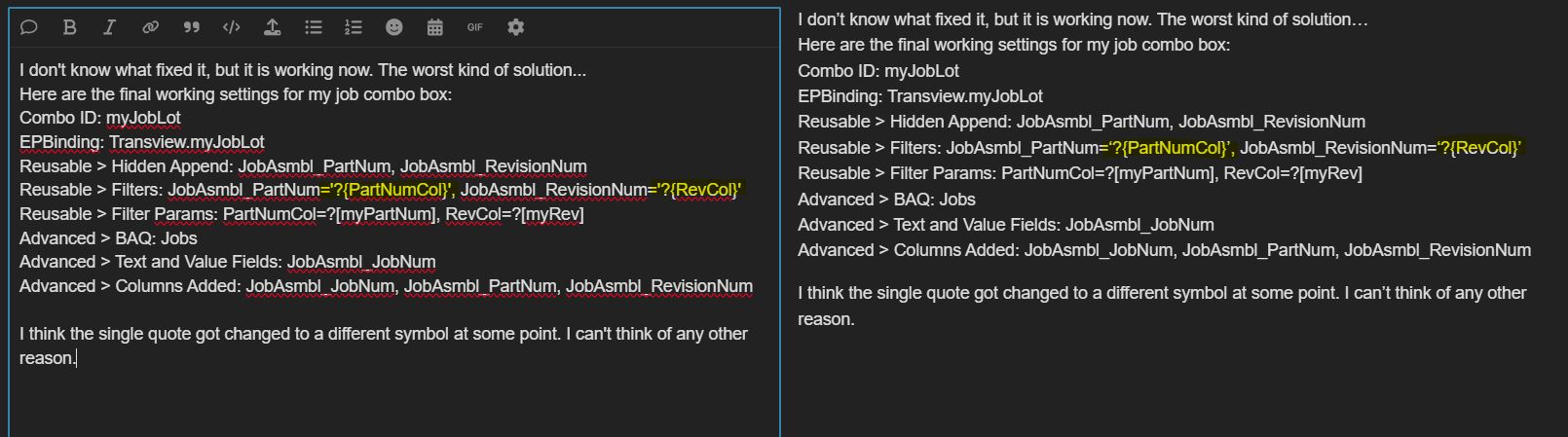
I don’t know what fixed it, but it is working now. The worst kind of solution…
Here are the final working settings for my job combo box:
Combo ID: myJobLot
EPBinding: Transview.myJobLot
Reusable > Hidden Append: JobAsmbl_PartNum, JobAsmbl_RevisionNum
Reusable > Filters: JobAsmbl_PartNum=‘?{PartNumCol}’, JobAsmbl_RevisionNum=‘?{RevCol}’
Reusable > Filter Params: PartNumCol=?[myPartNum], RevCol=?[myRev]
Advanced > BAQ: Jobs
Advanced > Text and Value Fields: JobAsmbl_JobNum
Advanced > Columns Added: JobAsmbl_JobNum, JobAsmbl_PartNum, JobAsmbl_RevisionNum
I think the single quote got changed to a different symbol at some point. I can’t think of any other reason.
The next step in the dashboard is a complicated one. I think I have to take the values that I now have in my Transview, and store them in callcontext so that I can retrieve them from an action built into my BAQ.
- How do I save values from Transview into Callcontext?
- How do I call a custom action from my BAQ?
Thank you! Have a great weekend!
I got my values into callcontext with the row-update widget and this syntax:
Columns > Ep Binding: CallContextBpmData.Character01
Columns > Value: “{Transview.myPartNum}” (make sure they copy as straight double quotes not the fancy curved ones)
After this is populated, I try to run my custom BAQ action using kinetic-erp widget:
BAQ Id: UD_OpenJobInventory
ViewName: myDV
Mode: Update
BAQ Update Options > Operation: Custom Action
BAQ Update Options > Action Id: AddRow (My BAQ is updatable and has functionality for AddRow, DeleteRow, UpdateRow, and some fail conditions. They all worked great in classic. I made no changes to the BAQ/BPM side.
I keep getting an undefined error when I try to addrow.
We apologize, but an unexpected internal problem occurred. Please provide your System Admin or Technical Support this Correlation ID for further details. Correlation ID: STUPIDUSELESSNUMBERHERE
I believe there are two possible causes. The most likely is this line where I try to assign the current date to a callcontext date field. It could also be that Kinetic still doesn’t support custom UBAQ/BPM actions. Since there is no good resource to show us how to use the stupid Kinetic control fields, I begged chatGPT to help me. This is the row-update assignment that may be causing the error:
row-update > Parameters > Columns > EpBinding: CallContextBpmData.Date02
row-update > Parameters > Columns > Value: “{Date().toISOString()}”
row-update > Parameters > Columns > Value: “{{Now}}”
row-update > Parameters > Columns > Value: “{Now.Date}”
What syntax should I use to save the current date to Date02? Edit: Maybe I just pull the date in the BPM. I can see in the debugger that the date is just saving the text values from above and not converting them to dates.
If you always want the current date why bother sending it from the UI? Just set it in your bpm.
@NateS is sneaky with his edits
I was just thinking the same thing! Confirmed Once I removed that dumb date assignment column, my BAQ action worked!
This is working nicely so far. I would like to refresh my grid once the BAQ event is complete. I am trying to use the grid-refresh widget and pointing to the target: “{metafx-panel-card-grid-4d0a0}”. What syntax should I use to refresh my grid so I can see the changes I just submitted?
Remember the event that was created to load the dataview for the grid? Something like dvOJI_Get? Instead of the refresh grid widget, just do an event-next and point to that _get event again.
That was great! Here is my AddRow Button event for my records:
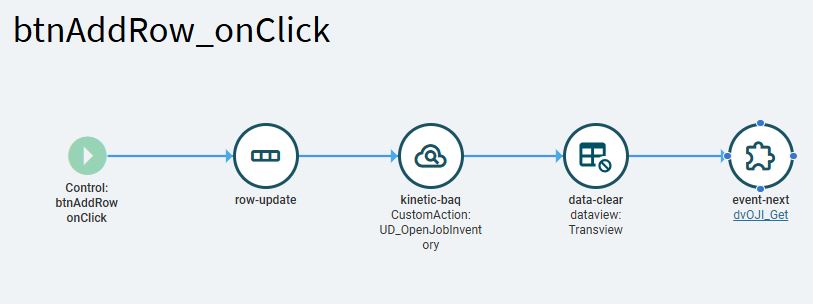
row-update > Parameters > Columns > Ep Binding: CallContextBpmData.Character01
row-update > Parameters > Columns > Value :“{Transview.myPartNum}” (straight quotes not curly)
Kinetic-baq > BAQ ID: UD_OpenJobInventory
Kinetic-baq > View Name: myDV (What do I use this for?)
Kinetic-baq > Mode : Update
Kinetic-baq > BAQ Update Options > Operation: CustomAction
Kinetic-baq > BAQ Update Options > Action ID: AddRow (I named this inside my UBAQ, and reference it in the BPM)
data-clear > Param > Type: Dataview
data-clear > Param > Value Transview
event-next > Event Id: dvOJI_Get