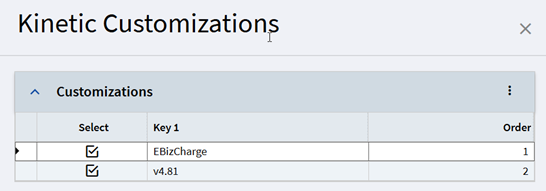
I created a customization and I need to have it merge with the Ebiz credit card layer. When just my layer is applied, it works fine. But when I apply both layers, the data for one of my grids doesn’t load. But I’m not seeing errors. My first guess is maybe both layers are hooking on the same base event and one blocks the other?
How do you troubleshoot these kinds of issues when there isn’t an error?
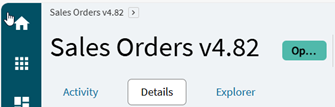
They kinda are, it’s a matter of using dev console and watching the events and sometimes looking at each layer separately. The layer number does matter, we add our version number to the layer and if ebiz is loaded second it shows their version instead.
the auto-merge conflict resolution is a mystery. The Menu Maintenance Order is new to me. Does that for sure control conflict resolution precidence in the runtime auto-merge?
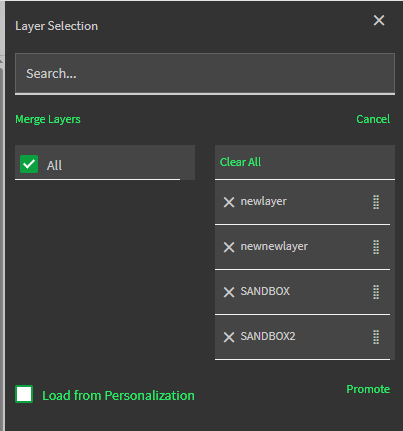
One thing you could try to resolve this case is to Merge Layers in AppStudio. There you can for sure force precidence. Higher on the list takes precidence on conflict.
Then troubleshoot the new merged layer to fix the dataview issue.
Maybe that’ll resolve the auto-merge or maybe it’ll be a throw away layer that at least shows you the merged result to resolve a conflict.
For example, merge layers ebiz and yours making yours on top, then Save Layer and give it a name. This will result in a new merged layer and leave the source layers as-is. Now preview this layer and check out the events, etc. Maybe do another merge with ebiz on top.
I’ve not done this, so if you do, let us know how it goes.
It’d be cool if they’d show a Version Compare across layers.
I merged them. No errors. I tested, no error. But my event clearly didn’t run.
I went to one of my events, changed it to trigger after a different event, and then put it back to the original event. Gives an error that someone else is already using that event, but doesn’t tell me its name or any way to figure out what. So it only checks when you first assign the event trigger, and even then the error message is completely useless. Modern Epicor in a nutshell.
I want my data to load after AfterGetByID, basically after the customer data is loaded, load my supporting data. I imagine they want to do something similar. This is going to be a big pain point for the userbase as a whole I think, as more an more people have consultants do work for them.
Extremely frustrating, I am working extra hours to try to get everything converted and I have to face time sucking issues like this.
It is too bad we’ve lost the ability to have base layers like in classic, worked so seamlessly for this scenario. Merging internal layers with external customizations is a terrible solution. What are you going to do with ebiz releases an update?
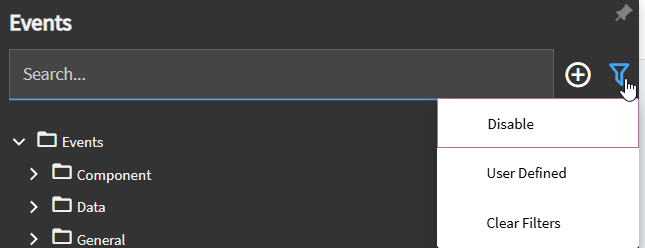
If the rest of the tooling wasn’t so bad this issue would be easier to troubleshoot. Is there really no way to filter events by base layer vs current layer? I can’t even open the ebiz layer and quickly see what events they have already used, as I don’t know what they named their events and all the system events are mixed in.
I don’t want to do it long term, I did it as a troubleshooting step. Since it seemed to produce the exact same results as applying multiple layers to the menu item, I think I will stick with that.
Unfortunately, that leaves your question completely open. How could Ebiz ever do an update that uses an additional event and be confident it won’t break for some customer, as they may have a layer using that event? It seems like you would have to make your integration layer not use any before/after on base layer events in order to be sure, and I don’t even know if its possible to make a very complex customization without doing that.
I’m a little surprised I haven’t seen more posts and complaints about this already, perhaps I haven’t been paying attention.
OK. I had call with Mario with ebiz, they have a tool partially complete for automatically finding conflicts so they can be addressed, sounds like they would be happy for me to test it when its working with the latest Kinetic update.
In the mean time, they said open their layer in a different tab, filter events to see what they have added. This way you can refer to what they have used as you are working.
For each system event before/after they have used, they made their own event named similarly that passes on the event to their functions. In your event, you can make the trigger or event next call these functions. Mario pointed out there is no need to merge, as the event name is not validated, so it can not exist, and then when the layer is merged on the fly it will work since the event will be added. This means I wouldn’t be able to test from application studio any more, would have to use a menu item.
But I could keep things un-merged.
Far from ideal, but at least I can see a path forward now.