Hi all, attempting to regenerate our data models and I’m getting the following error:
'Unable to build Data Model ‘Ice.Data.Model’, ICE = 4.2.300.16, ERP = 11.2.300.16
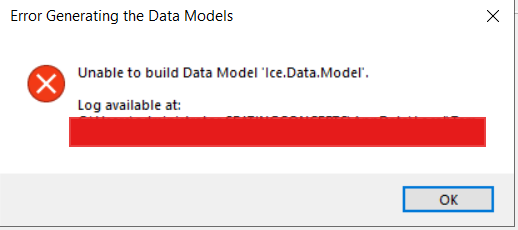
I’ve tried repairing all .NET packages, removing the database from EAC, adding it back, and the DataModelGenerator.log spews out this:
C:\Users\REDACTED\AppData\Local\Temp\Epicor\DataModelGenerator\Source\Server\Db\Ice.Data.Model\Ice.Data.Model.csproj : error NU1101: Unable to find package Microsoft.NETCore.App.Ref. No packages exist with this id in source(s): Offline
C:\Users\REDACTED\AppData\Local\Temp\Epicor\DataModelGenerator\Source\Server\Db\Ice.Data.Model\Ice.Data.Model.csproj : error NU1101: Unable to find package Microsoft.WindowsDesktop.App.Ref. No packages exist with this id in source(s): Offline
C:\Users\REDACTED\AppData\Local\Temp\Epicor\DataModelGenerator\Source\Server\Db\Ice.Data.Model\Ice.Data.Model.csproj : error NU1101: Unable to find package Microsoft.AspNetCore.App.Ref. No packages exist with this id in source(s): Offline
  Failed to restore C:\Users\REDACTED\AppData\Local\Temp\Epicor\DataModelGenerator\Source\Server\Db\Ice.Data.Model\Ice.Data.Model.csproj (in 2.18 sec).
  Determining projects to restore...
C:\Users\REDACTED\AppData\Local\Temp\Epicor\DataModelGenerator\Source\Server\Db\Ice.Data.Model\Ice.Data.Model.csproj : error NU1101: Unable to find package Microsoft.NETCore.App.Ref. No packages exist with this id in source(s): Offline
C:\Users\REDACTED\AppData\Local\Temp\Epicor\DataModelGenerator\Source\Server\Db\Ice.Data.Model\Ice.Data.Model.csproj : error NU1101: Unable to find package Microsoft.WindowsDesktop.App.Ref. No packages exist with this id in source(s): Offline
C:\Users\REDACTED\AppData\Local\Temp\Epicor\DataModelGenerator\Source\Server\Db\Ice.Data.Model\Ice.Data.Model.csproj : error NU1101: Unable to find package Microsoft.AspNetCore.App.Ref. No packages exist with this id in source(s): Offline
  Failed to restore C:\Users\REDACTED\AppData\Local\Temp\Epicor\DataModelGenerator\Source\Server\Db\Ice.Data.Model\Ice.Data.Model.csproj (in 233 ms).

Error Generating the Data Models: Unable to build Data Model 'Ice.Data.Model'.
I’ve created a support case on epicare, and they cannot give me a solid resolution. Unfortunately I cannot seem to find much online either. Anyone have experience with this?