Chalking it up to a version issue– I appreciate the suggestion, hadn’t tried that
If you’re using filesystem vs database, then base apps do not get stored in the db and won’t be available to export… so when you move things over (as you say, you can’t even add the base to a solution), they get marked as System  just went through this with Epicor support…
They had me run this query on the database to verify:
select Key1, SysCharacter01 from Ice.SysConfig where Key1 = 'KineticUseFileSystemNotDB'
For us, that comes back as 1 or true
So the base app is actually stored on the server at C:\inetpub\wwwroot\<YourInstanceName>\Server\Apps\MetaUI\<YourAppName - like Erp.UI.PickedTOEntry>
1 Like
Did anyone here found a way to fix the ‘System App’ ourselves ? I have a problem in a testing environment and I would like to import my base apps that are not working from our production to testing. However, I cannot export them since they are flagged as 'System.
However, they are 100% custom but they were created a long time ago in a previous version so I guess with the updates, they were changed to System
Haven’t found anywhere in Ice.XXXDef to change that to the base app
Make a uBAQ or function to update Ice.XXXDef.SystemFlag to false
2 Likes
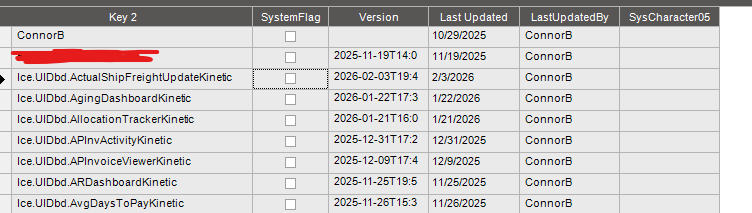

Check XXXDef.TypeCode and XXXDef.ProductID vs. a layer that does let you export
1 Like
The app name is in Key1 ? Because I see no row in Ice.XXXDef for my custom app except the Erp.UI.Q_ChangeOrder\patch.json one and even if I updated the SystemFlag to 0, logged out and tried again, it still shows as System App in Application Studio
Oh, your app is probably in the filesystem if it’s that old. Maybe it never got imported to XXXChunk or XXXDef.
Try to check XXXChunk and see if it’s there.
In conversion workbench, there are 2 conversions,
One moves apps from filesystem → XXXChunk
Other migrates from XXXChunk → XXXDef
You might try these.
1 Like
My app names were in Key 2, I attached a screenshot above. However, my apps weren’t marked System even though I get the same error when trying to export the app’s custom layer in App Studio
1 Like
What’s the one from FileSystem to XXXChunk ? Because you’re right my 2 apps are really old and I don’t see them in XXXChunk
I always run the 191 task in Conversion Workbench (Which I think is file to xxxdef) but that one deleted my Ice.XXXDef related to my app if I copy / paste them from another database for example
Yeah, in production, I would be quite hesitant to run these.
The normal upgrade cadence should have run them back in 2021ish and moved your stuff. (you should see that as last run date)
160 and 191 are the ones, but i wouldn’t run in prod.
I would try to manually find and correct - if you don’t see it in XXXChunk or XXXDef (check all the keyfields, as they changed usage across time) - then you would want to locate in filesystem
2 Likes
I see a program called ‘ConvertXXXChunk’ which ran in 2019
And the ‘MetaUIMigration’ which we run after every upgrade
It’s not in production. Production is 100% functionnal. It’s our testing database that is wrong
Good point about manually converting but not sure how I could create the ‘Chunk’ column
You would skip straight from filesystem to XXXDef.Content
You can copy the various fields from another custom app youve made
I forgot the exact setup, but its something like:
Key1 = app name
Key3 = File/Folder structure for the imported filesystem .json such as \Layout\layout.json
The content of the json goes into XXXDef.Content
1 Like

That was what I was mentioning that the usage of the keyfields have shifted over time.
If you skipped over one of the incremental updates, there’s a chance the .sql script that shifted data around didn’t run.
You can normalize the data yourself in place or ask for a datafix and wait some time….
3 Likes
Yeah, this is a case where I’d put responsibility on Epicor. If you attempt to fix it yourself without proper backups you can just make it worse.
1 Like
Do you see any newer dashboards made through App Studio? I assume those .dll’s were dashboards made from the Smart Client?
App Studio, I built these myself.
I guess I’m confused why ‘Epicor.Mfg.UI.App.COQAddedMaterial.dll’ wouldn’t be something like ‘Ice.UIDbd.COQAddedMaterial’ in your screenshot. I thought .dll’s from custom dashboards were only generated after deploying dashboards from the Smart Client
Still, since you’re getting the error and they aren’t marked as system something is wrong and suggest you make a Epicor support ticket. Put the onus on them it’s what we pay maintenance for.