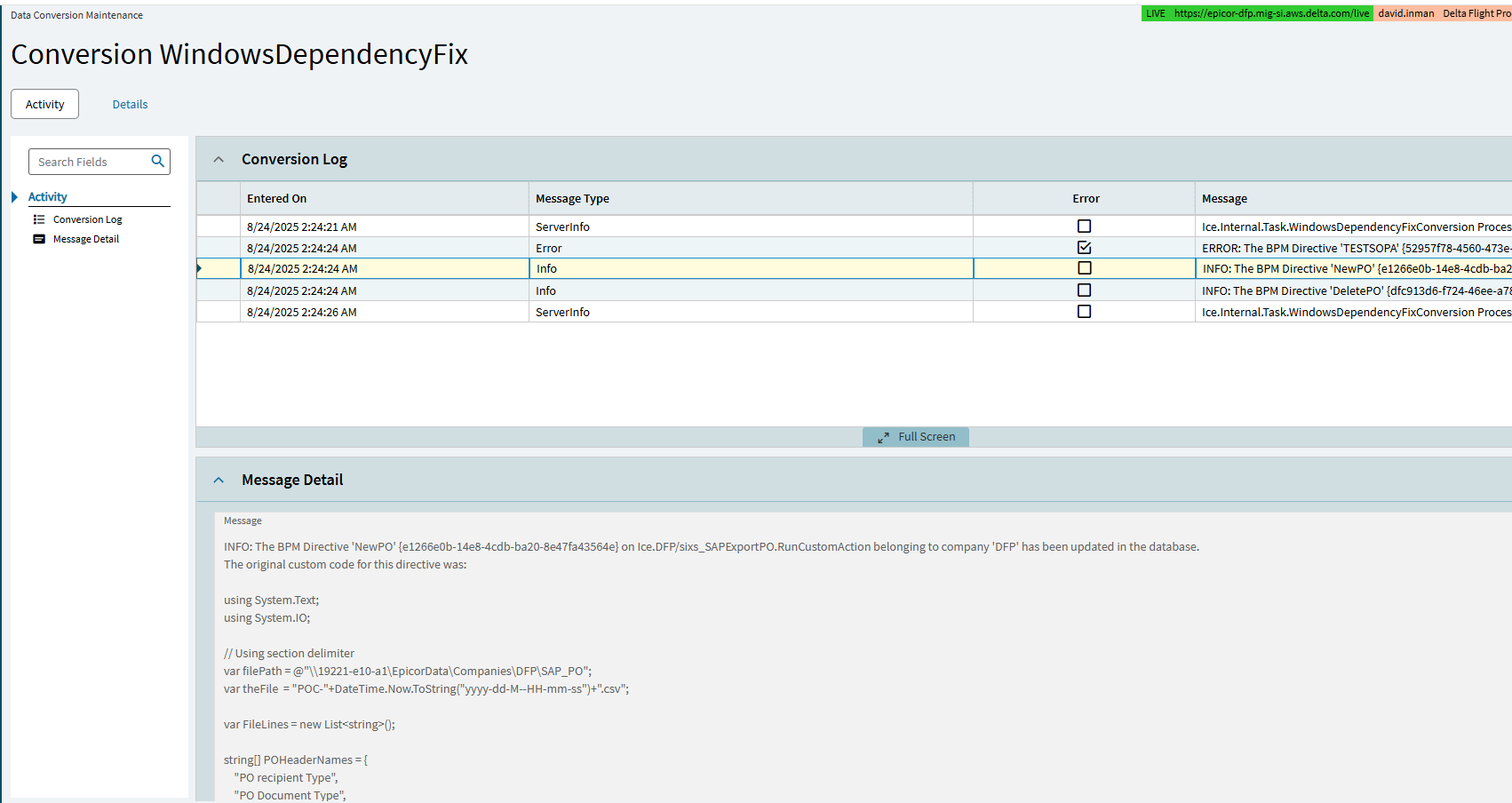
I got an email this morning, showing an error message, where one of my UBAQs had an outdated directive. This is my code to print all of our labels.
When I went to investigate, not only had Epicor run some type of tool on my code, they also did it wrong, and created errors.
Thank goodness it was in Pilot.
Sandbox.Compatibility.ConvertPath
NO - Just NO
We will convert our own code. We do NOT need automated tools, or manual intervention without permission or notice run on our systems as part of an upgrade. This is not acceptable at all, for many reasons.
To be fair some of us want them to automatically convert our dashboards and UBAQs, but as you said, not without some kind of notice. Are they treating your pilot like their sandbox?!
Unacceptable. But what leverage do you have? What are you gonna do, find a new ERP? They know we are locked in. ugg…
I just had to drive in to work to fix another one. This is costing us money.
Not only that, our code is propietary and my property. Same as our financials and trade secrets. Stay out of my database without express permission.
It’s not just me either with the issues, I’ve had numerous other people show me examples already. Anything that looks like a path they ran the tool on. Path on some integration, not related to epicor? Tough shit, they screwed with that too. Random strings and comments.
Epicor can respond, “Don’t touch our infrastructure. The code may be yours, but the file system is ours. We manage it.”
The result is the Sandbox interface. So, the choice is to leave it be and let it fail on upgrade time or try to update code because users won’t. It’s a no-win situation for Epicor and customers.
We’re currently working on updating to 2025.1 and I came across this same thing through reviewing Conversion Workbench processes that had issues. Not sure if it’s new or not, but the program “WindowsDependecyFix” did the same for us. If you click (in Kinetic) on the conversion name, it opens up a window that you can see the activity it did. I filtered on the Message column for Does Not Contain “no code” to show me the ones that have code and discovered exactly what you posted here. The Message Detail card will show you the previous code prior to the program updating it.
Another option is to include the code suggestions within a comment and throw a warning. Let the users add a specially formed comment to indicate they looked at the code and the conversion will skip it the next time. Any System.IO’s later will fail.
I appreciate they were trying to help but they should of left the code alone and let it fail. I like the idea of putting a comment with a suggested fixed code but it should be up to the customer to change their custom code. This is IMHO at least.
True. It is their fault. Not arguing that. There should have been a “last call” before making changes to code. The guidance has been there, the what has been known, but they failed on the when.