Understanding App Studio Event Flow

Hi everyone,

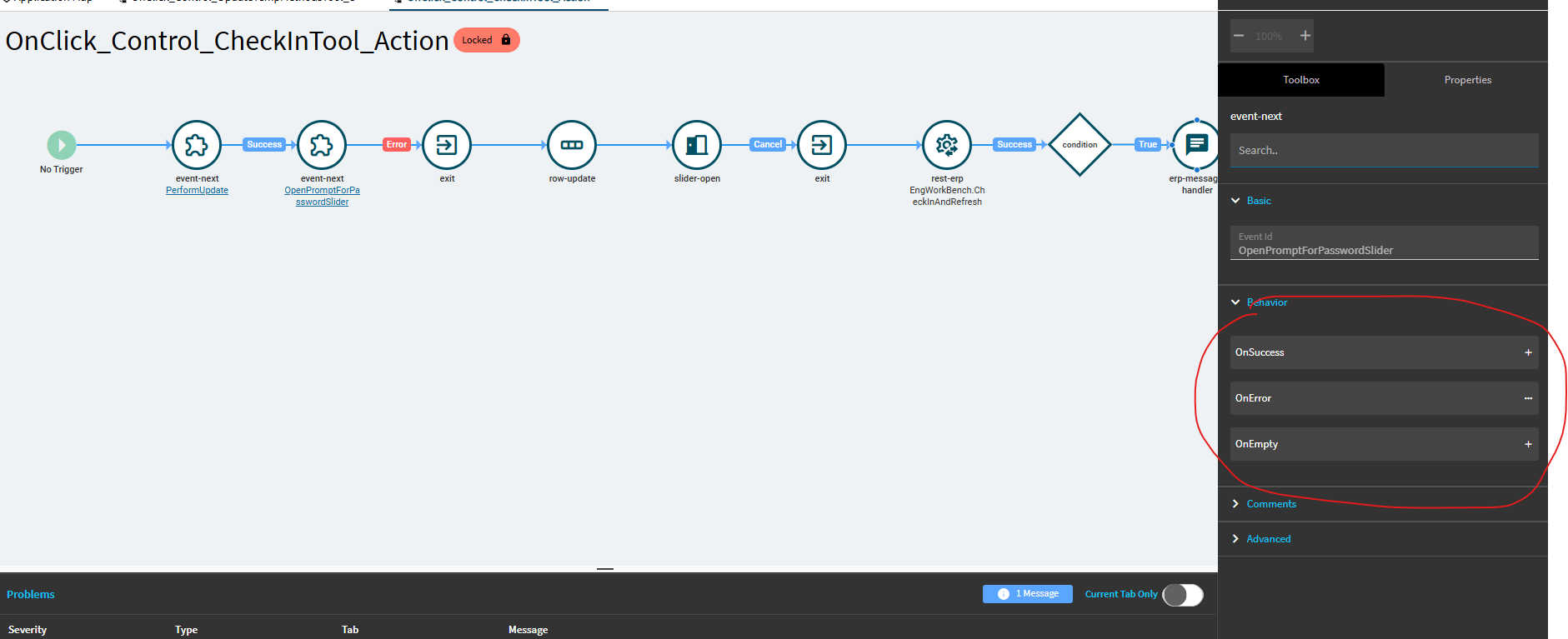
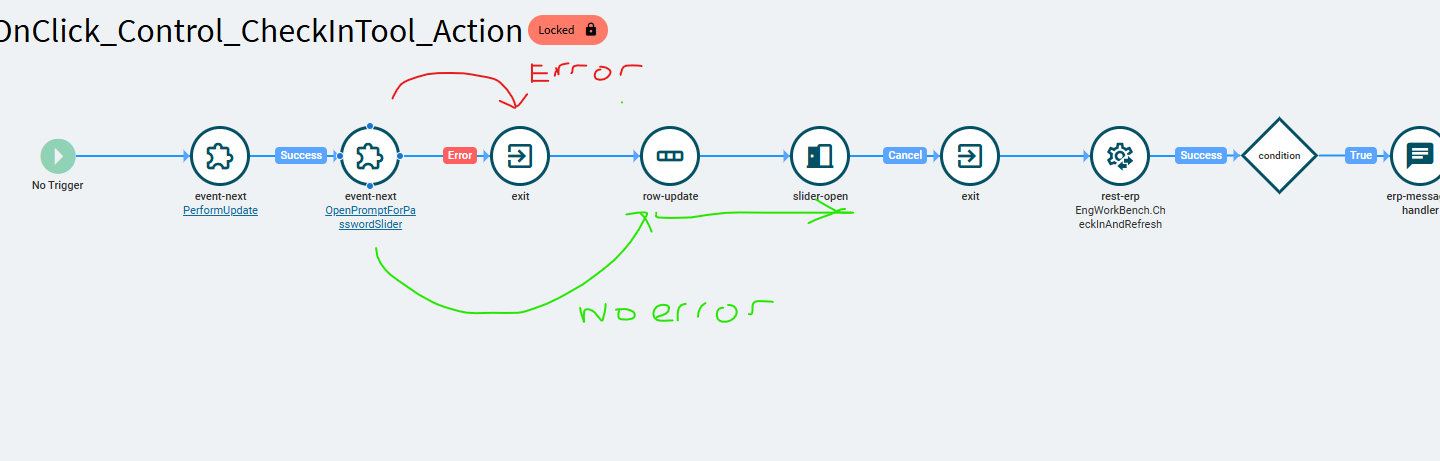
I am trying to understand the flow of widgets in an App Studio event. I am looking at a native/locked event in Engineering Workbench. Looking specifically at the “OpenPromptforPasswordSlider” wdiget/sub-event, it appears that if that event errors it calls the exit widget. That makes sense to me. However, if it does not error, it appears to jump to the row-update event and continues on. This does not make intuitive sense to me. I’d expect different connectors for different behavior outcomes. I notice this happens in other events as well so was just wondering if I am missing something or if someone could please explain how the flow works between widgets.

Thank you!

4 Likes

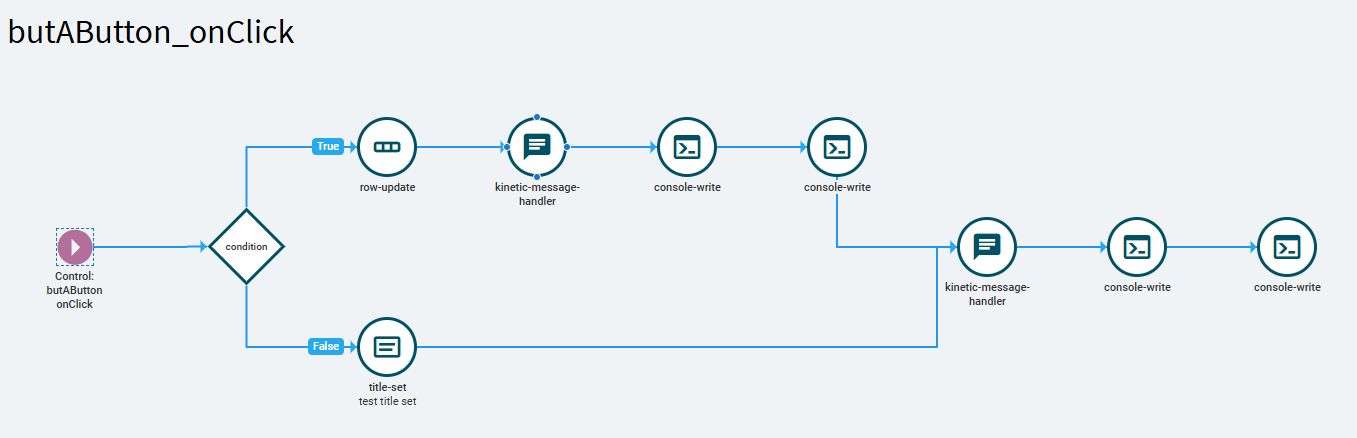
I’ve been working on a Custom Event for the Maintenance Job Entry screen for the last couple of days, and I’ve noticed that on a couple of occasions Application Studio messes up the layout of my widgets. It displays them all in a straight line like the one you show. I end up reorganizing all my widgets and connectors before testing the event. I am not sure if this is a bug in Application Studio or what, it hasn’t bothered me that much yet.

3 Likes

I’ve been told by power users of App Studio to not create too big of events, chain them together with Event-Next to avoid this bug/issue. It’s random and not something that can be replicated on demand so the exact trigger hasn’t been found to get a fix created.

2 Likes

I know one trigger for sure (Complex chains of condition events) that i’ve created a replication scenario for with a dashboard that i solutioned up and sent support demonstrating. You can consistently open the event i saved, which displays “truncated” from what i originally set up/is saved. if you hit ok, it saves the “truncated” form of the event, throwing away the remainder (which functions if left alone)

There are two separate activities going on in the background with App Studio, it’s building an object representing the execution flow of events, and there is a “GUI” object that represents what you see.

Those two objects can get out of sync - when you set up a complex event, app studio is able to render it as you build it, and save it. Closing the tab and opening it again triggers the error when AppStudio tries to re-render the GUI view from the saved event, it encounters some issue in building it and now they are out of sync. Which ends up altering the actual execution flow object if you save it.

As a rule of thumb, I only ever have one “Y” branch with a condition in an event, and if i need to branch further, i event-next and branch in there, and so on down the chain.

6 Likes

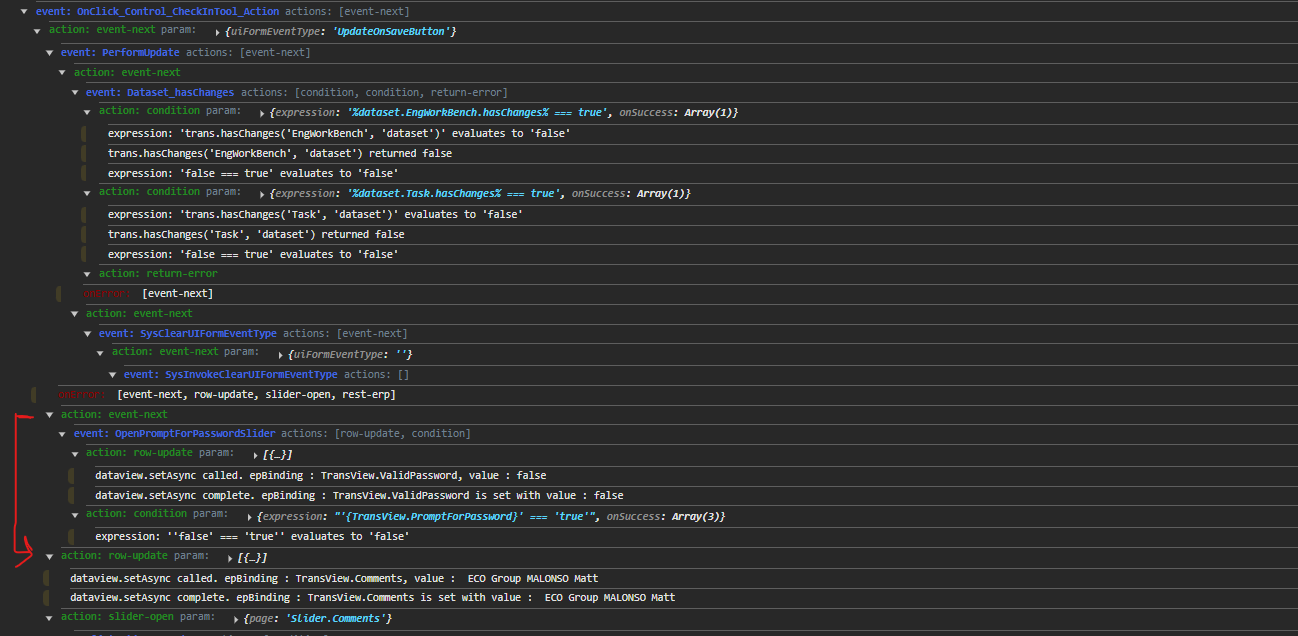
Yeah it’s interesting. I don’t think the event I am looking at is too complex. When I run a debug log, I can see that the OnError connector is not firing:

But when I look at the widget I don’t see any behavior for OnSuccess or OnEmpty:

Maybe the graphical representation for these native events aren’t super accurate.

1 Like

JSON seems to match the GUI,

It seems that the render is “right but confusing”

It doesn’t draw 2 connectors between events here because it’s not a Y branch but rather a nested event in the json. (Typically, the on-error would be a sibling node to the on-success, but here it is a child node)

  {
    "id": "OnClick_Control_CheckInTool_Action",
    "actions": [
      {
        "type": "event-next",
        "value": "PerformUpdate",
        "param": {
          "uiFormEventType": "UpdateOnSaveButton"
        },
        "onSuccess": [
          {
            "type": "event-next",
            "value": "OpenPromptForPasswordSlider",
            "onError": [
              {
                "type": "exit"
              }
            ]
          },
          {
            "type": "row-update",
            "param": [
              {
                "columns": [
                  {
                    "epBinding": "TransView.Comments",
                    "value": " ECO Group {ECOGroup.GroupID} {ECOGroup.Description}"
                  }
                ]
              }
            ]
          },
          {
            "type": "slider-open",
            "param": {
              "page": "Slider.Comments"
            },
            "onCancel": [
              {
                "type": "exit"
              }
            ]
          },
          {
            "type": "rest-erp",
            "param": {
              "svc": "Erp.BO.EngWorkBenchSvc",
              "svcPath": "CheckInAndRefresh",
              "requestMethod": "POST",
              "methodParameters": [
                {
                  "field": "ipGroupID",
                  "epBinding": "ECOGroup.GroupID"
                },
                {
                  "field": "ipPartNum",
                  "epBinding": "ECORev.PartNum"
                },
                {
                  "field": "ipRevisionNum",
                  "epBinding": "ECORev.RevisionNum"
                },
                {
                  "field": "ipAltMethod",
                  "epBinding": "ECORev.AltMethod"
                },
                {
                  "field": "ipProcessMfgID",
                  "epBinding": "ECORev.ProcessMfgID"
                },
                {
                  "field": "ipValidPassword",
                  "epBinding": "TransView.ValidPassword"
                },
                {
                  "field": "ipAuditText",
                  "epBinding": "TransView.Comments"
                }
              ],
              "erpRestPostArgs": {
                "responseParamArgs": [
                  {
                    "dataset": {
                      "datasetId": "EngWorkBench"
                    },
                    "responsePath": "returnObj"
                  }
                ]
              }
            },
            "onSuccess": [
              {
                "type": "condition",
                "param": {
                  "expression": "'{actionResult.opMessage}' !== ''",
                  "onSuccess": [
                    {
                      "type": "erp-message-handler",
                      "param": {
                        "level": "info",
                        "type": "Slideout",
                        "message": "{actionResult.opMessage}"
                      }
                    }
                  ]
                }
              },
              {
                "type": "erp-message-handler",
                "param": {
                  "level": "info",
                  "type": "Slideout",
                  "message": "Check In Complete"
                }
              },
              {
                "type": "event-next",
                "value": "RefreshTree"
              }
            ]
          }
        ]
      }
    ]
  },
2 Likes

I think what should probably happen here (ugh, do we have to submit an idea for this?) is that App Studio should not render the json literally in this scenario - what’s saved is what’s rendered, which is the exit as a child node to the event next, and does occur in a series, so the in-line rendering is technically correct.

However, the expected “correct” graphical representation here would be to to display the onError branch → exit as a Y branch vs. linear. i think the main problem with that is that app studio doesn’t seem to support routing multiple branches to one destination, which would be required to render this, the on-error branch should be rendered as a Y that connects back to row-update (but the exit component would halt execution before it Y’s back)

Note there is an on-cancel in this event that is rendered the same way.

6 Likes

Just give us a json editor view so we can ignore the wysiwyg.

5 Likes

Got it! That makes sense. Looking at the JSON definitely helps.

Thank you, Gabe. I’ve only seen this with Native/Locked events so far, but good to know that I can view it in JSON for further clarification.

1 Like

I’ve tried to set up my own event this way, and I don’t think app studio lets us do that, which explains why you’ve only seen it in native events.

You can do it directly in JSON with an editor such as my dashboard, but using the low code app studio editor they don’t seem to expose this nested method of chaining actions to us.

3 Likes

Notice there’s no such thing as a connector in the json. Event actions is just an ordered array.

So many AppStudio bugs are about some connectors collection that the GUI is trying to maintain so it can generate json - just make it code-first not wysiwyg-first. then simply validate json to schema instead of silently crash cuz your pretty diagram cannot make valid json. :roll_eyes:

2 Likes

omg I hope there was a priority PRB for this, its taken a year off my life

2 Likes

I’m trying to look it up to see what came of it, it was so long ago.

Here’s the event I set up, that looked normally when I built/saved it, this is how app studio renders it when you open it:

2 Likes

Took me a while to find that one!
PRB0295794, open 03/25 closed 05/25, ‘fixed’

“A copy of an event becomes corrupted after closing and re-opening the Event. Closing and re-opening a second time deletes most of the workflow”

I was linked that PRB for multiple cases/repro scenarios I put forward against 2024.1 back in March, if I remember they were supposed to have been fixed in 2024.2.

I wouldn’t know, because I changed my behavior to not create complex condition events way back then!

2 Likes

Hmm I’ve still had issues with events jumping from one chain to another and various other evil behaviors..

3 Likes

Same, hence my subtle usage of quotes around “fixed”… :slight_smile:

mike myers air quotes GIF

5 Likes