I’m trying to create an updatable BAQ and updatable dashboard. When I try to create a new record or update an existing record within the dashboard, the changes don’t save when I reopen the dashboard. I need to update and add new records to the UD12_Key1 field while maintaining constants for the Company and the Key2 fields. Can anyone diagnose this issue?
2 Likes
In the uBAQ what method are you using to update the UD table?
1 Like
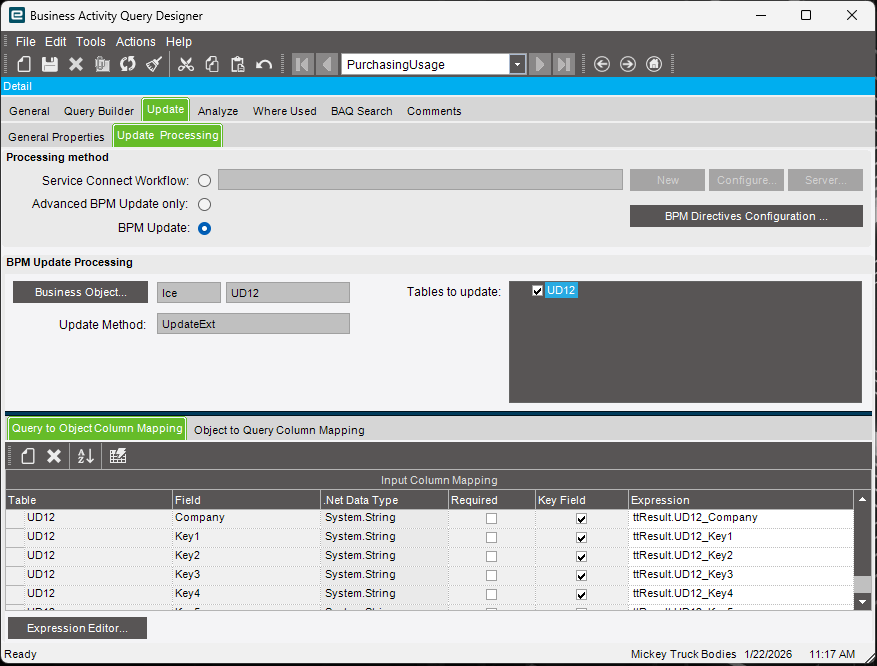
Any other tables besides UD12 in your BAQ?
1 Like
No, there are no other tables.
2 Likes
Are you sure you’re saving in the dashboard before exiting?
2 Likes
I bet thats it. When in your dashboard, you can add records, but they only go into the dataview. You have to click save, or run an update method to commit those changes to the tables.
2 Likes
You can’t change Key1 (or any of the keys) they are key fields.
2 Likes
Are you sure about that? In my experience you have to use Keys in UD tables, otherwise there is no, uhhh, key. 
1 Like
You have to use them to MAKE a new record. But you can’t change them once you create the record. The video shows the OP trying to update key1. Which won’t work. If you try it in the BAQ editor, I’m sure you’ll see the error when you try and update.
3 Likes
Looking at your video, your BAQ has both Key 1, and 2 as mandatory, but your form is only pushing key1.
2 Likes
Yes! I missed that part too! For fields that need to change, use any non-key field. Your key fields must be static once the record is created. You don’t need to use all the key fields.
1 Like