I frequently use the Delete key on my keyboard to edit text. When editing a field in Epicor I’ve found that many of the screen will delete the entire row you have selected and not just the text in the field you are editing. PO entry is the worst one that comes to mind. Is there a way to change this behavior?
1 Like
Are you Classic? For the browser, these are the key mappings (Ctrl+Alt+H)
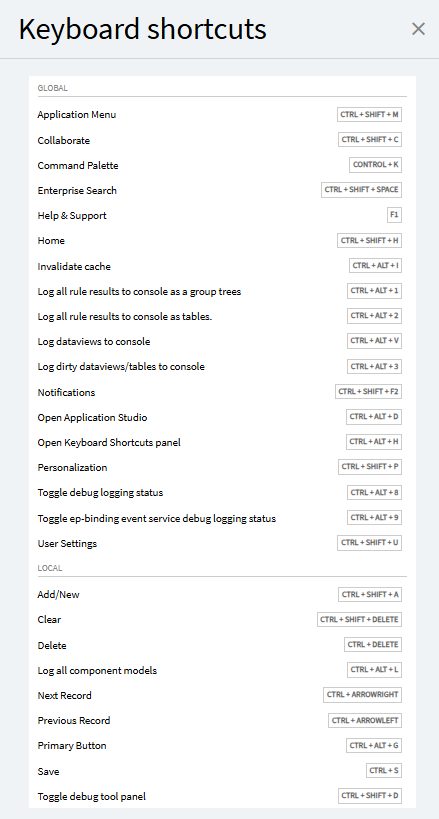
There it requires a Ctrl-Del to delete records. Same for classic on my PO Entry:
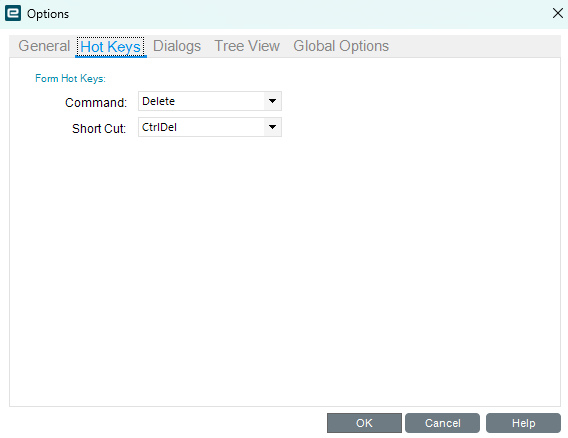

That shortcut is specific to the top level record. For example, if you’re editing PO lines from their list view in PO Entry, a naked delete will drop a row if it’s selected correctly. Occasionally the grid management code loses its place and does the delete-selected-row action when it should have delete-selected-text’d. I got into the habit of only backspace-deleting text after experiencing a couple of rows unexpectedly getting tossed into the void like that.
4 Likes
We use Kinetic in the Browser UI. This usually happens when I’m trying to edit the PO line comment text.