Where do I find VBS referenced in customization script?

We have some label printing that is triggered by an epibtn in a dashboard customization, that I am trying to untangle. This was configured years before I got here.
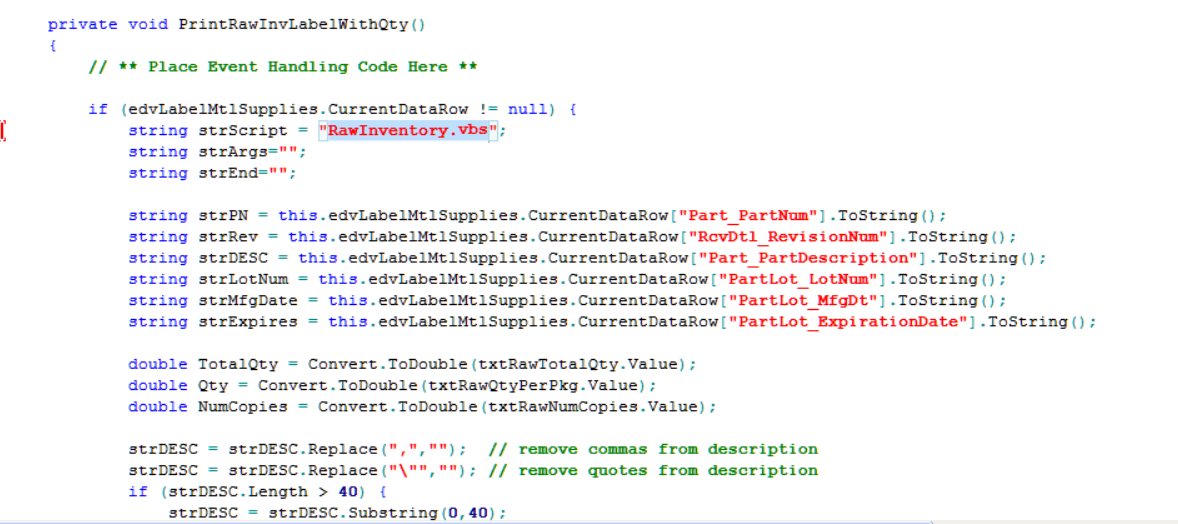
There is a method the epibutton is triggering that is referencing a vbs script. At least that is my understanding looking at it. I admittedly am awful at coding.
Where would I find this “RawInventory.vbs”?

That is what it is doing, right? or am I completely wrong?

Is the variable strScript used anywhere else’s in that function?

All that line does is create a variable named strScript, and set it to “RawInventory.vbs”

If there is not some later line that uses that variable, then that does nothing.

2 Likes

Ok, I thought it was referencing a script, but it is creating one. Makes sense. Good to know. I thought it had to be ref a file since the script goes to our label printer, instead of our normal printer. So i was expecting some logic somewhere, but I guess the printer designation is somewhere else.
Yes it is used in a different method, printing a diff label .

	private void PrintRawInvLabel()
	{
		// ** Place Event Handling Code Here **

		if (edvLabelMtlSupplies.CurrentDataRow != null) {
			string strScript = "RawInventory.vbs";
			string strArgs="";

			string strPN = this.edvLabelMtlSupplies.CurrentDataRow["Part_PartNum"].ToString();
			string strRev = this.edvLabelMtlSupplies.CurrentDataRow["RcvDtl_RevisionNum"].ToString();
			string strDESC = this.edvLabelMtlSupplies.CurrentDataRow["Part_PartDescription"].ToString();
			string strLotNum = this.edvLabelMtlSupplies.CurrentDataRow["PartLot_LotNum"].ToString();
			string strMfgDate = this.edvLabelMtlSupplies.CurrentDataRow["PartLot_MfgDt"].ToString();
			string strExpires = this.edvLabelMtlSupplies.CurrentDataRow["PartLot_ExpirationDate"].ToString();
			double NumCopies = 1;
			
			strDESC = strDESC.Replace(",","");  // remove commas from description
			strDESC = strDESC.Replace("\"",""); // remove quotes from description
			if (strDESC.Length > 40) {
				strDESC = strDESC.Substring(0,40);
			}
		
			strArgs += " /PN:\""+strPN+(strRev==""?"":" Rev "+strRev)+"\"";
			strArgs += " /DESC:\""+strDESC+"\"";
			strArgs += " /LOT:\""+strLotNum+"\"";
			if (strMfgDate != "") {
				strArgs += " /MfgDate:\""+String.Format("{0:d}",Convert.ToDateTime(strMfgDate))+"\"";
			}
			if (strExpires != "") {
				strArgs += " /Expires:\""+String.Format("{0:d}",Convert.ToDateTime(strExpires))+"\"";
			}
			strArgs += " /Copies:\""+NumCopies.ToString()+"\"";

//			MessageBox.Show(strScript+" "+strArgs);
			runScript(strScript, strArgs);
		}
		else {
			MessageBox.Show("You must first select a valid Part # below.");
		}
	}

that vbs file most likely resides on the App server in the folder or sub folder of the Epicor installation. It might even reside in the client folder on the workstations.

2 Likes

Ok let me look there!
I really appreciate the help. After this I am going to take a vb class. Never used it outside of excel.

Just a reminder that VB is being deprecated in customizations in favor of C#. Aaaaannndd, customizations in C# are being deprecated in favor of new layers (Application Studio) in Kinetic.

This looks like C# to me though. VB doesn’t have braces ‘{}’ in it.

The only place that has VB left in Epicor that I’m aware of is SSRS functions.

Great! yes it is C#. Good to know what is coming down the pike.

Dbd code was running on client, so it should be in the current client folder

1 Like

It looks to me like the code (in c#) creates a string for the argument to be sent to an external VB script (the automation that is between a batch file and a PowerShell script).

That external VBS takes the argument does some voodoo and probably sends it to the printer.

It would be best to fully integrate the printing process within Epicor
2 Likes

it is c# code allegedly running vbs script…
I wonder where runScript method is coming from, if this code even compiles.

It probably resides in both. On the server in the client ditribution, so that all clients get a copy of it.

But yes, the one that actually gets called will be on the client.

2 Likes

Mark wasn’t paying close attention…sorry.

And Gah! Calling VB Script from a customization! My security hairs are standing on edge!!!

Double sorry.

1 Like