I have a highly customized ARForm (Invoice) that works fine when printing individual invoices but occasionally blow up when you try Group Print. So far it has only happened 2 times this year but it is irritating me. The error says:
Program Ice.Services.Lib.RunTask raised an unexpected exception with the following message: RunTask: An internal error occurred on the report server. See the error log for more details. —> Microsoft.ReportingServices.Diagnostics.Utilities.RSException: An internal error occurred on the report server. See the error log for more details. —> Microsoft.ReportingServices.Diagnostics.Utilities.InternalCatalogException: An internal error occurred on the report server. See the error log for more details.
I would love to see the error logs but not sure where they are. I would assume the SSRS server (Our epicor install is split into 4 servers).
The ReportServerService_03_25_2019_00_05_25 log says this:
library!ReportServer_0-18!f1c!03/25/2019-11:44:21:: i INFO: RenderForNewSession(‘/Epicor10/reports/CustomReports/ARInvoiceForm/ARForm’)
library!ReportServer_0-18!f1c!03/25/2019-11:44:24:: e ERROR: Throwing Microsoft.ReportingServices.Diagnostics.Utilities.InternalCatalogException: ScalableList: Index 0 outside the allowed range [0::-1], Microsoft.ReportingServices.Diagnostics.Utilities.InternalCatalogException: An internal error occurred on the report server. See the error log for more details.;
library!ReportServer_0-18!f1c!03/25/2019-11:44:24:: i INFO: Skipped creating a dump file for the error InternalCatalogException, because a dump with the identical stack trace (with signature 542066093) was already created.
library!ReportServer_0-18!f1c!03/25/2019-11:44:24:: w WARN: Microsoft.ReportingServices.Diagnostics.Utilities.RSException: An internal error occurred on the report server. See the error log for more details. —> Microsoft.ReportingServices.Diagnostics.Utilities.InternalCatalogException: An internal error occurred on the report server. See the error log for more details.
at Microsoft.ReportingServices.Diagnostics.Utilities.RSServiceTraceInternal.FailInternal(String componentName, String message)
at Microsoft.ReportingServices.Diagnostics.Utilities.RSTrace.Assert(Boolean condition, String message)
at Microsoft.ReportingServices.OnDemandProcessing.Scalability.ScalableList1.CheckIndex(Int32 index, Int32 inclusiveLimit) at Microsoft.ReportingServices.OnDemandProcessing.Scalability.ScalableList1.get_Item(Int32 index)
at Microsoft.ReportingServices.Rendering.HPBProcessing.Tablix.RowInfo.AddToPageContent(ScalableList`1 columnInfo, Int32& colsOnPage, Boolean isLTR, Boolean pinnedToParentCell, RPLWriter rplWriter, PageContext pageContext, Double pageLeft, Double pageTop, Double pageRight, Double pageBottom, RepeatState repeatState)
at Microsoft.ReportingServices.Rendering.HPBProcessing.Tablix.AddToPage(RPLWriter rplWriter, PageContext pageContext, Double pageLeft, Double pageTop, Double pageRight, Double pageBottom, RepeatState repeatState)
at Microsoft.ReportingServices.Rendering.HPBProcessing.PageItemContainer.AddToPage(RPLWriter rplWriter, PageContext pageContext, Double pageLeft, Double pageTop, Double pageRight, Double pageBottom, RepeatState repeatState)
at Microsoft.ReportingServices.Rendering.HPBProcessing.ReportSection.NextPage(RPLWriter rplWriter, Int32 pageNumber, Int32 totalPages, Double top, Double availableHeight, ReportSection nextSection, Boolean isFirstSectionOnPage)
at Microsoft.ReportingServices.Rendering.HPBProcessing.Report.NextPage(RPLWriter rplWriter, Int32 totalPages)
at Microsoft.ReportingServices.Rendering.HPBProcessing.HPBProcessing.GetNextPage(RPLReport& rplReport)
at Microsoft.ReportingServices.Rendering.ImageRenderer.PDFRenderer.Render(Report report, NameValueCollection deviceInfo, Hashtable renderProperties, CreateAndRegisterStream createAndRegisterStream)
at Microsoft.ReportingServices.Rendering.ImageRenderer.RendererBase.Render(Report report, NameValueCollection reportServerParameters, NameValueCollection deviceInfo, NameValueCollection clientCapabilities, Hashtable& renderProperties, CreateAndRegisterStream createAndRegisterStream)
— End of inner exception stack trace —
at Microsoft.ReportingServices.ReportProcessing.ReportProcessing.HandleRenderingException(ReportRenderingException rex)
at Microsoft.ReportingServices.ReportProcessing.Execution.RenderReport.Execute(IRenderingExtension newRenderer)
at Microsoft.ReportingServices.ReportProcessing.ReportProcessing.RenderReport(DateTime executionTimeStamp, ProcessingContext pc, RenderingContext rc, IChunkFactory yukonCompiledDefinition)
at Microsoft.ReportingSer
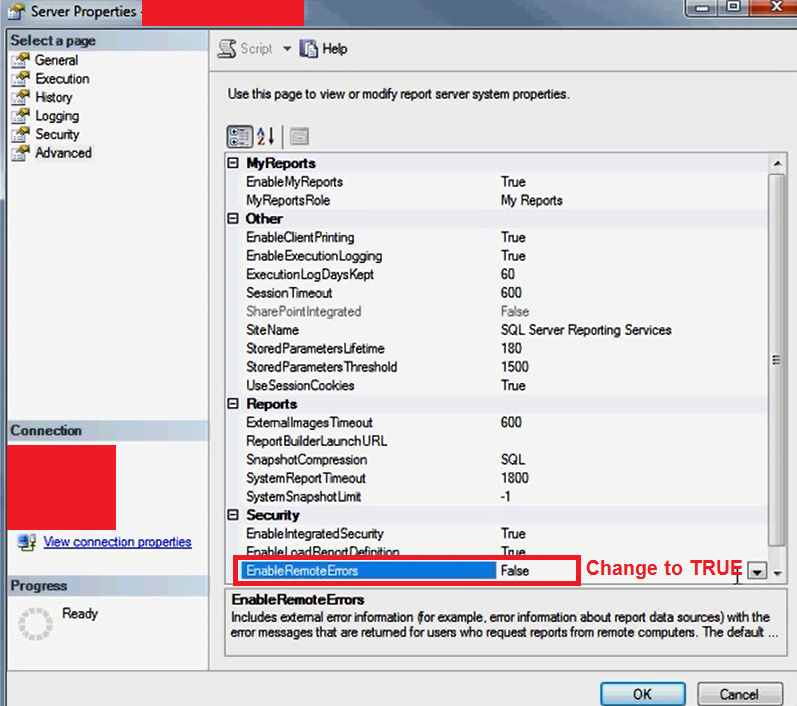
I have done that. Does it put the extra logging in the ReportServerService log? or somewhere else?
Unfortunately, They couldn’t hold off on processing the invoices any longer so they did them individually to get them out the door so I don’t have the group to test against until the next time it happens.
Just trying to make sure I know where to look so I am not stumbling around.
Thanks for the tip on enabling remote! I appreciate it.