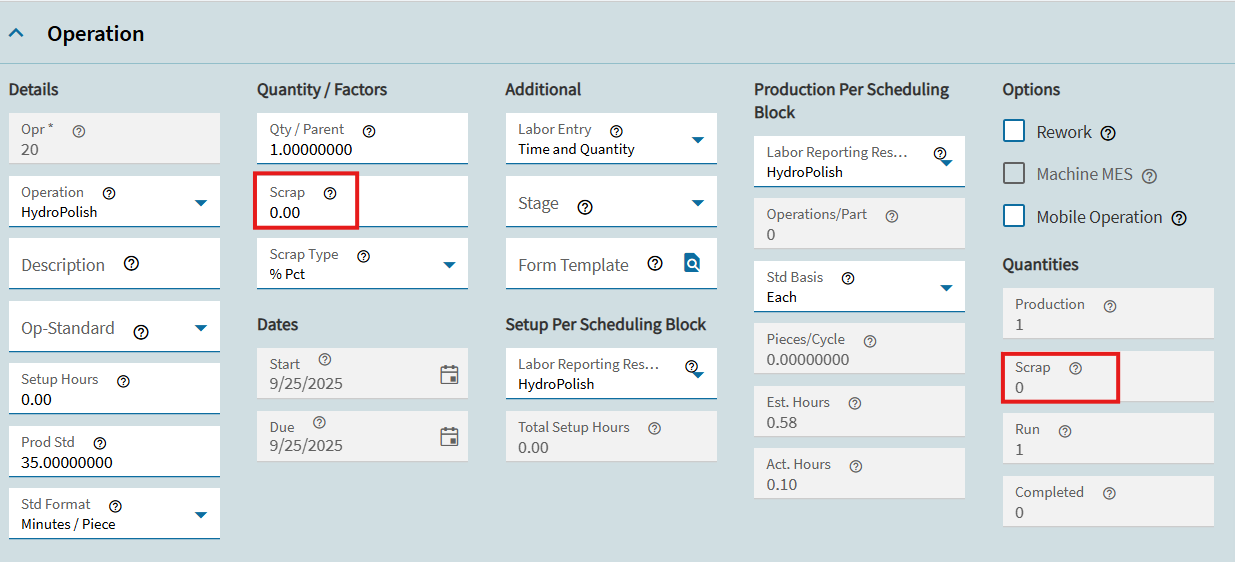
This is a test conducted in the Pilot Environment. In MES Data Collection I have started production on a job operation and then mass issued material and then ended activity and scrapped that quantity. When I go back to Epicor and look at the job assemblies, the operation shows a complete icon and no scrap.
Look at the Material Transactions in Activity.
I don’t see anything in Material Transactions, but I do see my scrap quantity in Operation Activity and my Non-Conformance I created in Assembly Activity. How can I scrap material in MES Data Collection?
Using the scrap box in MES does scrap the quantity entered. All cost of the scrap quantity stays on the job and you are able to report against it.
What is it that you are expecting to happen? If we know that, we may be able to show you another way to accomplish it in the system.
How would I get any transactions to show in the Material Transactions tab in Activity? Is there any way to have this show from something we did in MES Data Collection.
Also, what is the Scrap field on each operation in the assemblies tab for? If I scrap in MES it doesn’t carry over there? only to Activity tab in Job Entry?
The only way to scrap material from a job is through creating an NCR manually through the Nonconformance screen by selecting New Material. You cannot scrap material from a job through MES, what you are scrapping is the amount of material used plus labor.
The scrap entered at the end of an operation is not for material, instead, it is for the material plus the labor done to that point. What you are actually scrapping at the end of the operation is WIP.
The material transactions tab only shows transactions against that material number. Since you scrapped at the end of an operation, it is no longer that material number as something was done to the material to change it to something else.
I have never done a Material NCR before to see if the transaction would show up in the transactions tab. My guess is that it would. You could test it by creating an NCR. 
As usual, @jkane beat me to the punch. But another tidbit…
On the lower part of the MES screen (once you’re clocked into an operation) is a button labeled “Non-Conformance”. This is where a shop operator can report Materials as being unworthy of further use. Clicking it opens the Non-Conformance application, where you can add a new material non-conformance. It does not allow the operator to Scrap, but anything entered here will go into Inspection Processing and will then follow the regular Quality route from there.
Well said